14
Sound Controls
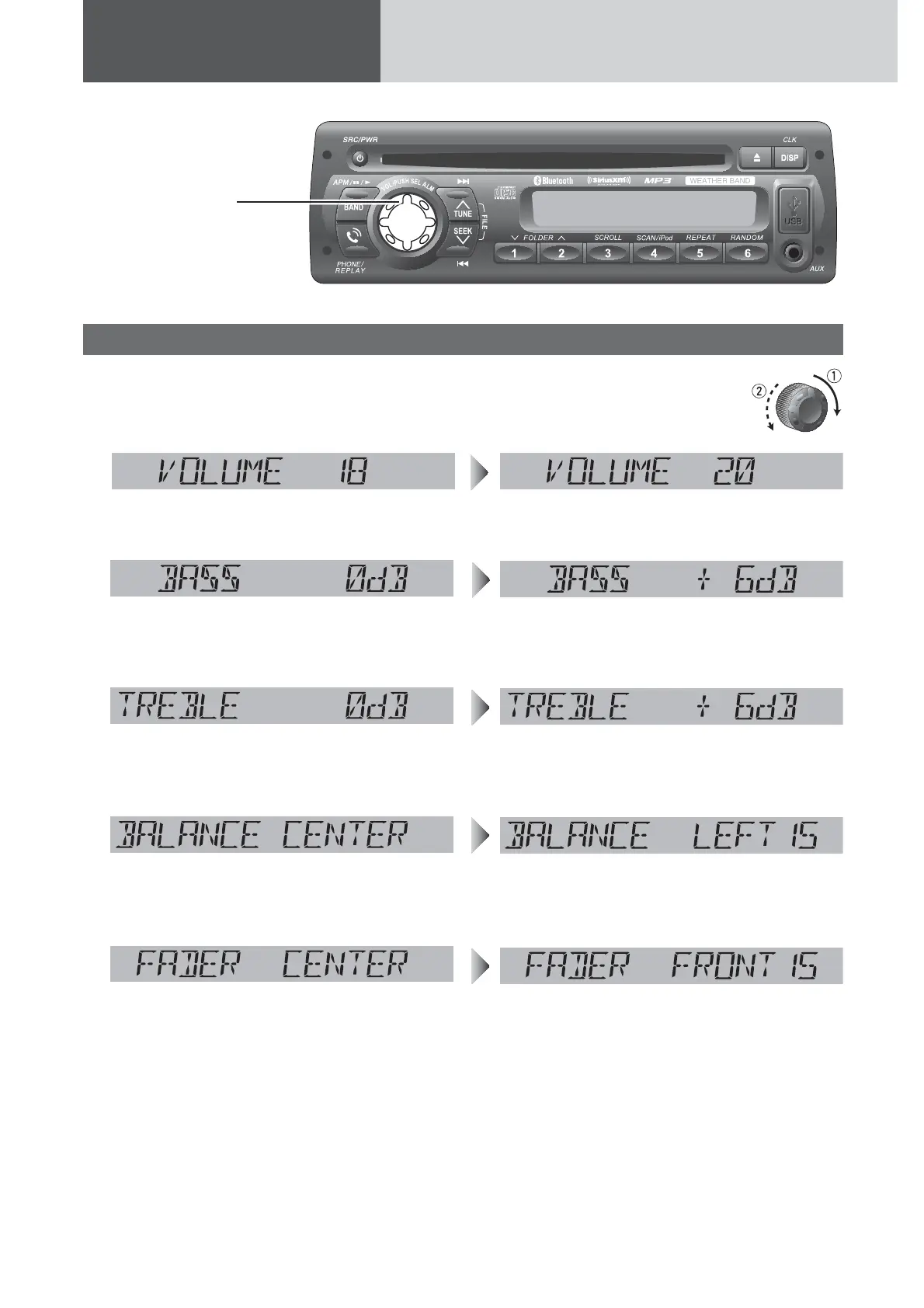
[VOL]
selects a value in the
audio menu.
(PUSH SEL: Select)
selects items in the
audio menu.
Audio modes (Bass/Treble/Balance/Fader/SQ)
1
Push [SEL] (Select) to select the audio
mode in sequence.
2
Turn [VOL] (Volume) clockwise
or counterclockwise to change
each level or select a setting.
Volume
Bass
Treble
Balance
Fader
q: Up
w: Down
q: Increased
w: Decreased
q: Increased
w: Decreased
q: Right enhanced
w: Left enhanced
q: Front enhanced
w: Rear enhanced
(Setting Range: 0 to 40, default: 18)
(Setting Range: –12 dB to +12 dB by 2 dB,
default: 0 dB)
(Setting Range: –12 dB to +12 dB by 2 dB,
default: 0 dB)
(Setting Range: 15 levels each and CENTER,
default: CENTER)
(Setting Range: 15 levels each and CENTER,
default: CENTER)
Note: If no operation takes place for more than 5
seconds in audio mode (2 seconds in volume mode),
the display returns to the regular mode.





 To Next Page