37
Parental lock setting mode
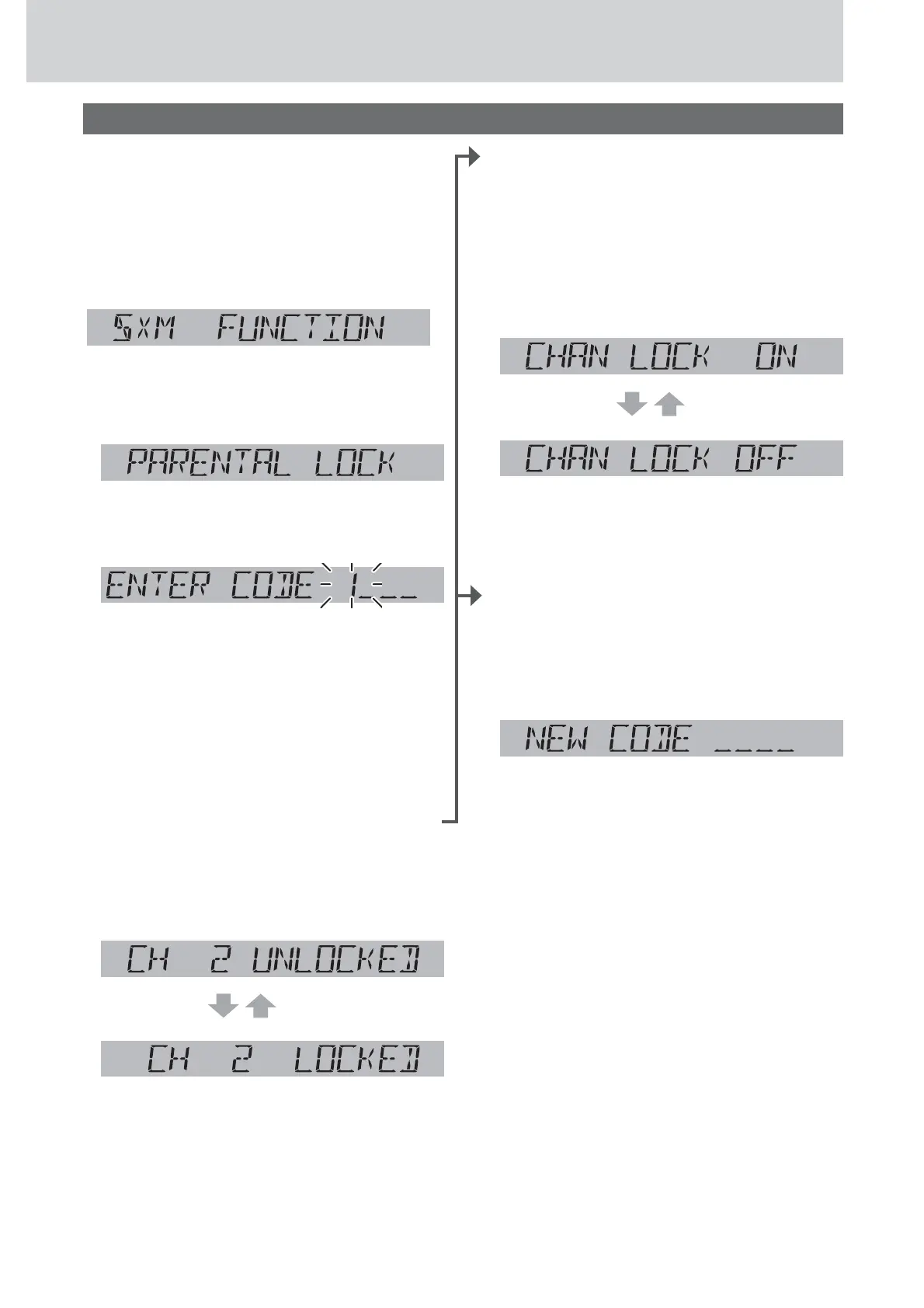
This function disables the audience from selecting
the locked channel.
1
Hold down [SEL] for more than 2
seconds to open SXM function setting
screen.
2
When “DIRECT TUNING” is dis-
played, push [SEL] to select parental
lock setting mode.
(Parental lock setting mode)
3
Enter a 4-digit passcode, then press
[BAND] when finished.
q Press [d] or [s] to select a number.
w Press [BAND] to shift to the right adjacent
digit.
A digit where entry is determined is indicated
as “
*
”.
e Repeat the steps q and w to enter a 4-digit
number.
Note: (Default: 1111). If you want to initialize the
passcode, hold down [DISP] for more than 10
seconds while passcode entry, the 4-digit passcode
will return to the default.
4
Press [TUNE }] or [TUNE {] to select
a channel.
5
Press [BAND] to switch a select chan-
nel to be locked or unlocked.
unlocked
locked
Note: Channel 0 (CH 0) and Channel 1 (CH 1) can
not be locked.
6
When done selecting the locked chan-
nels, press [DISP] to exit the function
setting or push [SEL] to change the
parental lock ON/OFF setting.
OR
To set parental lock ON/OFF:
4
Push [SEL] to open lock ON/OFF
mode after step 3.
5
Turn [VOL] to switch between lock ON
or OFF.
(Default)
6
When done selecting the parental lock
ON/OFF setting, push [SEL] to exit the
function setting mode.
OR
To change the parental lock passcode:
4
Hold down [BAND] for more than 2
seconds after step 3.
(New code entry mode)
5
Enter a new 4-digit code, then press
[BAND] when finished.
q Press [d] or [s] to select a number.
w Press [BAND] to shift to the right adjacent
digit.
A digit where entry is determined is indicated
as “
*
”.
e Repeat the steps q and w to enter a 4-digit
number.
6
Repeat step 5 to confirm the new
code.
“NEW PASSCODE SET” is displayed for 2
seconds and the new code setting is finished,
then returns to channel locked/unlocked setting
display.
Function settings (continued)









 To Next Page