14 - ENGLISH
Getting Started
Setting up
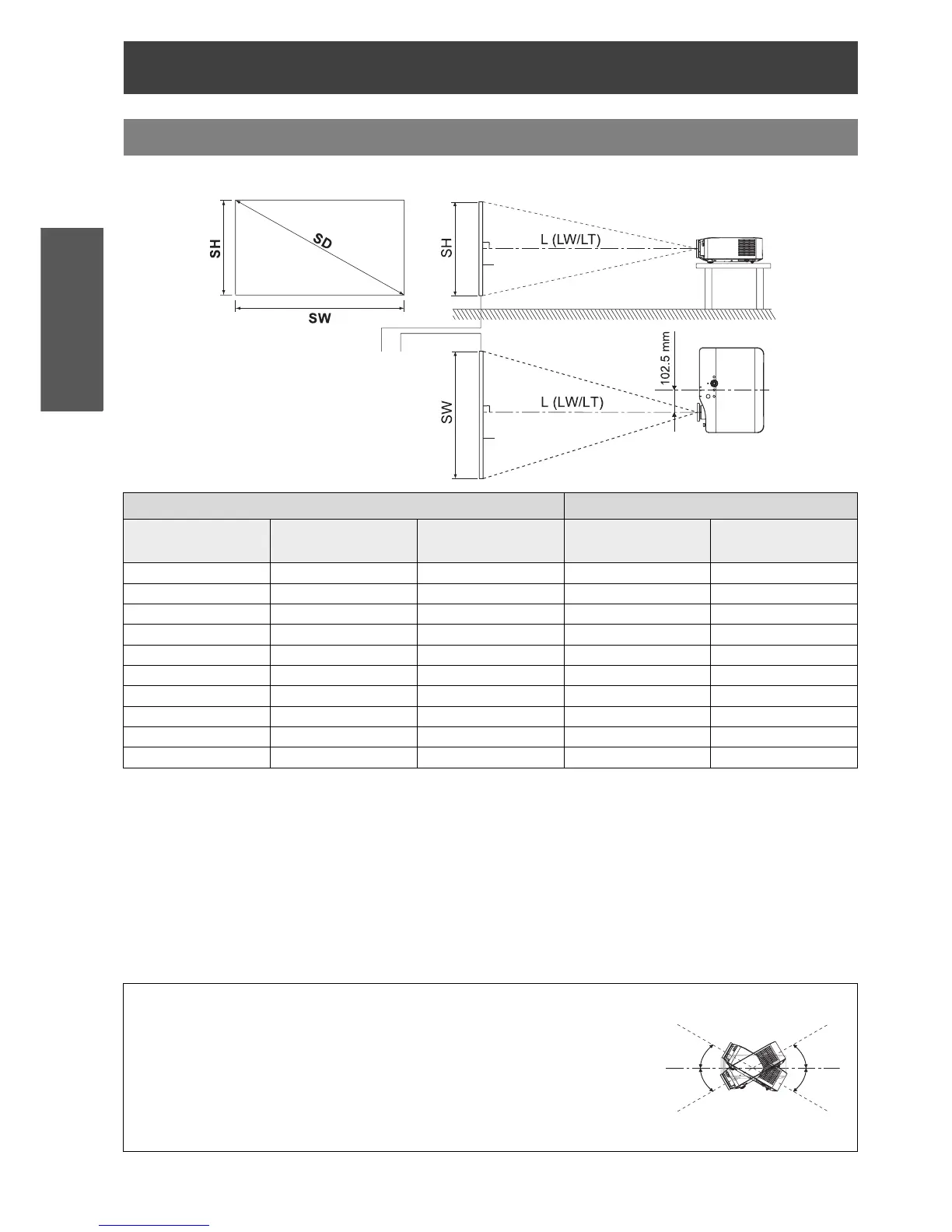
You can adjust the projection size with 2.0 power zoom lens. Calculate and define the throw distance as follows.
* All measurements above are approximate and may differ slightly from the actual measurements.
J Calculation methods for screen dimensions
You can calculate more detailed screen dimensions from the screen diagonal.
* The results above are approximate and may differ slightly from the actual measurements.
Screen size and throw distance
Projection size (16 : 9) Throw distance (L)
Diagonal length
(SD)
Screen height (SH) Screen width (SW)
Minimum distance
(LW)
Maximum distance
(LT)
1.01 m (40") 0.50 m (1'7") 0.89 m (2'11") 1.2 m (3'11") 2.4 m (7'10")
1.27 m (50") 0.62 m (2') 1.11 m (3'7") 1.5 m (4'11") 3.0 m (9'10")
1.52 m (60") 0.75 m (2'5") 1.33 m (4'4") 1.8 m (5'10") 3.7 m (12'1")
1.77 m (70") 0.87 m (2'10") 1.55 m (5'1") 2.1 m (6'10") 4.3 m (14'1")
2.03 m (80") 1.00 m (3'3") 1.77 m (5'9") 2.4 m (7'10") 4.9 m (16')
2.28 m (90") 1.12 m (3'8") 1.99 m (6'6") 2.7 m (8'10") 5.5 m (18')
2.54 m (100") 1.24 m (4') 2.21 m (7'3") 3.1 m (10'2") 6.2 m (20'4")
3.05 m (120") 1.49 m (4'10") 2.66 m (8'8") 3.7 m (12'1") 7.4 m (24'3")
3.81 m (150") 1.87 m (6'1") 3.32 m (10'10") 4.6 m (15'1") 9.3 m (30'6")
5.08 m (200") 2.49 m (8'2") 4.43 m (14'6") 6.2 m (20'4") 12.4 m (40'8")
NOTE:
Do not use the projector at a raised or a horizontally tilted position as it may
cause malfunction of the projector.
Make sure the projector lens surface is parallel with the screen. You can tilt
the projector body approximately ± 30 degrees vertically. Overtilting may
result in shortening the component’s life.
For the best quality of the projection image, install a screen where sun light or
room light does not shine directly onto the screen. Close window shades or
curtains to block the lights.
Screen
SW = SD x 0.872
LW = 1.2244 x SD - 0.056
SH = SD x 0.490
LT = 2.4449 x SD - 0.056
Unit: m



 To Next Page