76 - ENGLISH
Chapter 4 Settings — [PROJECTOR SETUP] menu
[COOLING CONDITION]
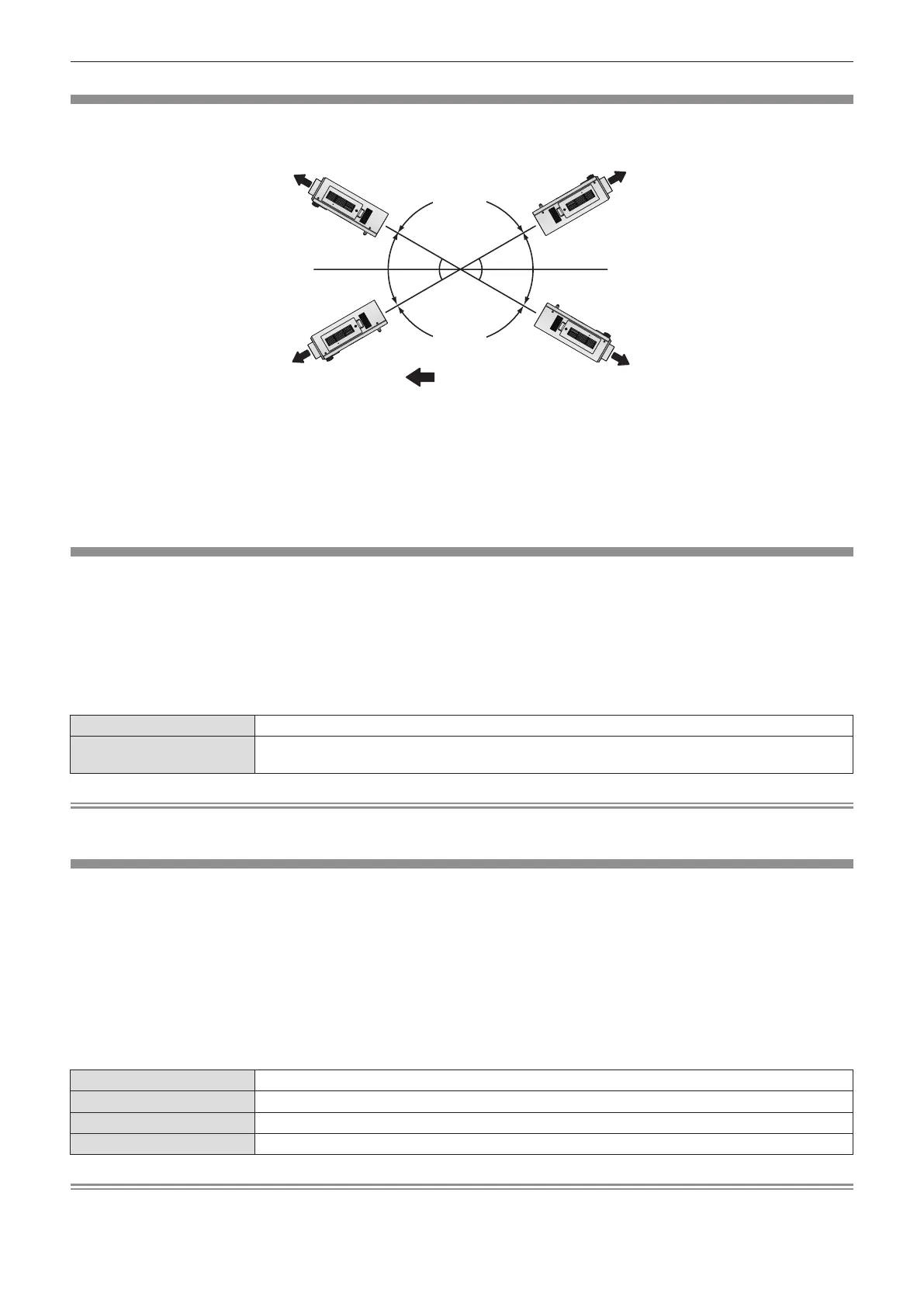
Change the fan control depending on the direction of projection.
Set [COOLING CONDITION] correctly in accordance with the direction of projection referring to the following gure. It may shorten the life of
the lamp if used in incorrect setting.
:
30°
30°
30°
30°
[UPWARD SETTING]
[FLOOR SETTING] [CEILING SETTING]
[DOWNWARD SETTING]
Projection direction
1)
Press as to select [COOLING CONDITION].
2)
Press the <ENTER> button.
rf
The [COOLING CONDITION] screen is displayed.
3)
Press as to select a cooling condition.
4)
Press the <ENTER> button.
5)
When the confirmation is displayed, select [OK]
or [CANCEL], and press the <ENTER> button.
[HIGH ALTITUDE MODE]
Set to [ON] to use the projector at 1 400 m (4 593 ft) to 2 700 m (8 858 ft) elevations.
1)
Press as to select [HIGH ALTITUDE MODE].
2)
Press qw to switch [HIGH ALTITUDE MODE].
rf
The setting will change between [OFF] and [ON].
3)
When the confirmation is displayed, select [OK]
or [CANCEL], and press the <ENTER> button.
rr
[HIGH ALTITUDE MODE]
[OFF] When using at a place lower than 1 400 m (4 593 ft) above sea level
[ON]
When using at a high altitude (1 400 m (4 593 ft) or higher and lower than 2 700 m (8 858 ft) above sea
level)
Note
rf
The speed of the fan increases and the operation sound becomes louder when set to [ON].
[LAMP SELECT]
Switch between brightness of two lamps and that of single lamp from the two luminous lamps built into the projector body according to the
use condition or purpose. When [SINGLE] is set, the lamp to be turned on is automatically selected based on the cumulative operating time of
lamps.
1)
Press as to select [LAMP SELECT].
2)
Press qw to switch [LAMP SELECT].
rf
The setting will change among [DUAL], [SINGLE], [LAMP1] and
[LAMP2] each time you press the button.
3)
Press the <ENTER> button.
rr
[LAMP SELECT]
[DUAL] Two lamps will light.
[SINGLE] Single lamp will light. (The lamp with shorter cumulative operating time is selected automatically.)
[LAMP1] Lamp 1 will light.
[LAMP2] Lamp 2 will light.
Note
rf
When [SINGLE], [LAMP1], or [LAMP2] is selected, if the lamp does not light or the cumulative operating time exceeds 2000 hours (when
[LAMP POWER] is set to [NORMAL]), the other lamp will light. When [DUAL] is selected, if either lamp does not light or the cumulative



 To Next Page