ENGLISH - 35
Attention
f Always use one of the following when connecting a VCR.
- A VCR with built-in time base corrector (TBC).
- A time base corrector (TBC) between the projector and the VCR.
f If nonstandard burst signals are connected, the image may be distorted. In such case, connect the time base corrector (TBC) between the
projector and the external devices.
Note
f For an HDMI cable, use an HDMI High Speed cable that conforms to HDMI standards. If a cable that does not conform to HDMI standards
is used, images may be interrupted or may not be projected.
f This projector does not support the VIERA Link (HDMI) or HDMI CEC (Consumer Electronics Control).
f When the <VARIABLE AUDIO OUT> terminal is connected with cable, the sound will not be output from the built-in speaker.
f When input Y/C signal, the optional D-SUB - S Video Conversion cable (Model No.: ET-ADSV) is required.
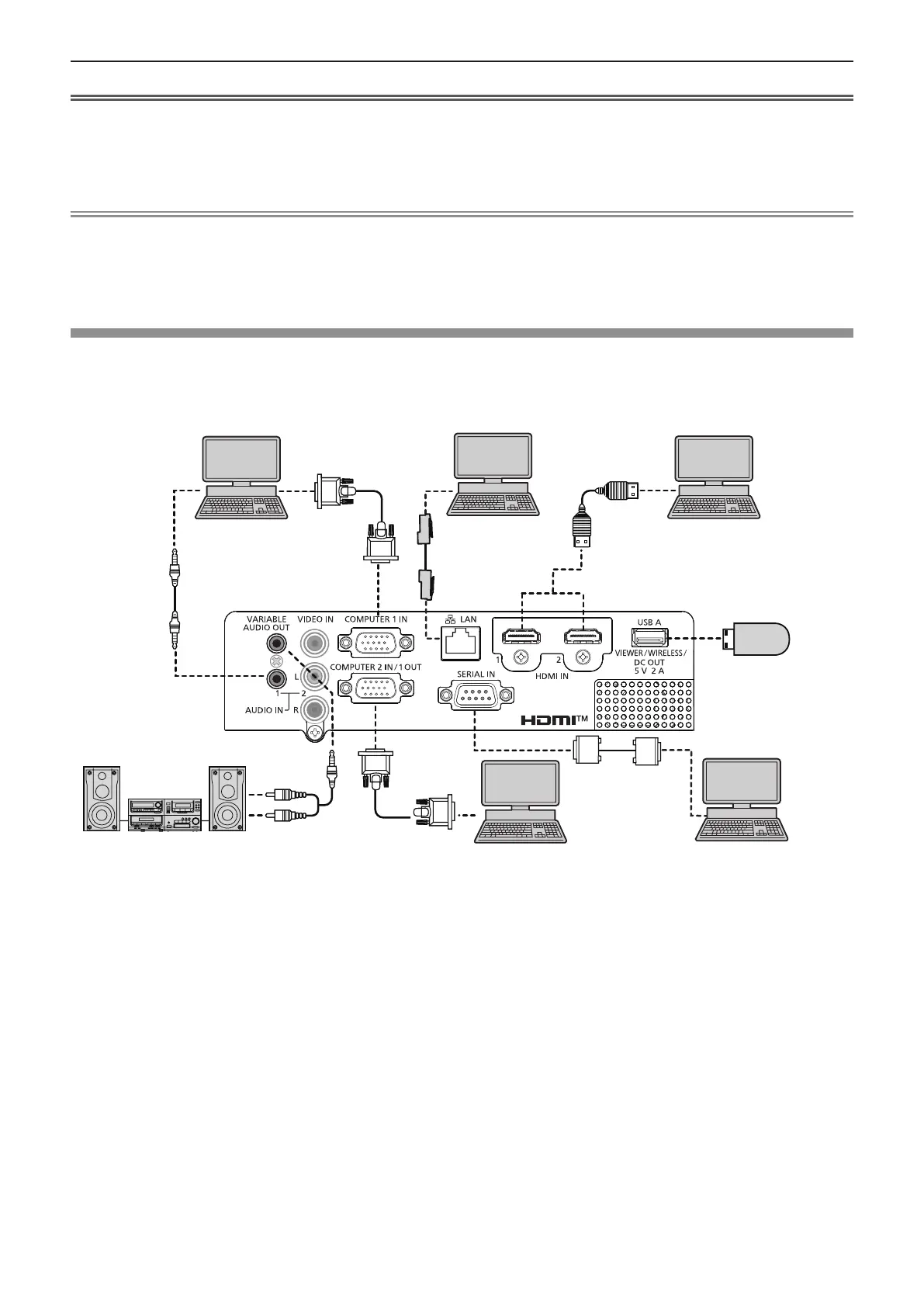
Connecting example : Computers
r For PT-LW376, PT-LW336, PT-LB426, PT-LB386 and PT-LB356
Audio equipment
Control computer
Computer
Computer
USB memory/
Wireless module
(Model No.: AJ-WM50 /
ET-WML100)
Control computer
Computer
Chapter 2 Getting Started - Connecting



 To Next Page