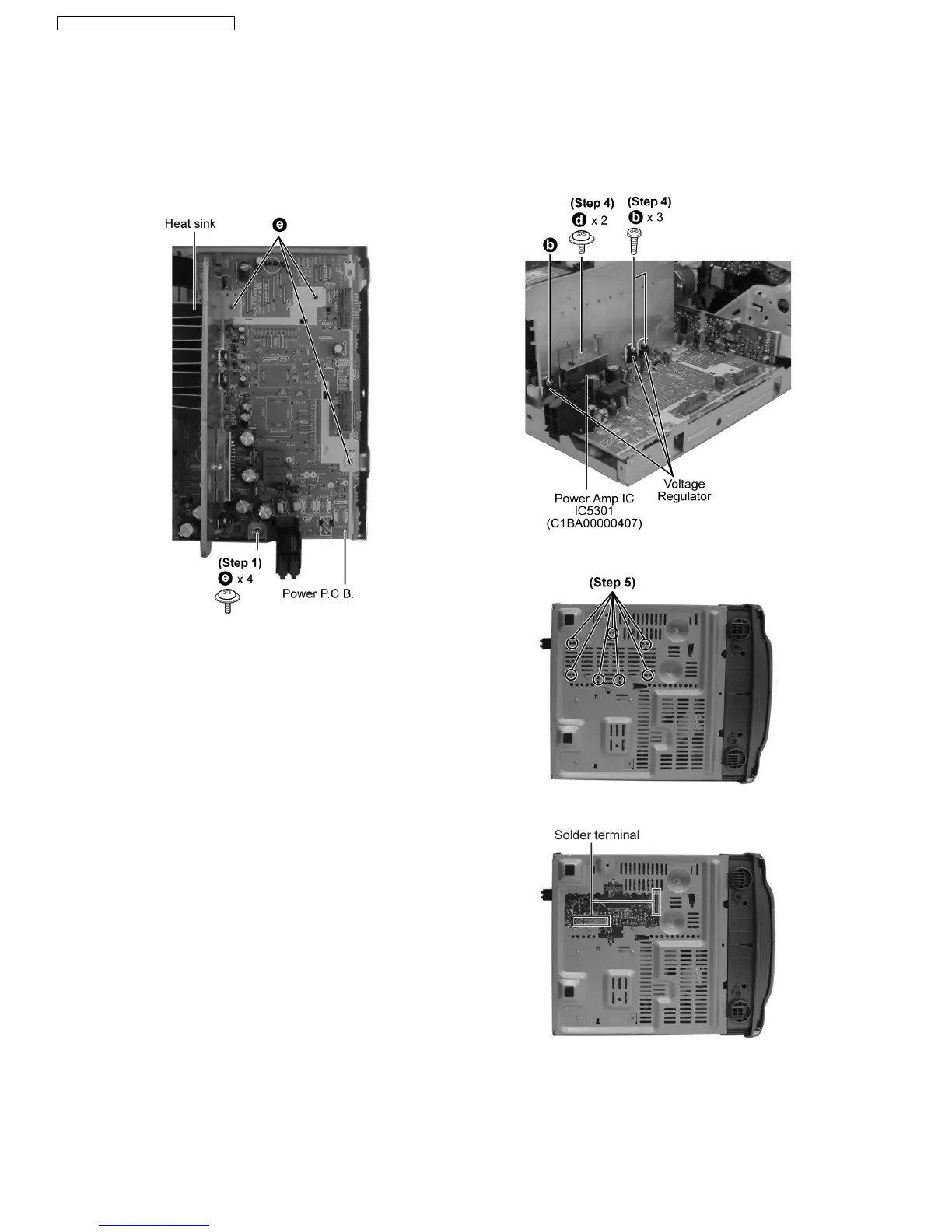
Step 1 Remove the 4 screws on Power P.C.B..
Step 2 Detach cable (CN5950) remove the 5 screws on Power
P.C.B..
Step 3 Remove Power P.C.B..
Note:
Insulate the Power P.C.B. with insulation material to avoid short
circuit.
· Replacement of the Power Amp IC or Voltage Regulator
Step 4 Remove 2 screws at the Power Amp IC and/or 3
screws to Voltage Regulator.
Step 5 Cut the joints with a metal cutter as shown below.
Step 6 Desolder the terminals to replace the components.
Step 7 Fix back the cut portion with a screw as shown.
10.9. Disassembly of Power P.C.B.
· Follow the (Step 1) - (Step 2) of Item 10.4 - Disassembly of Top Cabinet
· Follow the (Step 1) - (Step 4) of Item 10.6 - Disassembly of CD Changer Unit
· Follow the (Step 1) - (Step 3) of Item 10.5 - Disassembly of Rear Panel
· Follow the (Step 1) - (Step 3) of Item 10.7 - Disassembly of Main P.C.B.
28
SA-AK240E / SA-AK240EB / SA-AK240EG




 To Next Page