13.1. Cassette Deck Section
· Measurement Condition
− Reverse-mode selector switch:
− Deck Tape Select: NORMAL
− Make sure head, capstan and press roller are clean.
− Judgeable room temperature 20 ± 5 °C (68 ± 9°F)
· Measuring instrument
− EVM (DC Electronic voltmeter)
− Digital frequency counter
· Test Tape
− Tape speed gain adjustment (3 kHz, -10 dB);
QZZCWAT
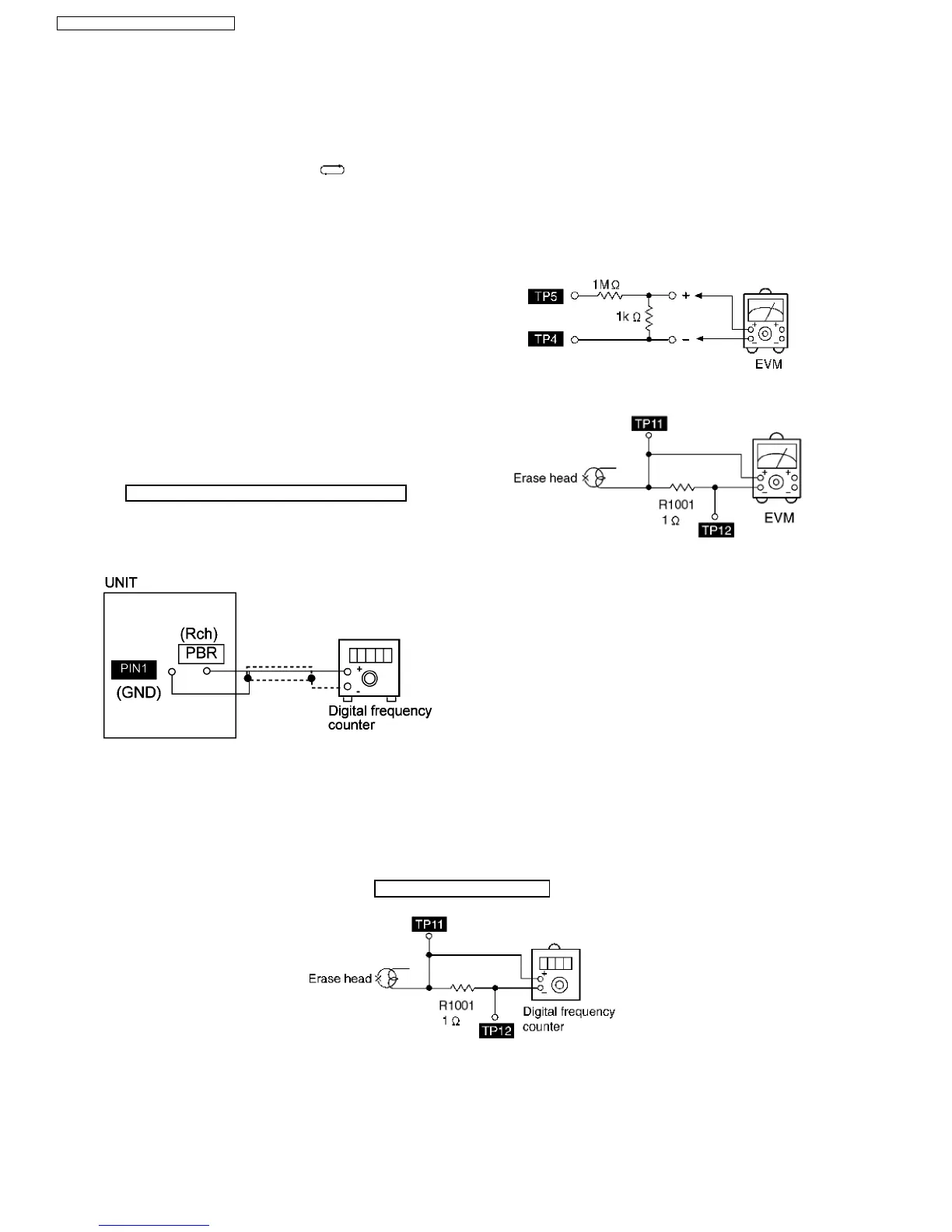
13.1.1. Tape Speed Adjustment (Deck 1/2)
1. Insert the test tape (QZZCWAT) to DECK 2 and playback
(FWD side) the middle portion of it.
2. Adjust Motor VR (DECK 2) for the output value shown
below.
Adjustment target: 2910 ~ 3090 Hz (NORMAL speed)
3. After alignment, assure that the output frequency of the
DECK 1 FWD are within ±60 Hz of the value of the output
frequency of DECK 2 FWD.
Fig. 1
13.1.2. Bias Voltage Check
1. Set the unit “AUX” position.
2. Insert the Normal blank tape (QZZCRA) into DECK 2 and
the unit to “REC” mode (use “l REC/STOP” key).
3. Measure and make sure that the output is within the
standard value.
Bias voltage for Deck 2 14±4mV (Normal)
Fig. 2
Fig. 3
13 Adjustment Procedures
13.1.3. Bias Frequency Adjustment (Deck 1/2)
1. Set the unit to “AUX” position.
2. Insert the Normal blank tape (QZZCRA) into DECK 2 and set the unit to “REC” mode (l use “REC/STOP” key).
3. Adjust L1002 so that the output frequency is within the standard value as below.
Standard Value: 89 ~ 110 kHz
Fig. 4
13.1.3.1. Cassette Deck Section
Below is the locations of test points for Deck P.C.B.:-
44
SA-AK240E / SA-AK240EB / SA-AK240EG




 To Next Page