45
• For PH only
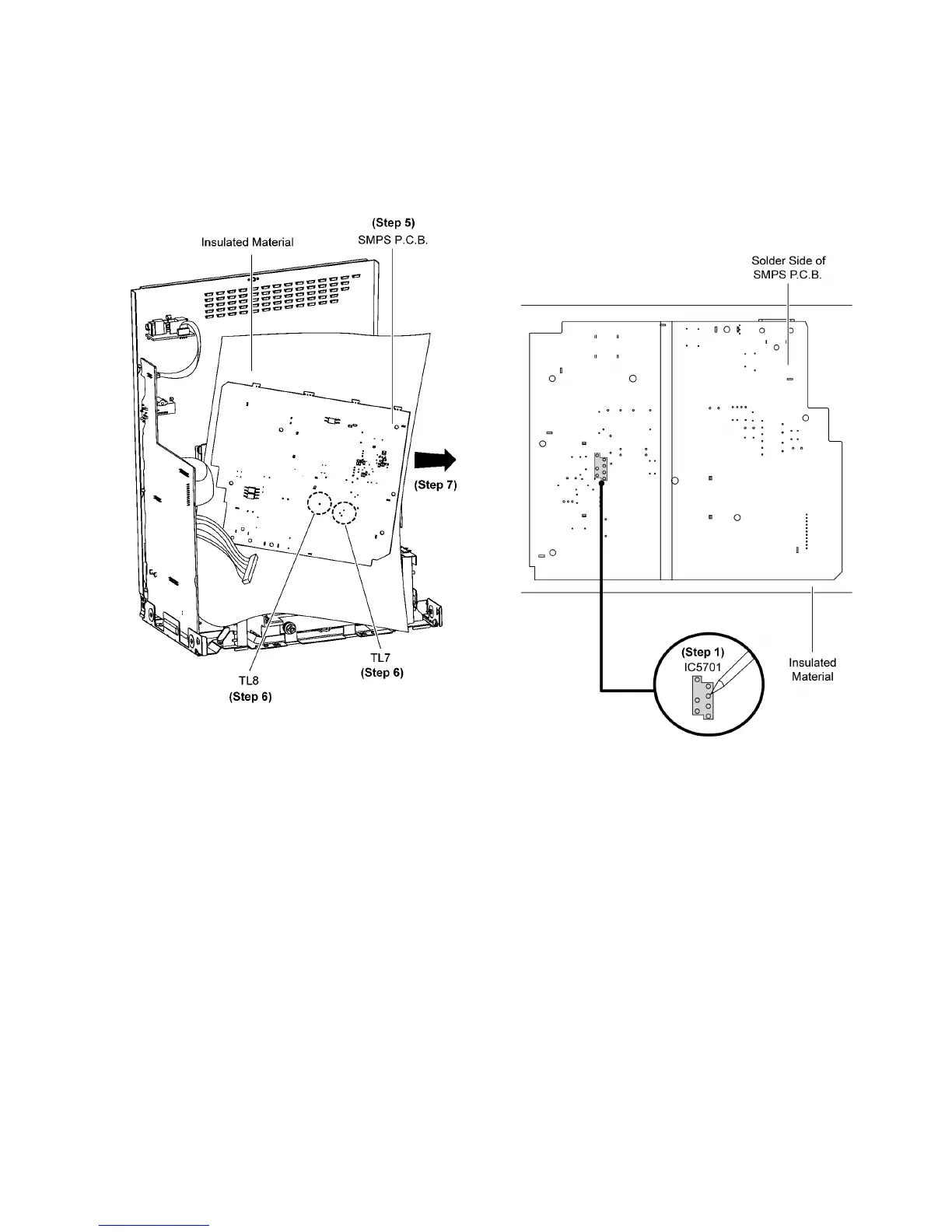
Step 5 Flip the SMPS P.C.B. and position it according to dia-
gram shown.
Caution: Insulated Material is required in order to insulated
SMPS P.C.B. from other parts.
Step 6 Desolder 2 Wire pins, Black TL7 (Black), TL8 (Red)
wires pin.
Step 7 Remove SMPS P.C.B..
9.17. Replacement of Switching Reg-
ulator IC (IC5701)
• Refer to “Disassembly of SMPS P.C.B.”.
9.17.1. Disassembly of Switching Regula-
tor IC (IC5701)
Step 1 Desolder pins of the Switching Regulator IC (IC5701) on
the solder side of SMPS P.C.B..
Step 2 Remove 1 screw from the Switching Regulator IC
(IC5701).
Step 3 Remove the Switching Regulator IC (IC5701) from the
Heatsink A.
Caution: Avoid touching the Heatsink A due to its high
temperature after porlonged use. Touching it may lead to
injuries.






 To Next Page