L
R
L
R
LOOP ANT
HOLDER
FM
ANT
AM
ANT
GND
LOOP
EXT
75Ω
DIGITAL IN
TAPE
S-VIDEO
TV
OPTICAL1
(TV)
REC
(OUT)
PLAY
(IN)
OPTICAL2
(DVD)
MONITOR
OUT
TV
CD
MONITOR
OUT
CENTER
SURROUND
SUBWOOFER
L
R
TV
IN
VCR
VCR
DVD/DVD 6CH
SPEAKERS
HAUT-PARLEURS
AC IN
∼
AC
OUTLET
SUBWOOFER
IN
IN
IN
IN
IN
FRONT
OUT
OUT
DVD
IN
COAXIAL
SURROUND
FRONT
CENTER
6-8Ω
6-8Ω
6-8Ω
EACH SPEAKER
CHAQUE
EACH SPEAKER
CHAQUE
R L
R L
TV
6
RQT6193
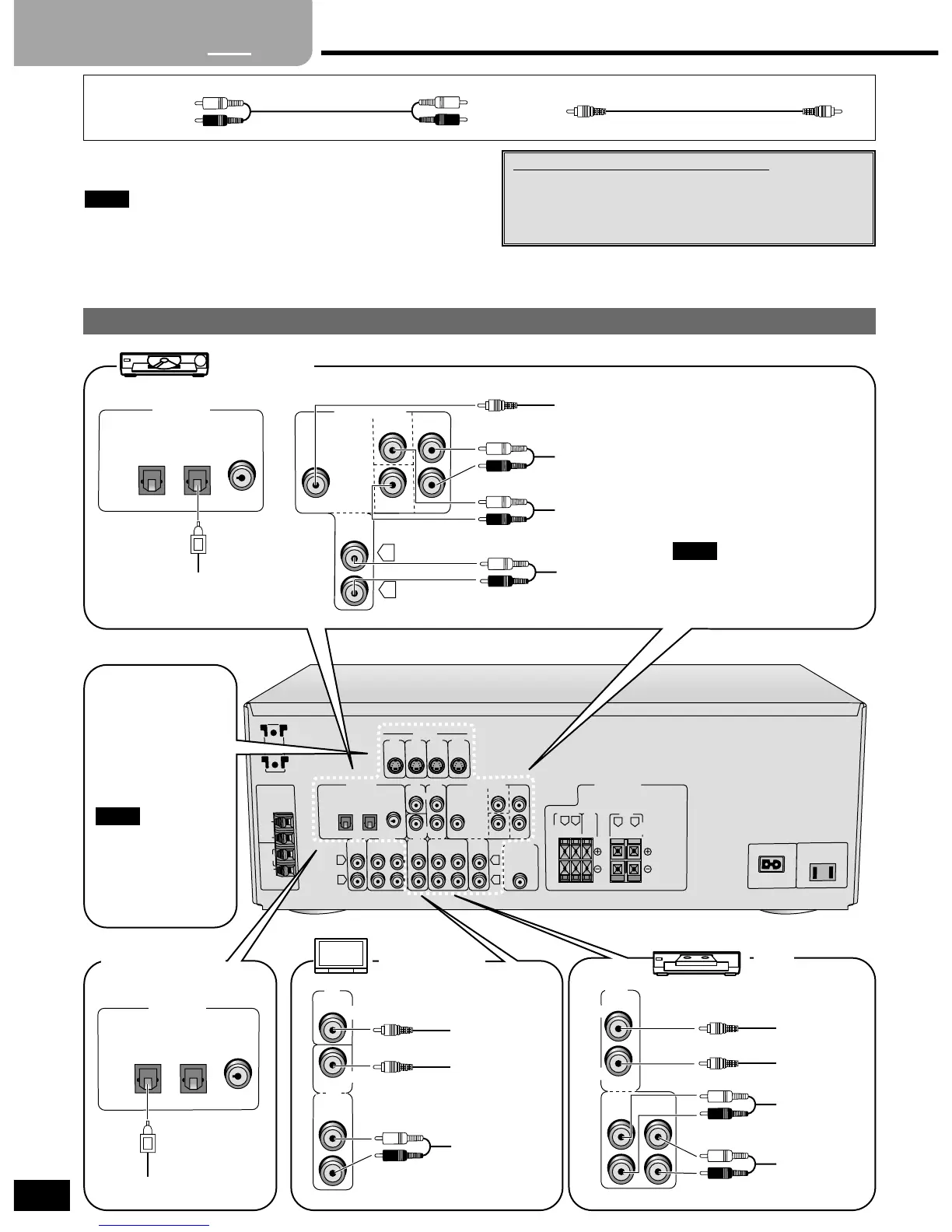
Equipment connections
TV, VCR and DVD player
Stereo connection cable
White (L)
Red (R)
Video connection cable
Changing the digital input settings
You can change the input settings for the digital
terminals if necessary. Note the equipment you have
connected to the terminals, then change the settings (
\
pages 8 and 9).
Step
1
2
3 4
L
R
CENTER
SURROUND
SUBWOOFER
L
R
DVD/DVD 6CH
IN
IN
FRONT
DVD player
VIDEO OUT
AUDIO OUT
(SURROUND L, R)
AUDIO OUT
(CENTER, SUBWOOFER)
AUDIO OUT
(FRONT L, R)
VCR
VIDEO IN
VIDEO OUT
AUDIO IN
AUDIO OUT
TV or monitor
VIDEO IN
VIDEO OUT
AUDIO OUT
Connect to FRONT L, R if your
DVD player does not have 6
channel output.
Note
DIGITAL IN
OPTICAL1
(TV)
OPTICAL2
(DVD)
COAXIAL
DIGITAL AUDIO OUT
To connect equipment, refer to the appropriate operating
instructions.
¡Do not bend the optical fiber cable.
¡Turn off all components before making any connections.
¡Use digital connection to enjoy Dolby Digital or DTS (
\
page 10).
¡Use analog connection to enjoy sources that cannot be decoded
on this unit and to record a source (
\
pages 10 and 15).
Note
The S-VIDEO
terminals
Connections through
these terminals provide
higher quality pictures
than through the video
terminal.
Video signals input into
the VIDEO terminals
cannot be output from
S-VIDEO terminals or
vice versa.
Note
Satellite receiver
etc.
DIGITAL IN
OPTICAL1
(TV)
OPTICAL2
(DVD)
COAXIAL






 To Next Page