the middle portion of it.
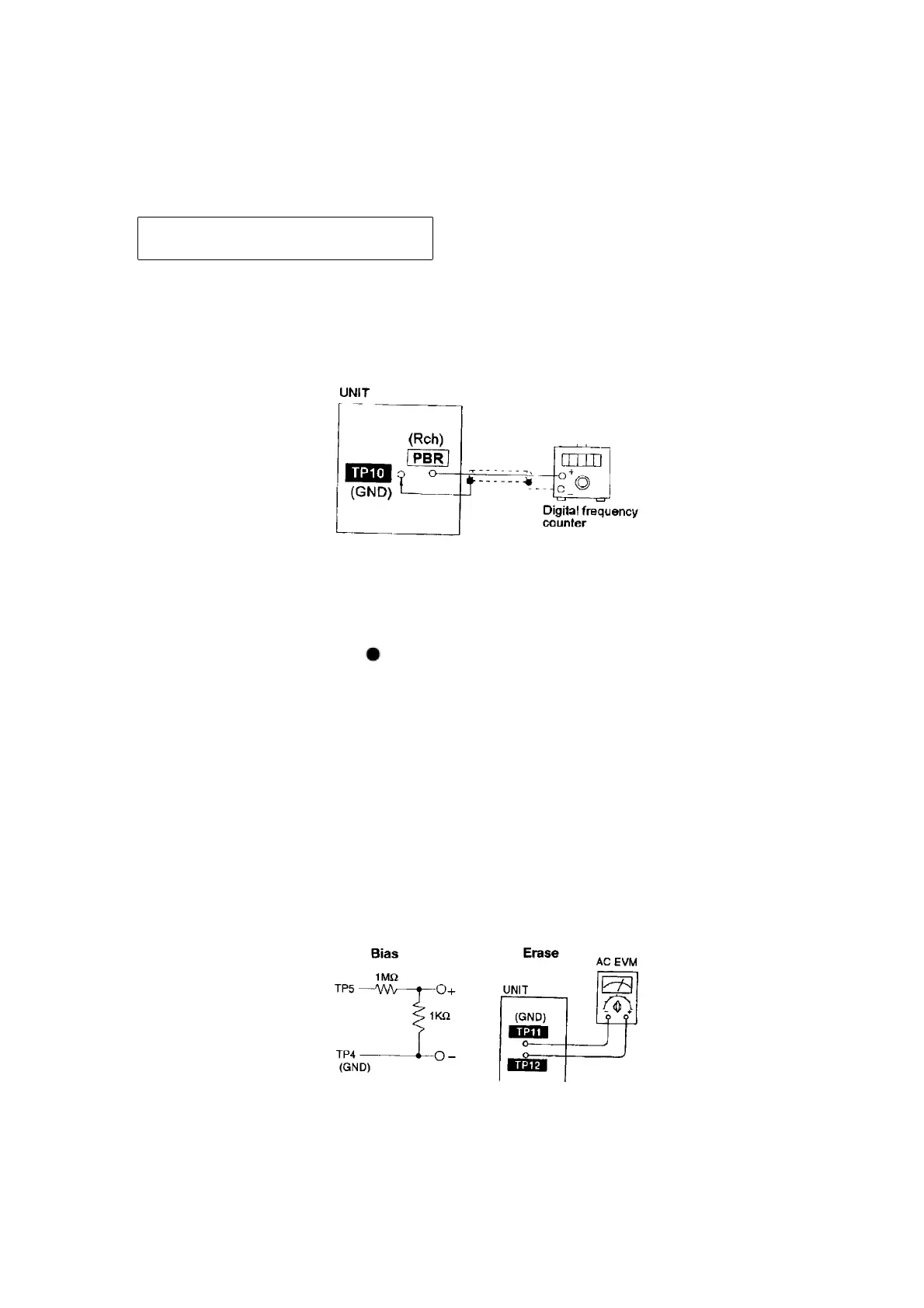
3. Adjust Motor VR for the output value shown below.
Adjustment target: 2940 ~ 3060 Hz
(NORMAL speed)
4. After alignment, assure that the output frequency of the DECK
REV is within ±60 Hz respectively of the value of the output
frequency of DECK FWD.
11.1.3. Bias and Erase Voltage Check
1. Set the unit “AUX” position.
2. Insert the Normal blank tape (QZZCRA) into DECK and the unit to
“REC” mode (use “ REC/PAUSE” key).
3. Measure and make sure that the output is within the standard
value.
4. Insert the Cr02 tape(QZZCRX).
5. Repeat steps 2 and 3.
Bias voltage 14 ± 4mV (Normal)
17 ± 5mV (Cr02)
Erase voltage for Deck 2 more than 80mV (Normal)
more than 90mV (Cr02)
11.1.4. Bias Frequency Adjustment
1. Set the unit to “AUX” position.
30










 To Next Page