EasyManua.ls Logo

Panasonic SA-PMX152EG - Troubleshooting Guide; No Output Sound

Panasonic SA-PMX152EG
79 pages
Print Icon
To Next Page IconTo Next Page
To Previous Page IconTo Previous Page
Loading...
22
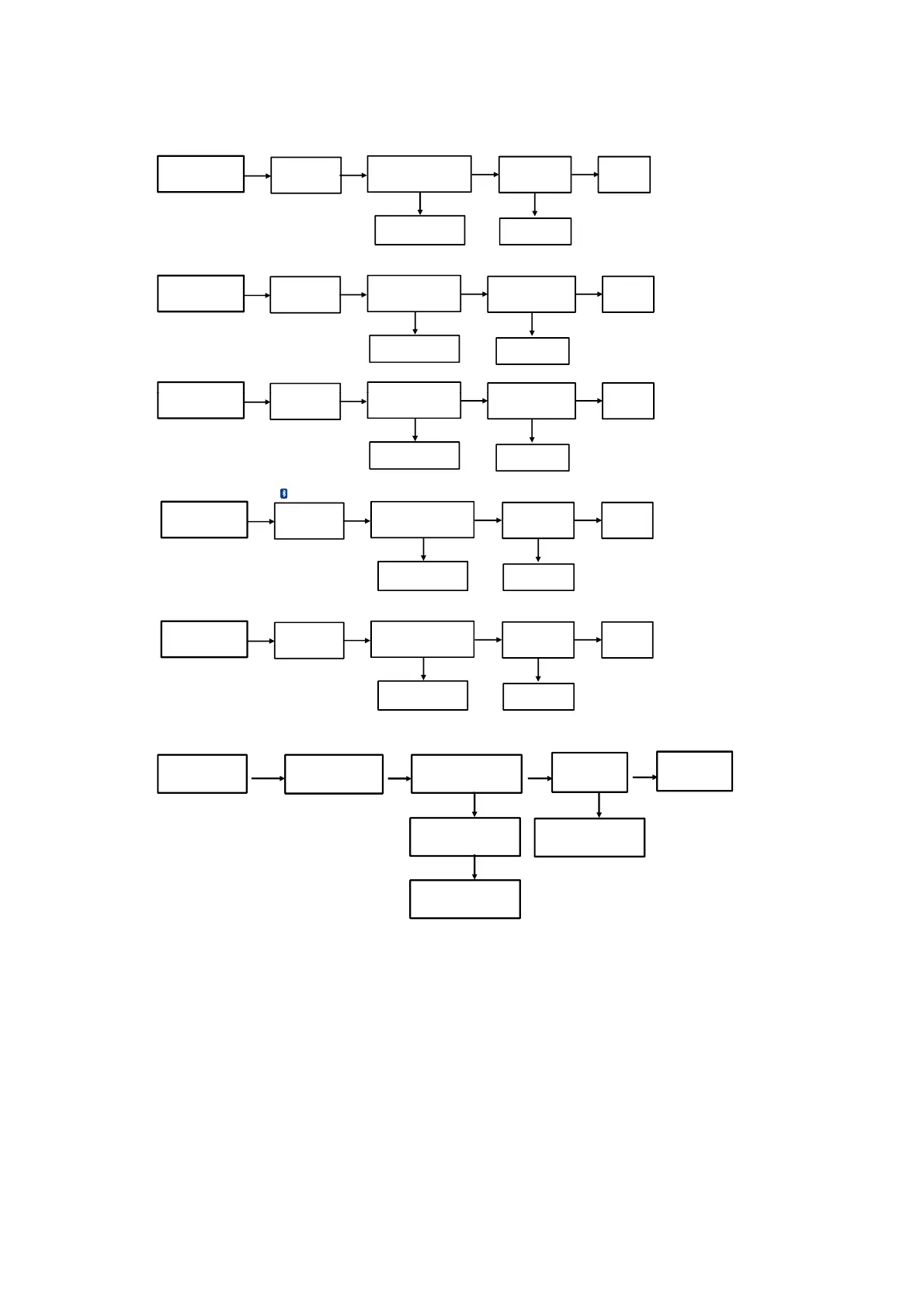
9. No Output Sound
9.1. CD Play
9.2. USB Play
9.3. PC Play (USB-DAC)
Press the Power Button
of Unit or Remote Control
to Turn ON the Unit
Change Main PCB
NG
Press Play
FL Display " Track & Count"
NG
Output Sound
No Problem
Found
OK
OK OK
CD Mode
Change CD Mechanism
Press the Power Button
of Unit or Remote Control
to Turn ON the Unit
Change Main PCB
NG
Insert USB Thumdrive
FL Display " USB A/B"
Press "Play"
NG
Output Sound
No Problem
Found
OK
OK OK
USB
Mode
Change USB Thumdrive
PthP Btt
Pl i USB PC bl
OK
OK
OK
9.4. Bluetooth Play
9.5. Tuner Mode
Press the Power Button
of Unit or Remote Control
to Turn ON the Unit
Change Main PCB
NG
Press Play
FL Display " BLUETOOTH "
NG
Output Sound
No Problem
Found
OK
OK OK
Bluetooth Mode
Re-connect Bluetooth
into the Device
Press the Power Button
of Unit or Remote Control
to Turn ON the Unit
Change Main PCB
NG
Search for Tuner Signal
NG
Output Sound
No Problem
Found
OK
OK OK
DAB/FM/AM
Mode
Check the Antenna
Wire Connection
P
ress
th
e
P
ower
B
u
tt
on
of Unit or Remote Control
to Turn ON the Unit
Change Main PCB
NG
Pl
ug
i
n
USB PC
ca
bl
e
FL Display " PC "
Press "Play"
NG
Output Sound
No Problem
Found
OK
OK
OK
PC
Mode
Change USB PC cable
9.6. Network Mode (PMX150/152 only)
Press Power Button
of Unit or Remote Control
to Turn ON the Unit
Network Mode
NG
Connect Smartphone Device and
select EUT as speaker. Press Play
FL Display "Network or AirPlay"
Output Sound
OK
OK
Check CN9000 FFC cable
NG
Change Main PCB
No Problem Found
OK
NG
Change Main PCB

Table of Contents

Related product manuals