52
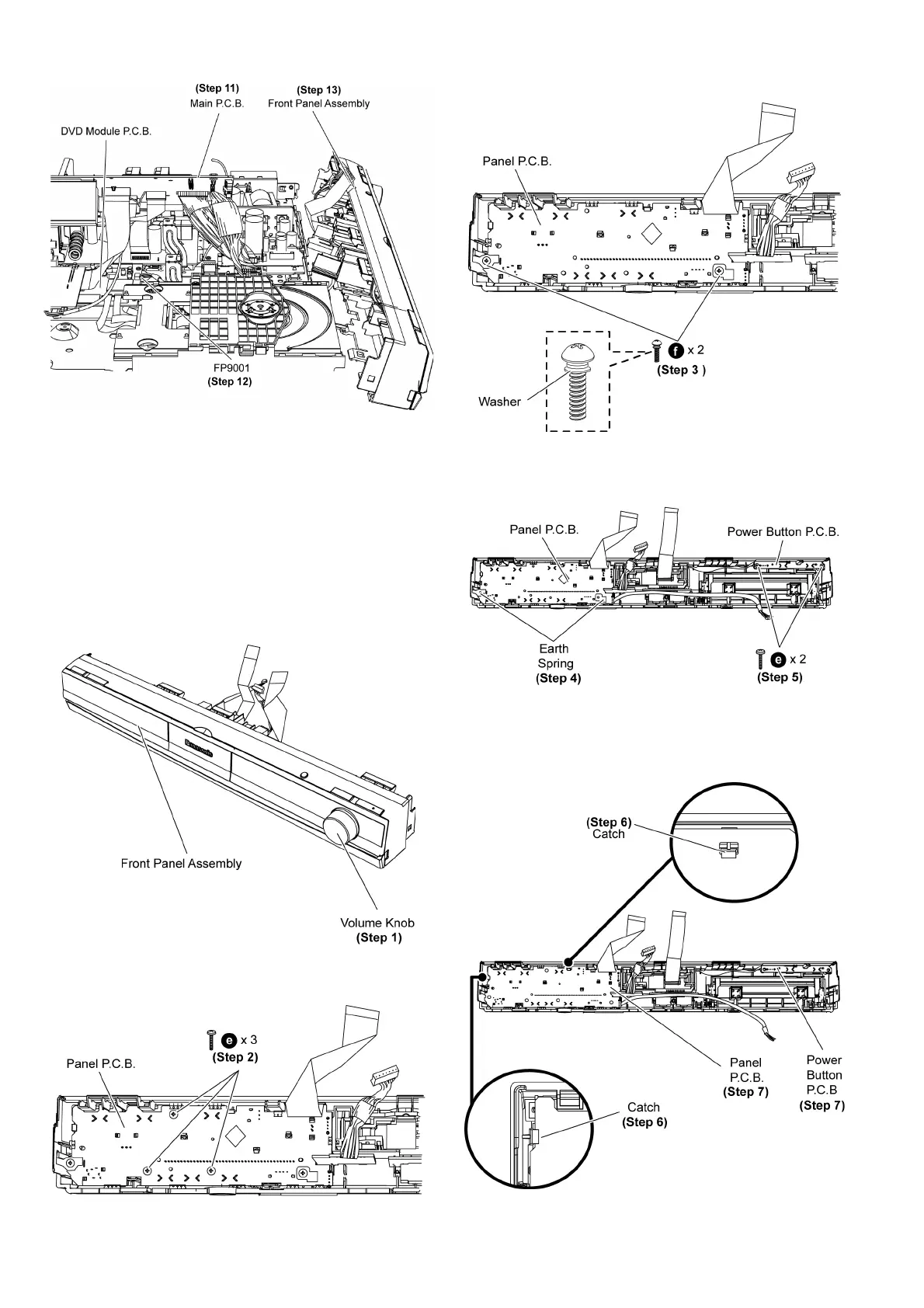
Step 11 Lift up the Main P.C.B. according to the diagram
shown.
Step 12 Detach 5P cable at the connector (FP9001) on DVD
Module P.C.B.
Step 13 Remove the front panel assembly.
9.7. Disassembly of Panel, Power
Button P.C.B.
• Follow (Step 1) to (Step 3) of Item 9.3.
• Follow (Step 1) to (Step 13) of Item 9.6.
Step 1 Remove the volume knob.
Step 2 Remove 3 screws (Without Washer) on Panel P.C.B.
Step 3 Remove 2 screws (With Washer) on Panel P.C.B.
Step 4 Remove 2 earth springs on Panel P.C.B.
Caution: Keep the earth springs in safe place. Avoid dent-
ing it. Place it back during assembling.
Step 5 Remove 2 screws on Power Button P.C.B.
Step 6 Release 2 catches.












 To Next Page