Getting started
7
VQT2Q55
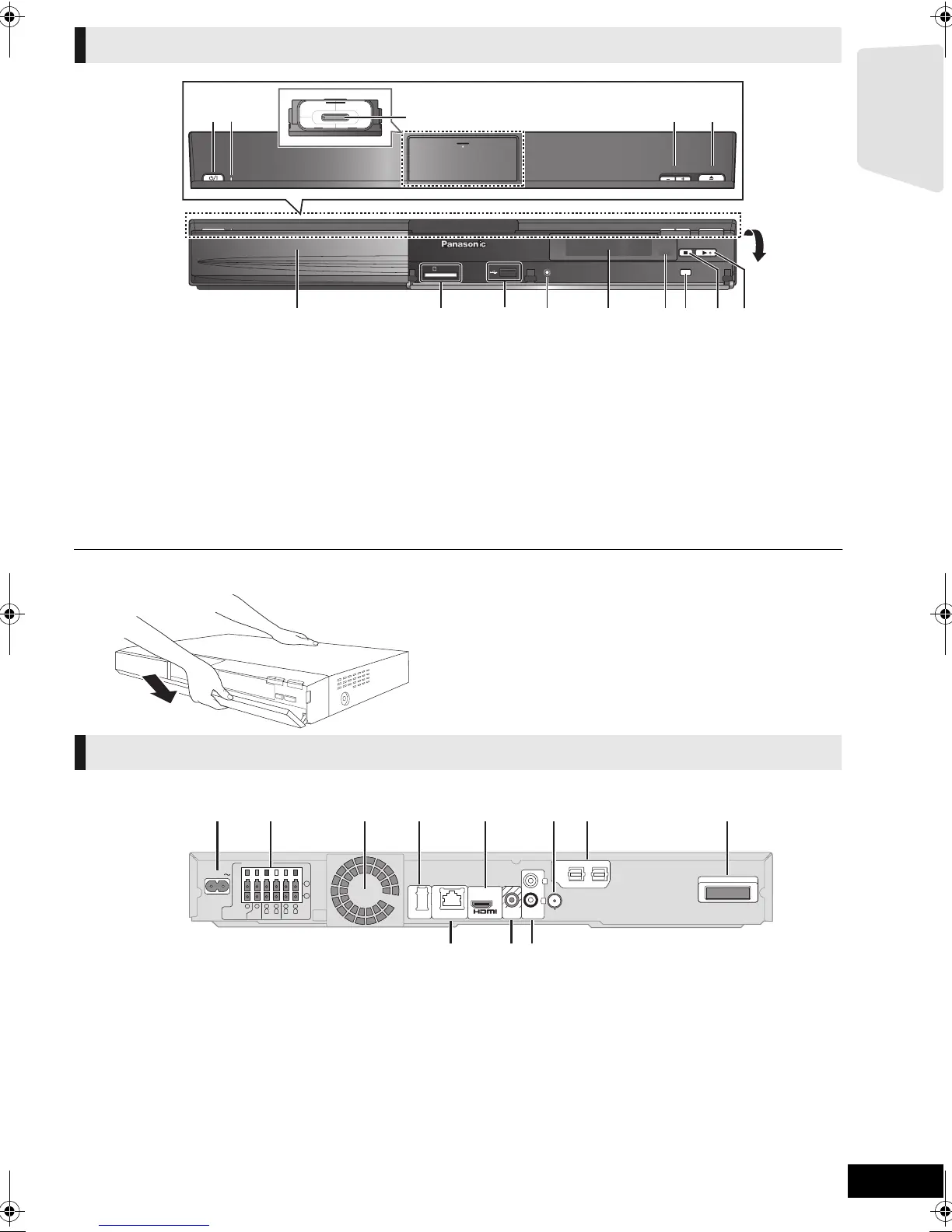
1 Standby/on switch (Í/I) (> 19)
Press to switch the unit from on to standby mode or vice
versa. In standby mode, the unit is still consuming a small
amount of power.
2 Power indicator
The indicator lights when this unit is turned on.
3 Connect iPod/iPhone (> 32)
4 Adjust the volume of the main unit
5 Open or close the disc tray (> 22)
6 Disc tray
7 SD card slot (> 22)
8 USB port (> 22)
9 [BT737] [BT337] Connect Auto speaker setup microphone
10 Display (FL display)
≥ “SRD” (SURROUND) lights when sound is output to the
surround speakers.
11 Remote control signal sensor
Distance: within approx. 7 m.
Angle: Approx. 20e up and down, 30e left and right
12 Select the source (> 23)
13 Stop (> 25)
14 Start play (> 25)
∫ If the front cover comes off
1 Hold rear side of main unit by one hand and match up left
or right side protruding hook on the cover first with the
corresponding slot on the unit.
2 Push the hook firmly towards the unit until it clicks into
place. Then push the succeeding hooks one by one until
all have clicked into place.
3 Check that the cover now moves correctly.
≥ If it does not, remove it and repeat the above procedure.
1 AC IN terminal (> 18)
2 Speaker terminals (> 13)
3 Cooling fan
4 USB port for optional wireless adaptor (> 17)
5 HDMI AV OUT terminal (> 15)
6 FM radio antenna terminal (> 16)
7 DIGITAL AUDIO IN terminals (> 14 , 15)
Terminal 1 is designated for connection with the TV.
Terminal 2 can be used with equipment other than the
STB.
8 Digital transmitter dock (> 12)
Connect a digital transmitter when using an optional
wireless system.
9LAN port (> 17)
10 VIDEO OUT terminal (> 14)
11 AUX terminal (> 14)
Main unit (Front)
OPEN/CLOSEVOLUME
iPod
SELECTOR
SD CARD
SETUP MIC
1 2
3
45
6 7 8 9 10 11 12 13
14
Main unit (Rear)
2
DIGITAL AUDIO IN
DIGITAL TRANSMITTER
VIDEO
OUT
AUX
LAN
WIRELESS
FM ANT
L
R
5
2
1
3Ω6Ω6Ω
FRONT
CENTER
SUBWOOFER
R L
6
4
3
3Ω
SURROUND
R L
(75Ω)
OPTICAL
2
DIGITAL AUDIO IN
DIGITAL TRANSMITTER
1
LAN
(
10BASE-T/
100BASE-TX
)
AC IN
(ARC)
AV
OUT
1 2 3 4 5 6 7 8
109 11
SCBT737_337_230GN_VQT2Q55.book 7 ページ 2010年2月23日 火曜日 午後5時22分


 To Next Page