Connecting the Universal Dock for iPod
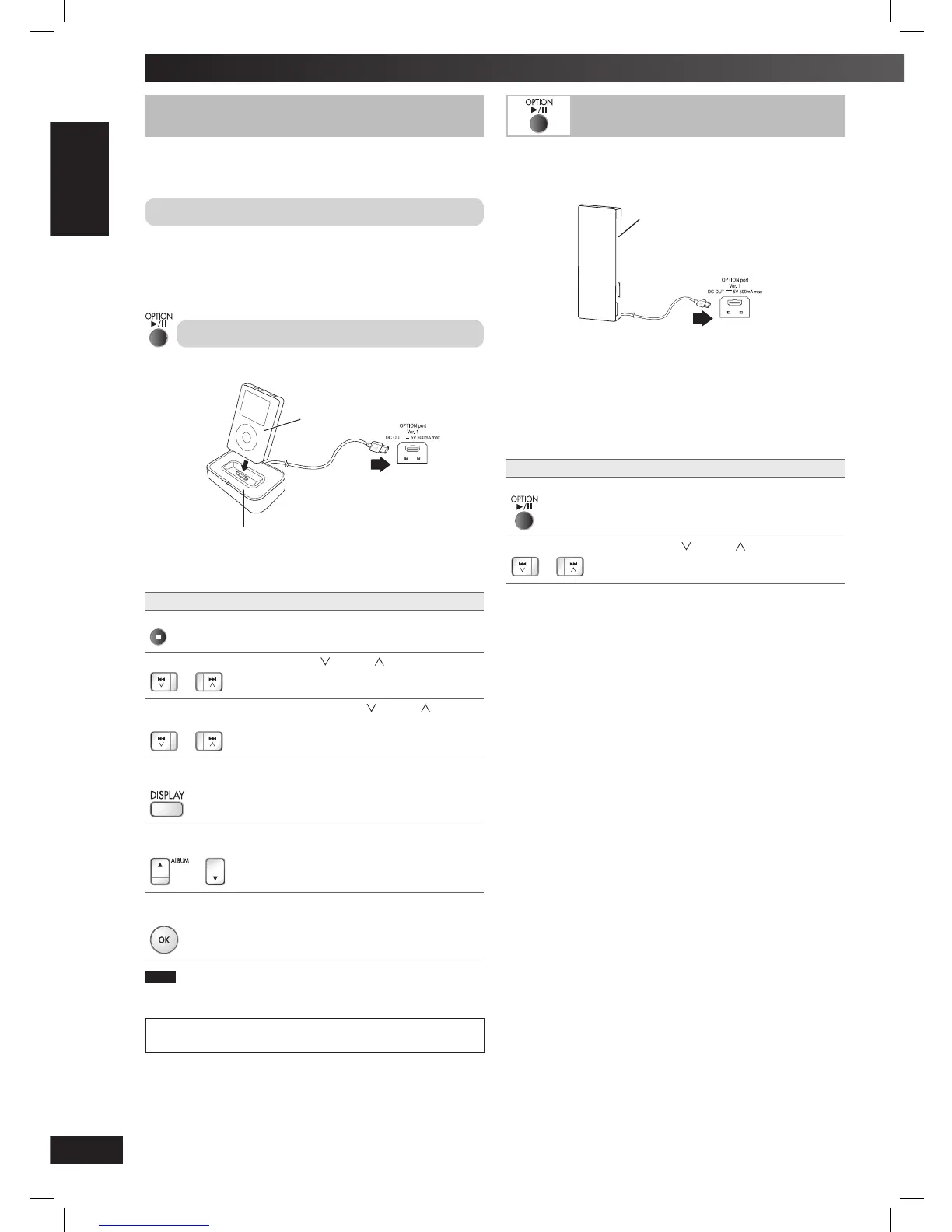
You can charge and play your iPod by connecting a Universal Dock
for iPod (SH-PD10, sold separately) to this unit.
Connecting and charging the iPod
1
Connect the Universal Dock for iPod into the OPTION port.
2
Insert the appropriate adapter and place your iPod into the
Universal Dock. (See the SH-PD10’s instruction manual.)
Playing the iPod
1
Connect the iPod as described above.
iPod
(not included)
SH-PD10
(not included)
Rear panel of
this main unit
2
Press [6, OPTION] to select “OPTION” as the source.
To Action
Pause Press [6, OPTION] or [
7
].
Press [6, OPTION] to resume.
Skip tracks
or
Press [4/ ] or [¢/ ].
Search through
tracks
or
Press and hold [4/ ] or [¢/ ].
Display iPod menu
screen
Press [DISPLAY].
Use as iPod menu
cursor
or
Press [5/∞, ALBUM].
Select iPod menu
item
Press [OK].
Note
Refer to the SH-PD10’s instruction manual for the compatible iPod
models.
iPod is a trademark of Apple Inc., registered in the U.S. and other
countries.
Using other equipment
ice
By connecting a Bluetooth Receiver (e.g SH-FX570R, sold
separately), you can receive and play the audio stored in your
Bluetooth audio source device (personal computer, etc).
SH-FX570R (not included)
Rear panel of
this main unit
1
Connect the Bluetooth Receiver into the OPTION port.
2
Press [6, OPTION] to select “OPTION” as the source.
3
Press [7].
4
Pairing and play your Bluetooth audio device.
(See the SH-FX570R’s instruction manual.)
To Action
Pause
Press [6, OPTION].
Press [6, OPTION] to resume.
Skip tracks
or
Press [4/ ] or [¢/ ].
PMX3_E_EN.indd 14PMX3_E_EN.indd 14 6/17/08 10:15:31 AM6/17/08 10:15:31 AM







 To Next Page