5
VQT5J67
Overview of controls
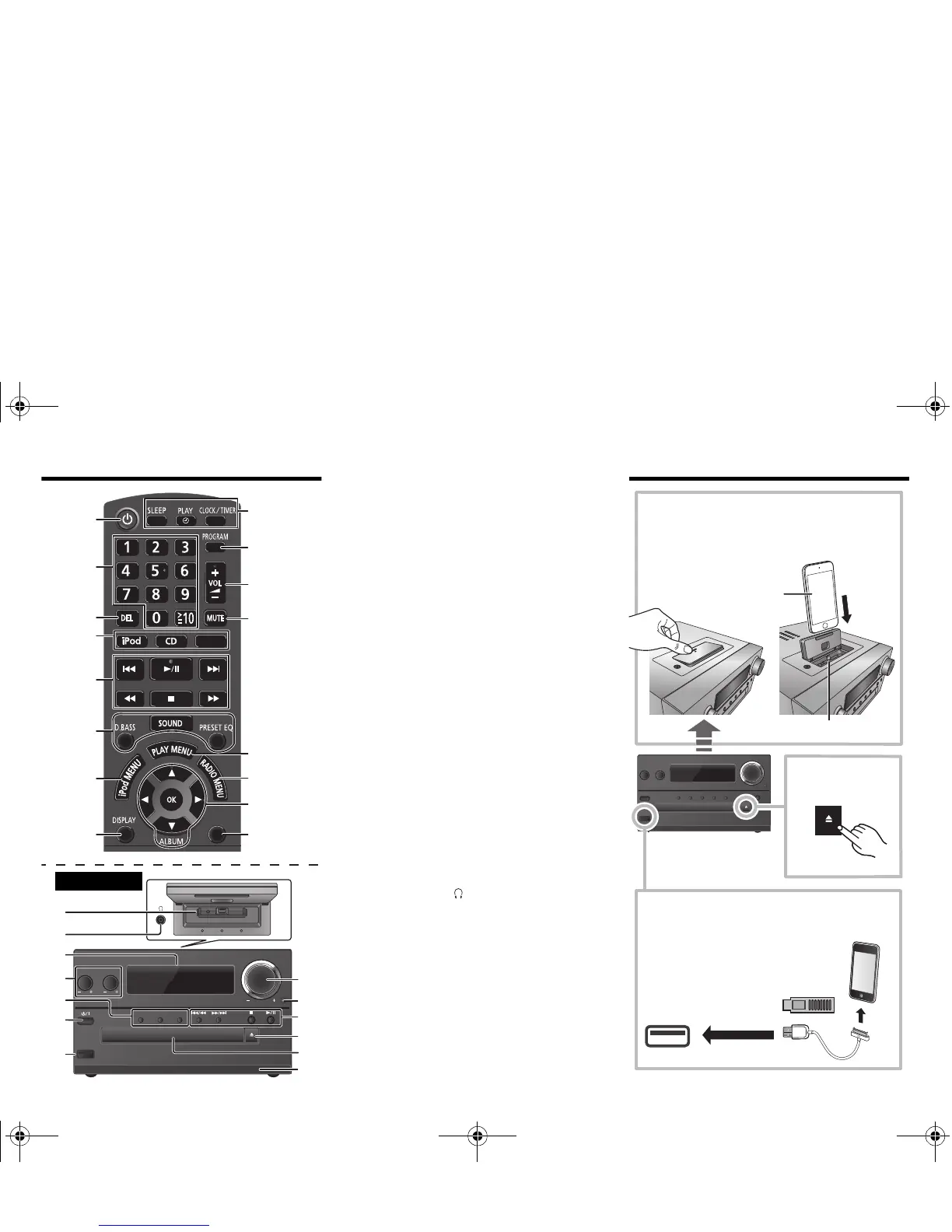
1 Standby/on switch [Í], [Í/I]
Press to switch the unit from on to standby mode or vice
versa. In standby mode, the unit is still consuming a
small amount of power.
2 Numeric buttons [1 to 9, 0, S10]
To select a 2-digit number
Example: 16: [S10]
> [1] > [6]
3 Delete a programed track
4 Select audio source
5 Basic playback control
6 Select the sound effects
7 View the iPod menu
8 View content information
9 Clock and timer operation
10 Set the program function
11 Adjust the volume of the system
12 Mute the sound of the system
Press the button again to cancel.
“MUTE” is also canceled when you adjust the volume or
when you switch off the system.
13 Set the play menu item
14 Set the radio menu item
15 Select the option
16 Enter setup menu
17 “iPod_Dock” for iPod/iPhone
18 Headphones jack ( )
• Plug type: Ø 3.5 mm (
1
/
8
q) stereo (not supplied)
• Avoid listening for prolonged periods of time to prevent
hearing damage.
• Excessive sound pressure from earphones and
headphones can cause hearing loss.
• Listening at full volume for long periods may damage
the user’s ears.
19 Display panel
20 “iPod_Port” for iPod/iPhone/iPad and USB devices
21 Open or close the disc tray
22 Disc tray
23 Remote control sensor
Inserting media
(Continued on the next page)
iPod/iPhone
(not supplied)
Lightning connector
Select “iPod_Dock” as the source
Open the cover and connect an iPod/iPhone with
Lightning connector.
Select “iPod_Port” as the source
“USB” is displayed when a compatible USB
device is inserted.
• Do not connect the following models:
iPod classic, iPod [4th (color display), and
5th (video) generation], iPod nano
(1st generation)
Unexpected behaviour may occur.
Select “CD” as the
source






 To Next Page