Section 5 – Intercom Connection
31
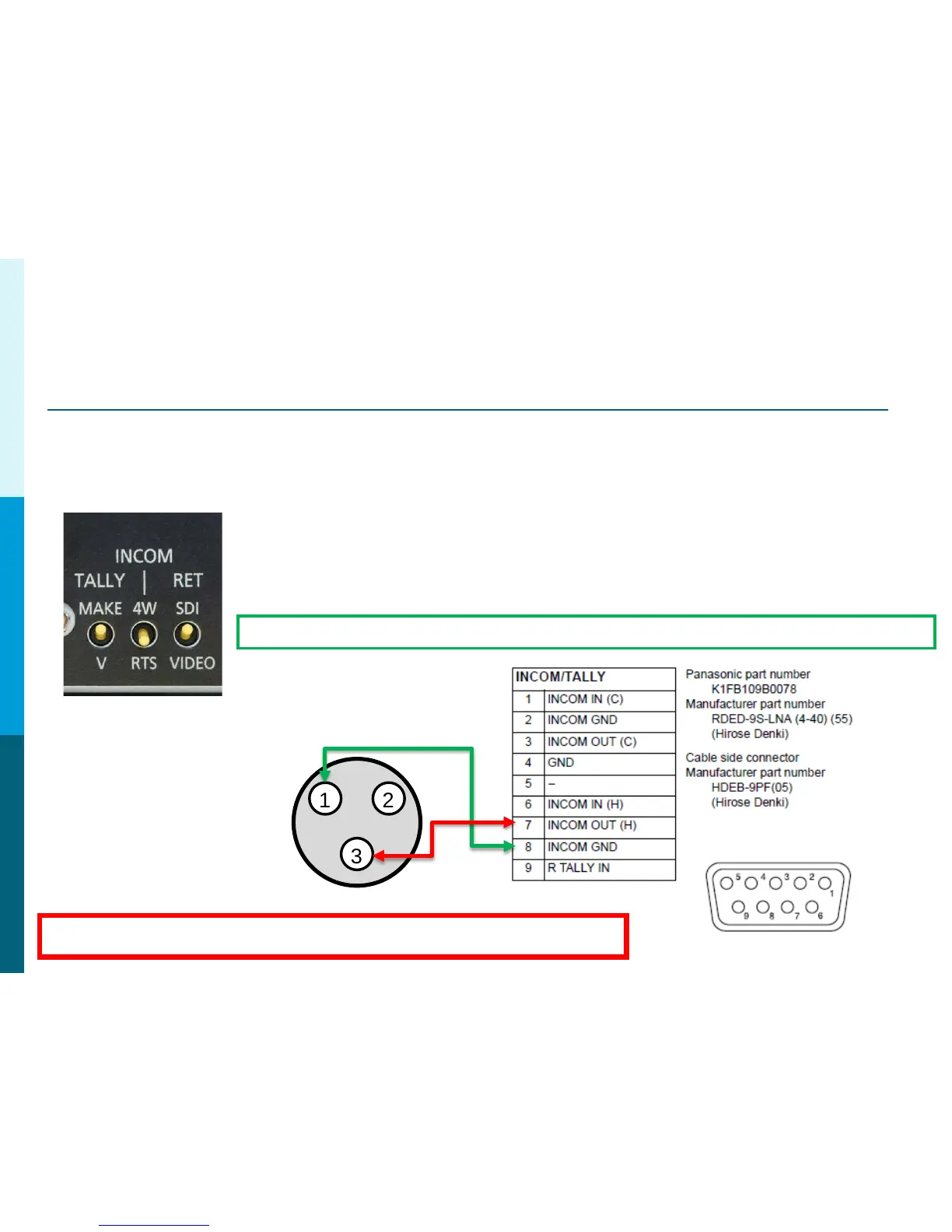
RTS TW Intercom Connection to AG-BS300
1. Set INCOM switch on BS-300 to RTS (2 wire, AKA TW).
2. Turn down all volume levels before powering on.
3. Connect Pin 8 on AG-BS300 to Common (pin 1) on RTS TW.
4. Connect Pin 7 on AG-BS300 to Channel 1 (pin 2) OR use
Channel 2 (pin 3) on RTS TW.
Panasonic Solutions Company
1 2
3
RTS TW
AG-BS300
Example Shown with Channel 2. If Channel 1, the red line would connect to pin 2.
Channel 2 Example
3 Pin XLR
IMPORTANT NOTE: If not connecting to an RTS or Clear-Com System, 200ohm Termination
must be installed between Pins 7 and 8 on the AG-BS300 INCOM/TALLY Connection.
AG-BS300




 To Next Page