20
Adjusting POS. /SIZE
NORMAL
NORMALIZE
POS. /SIZE
V-POS
H-POS
V-SIZE
H-SIZE
CLOCK PHASE
1
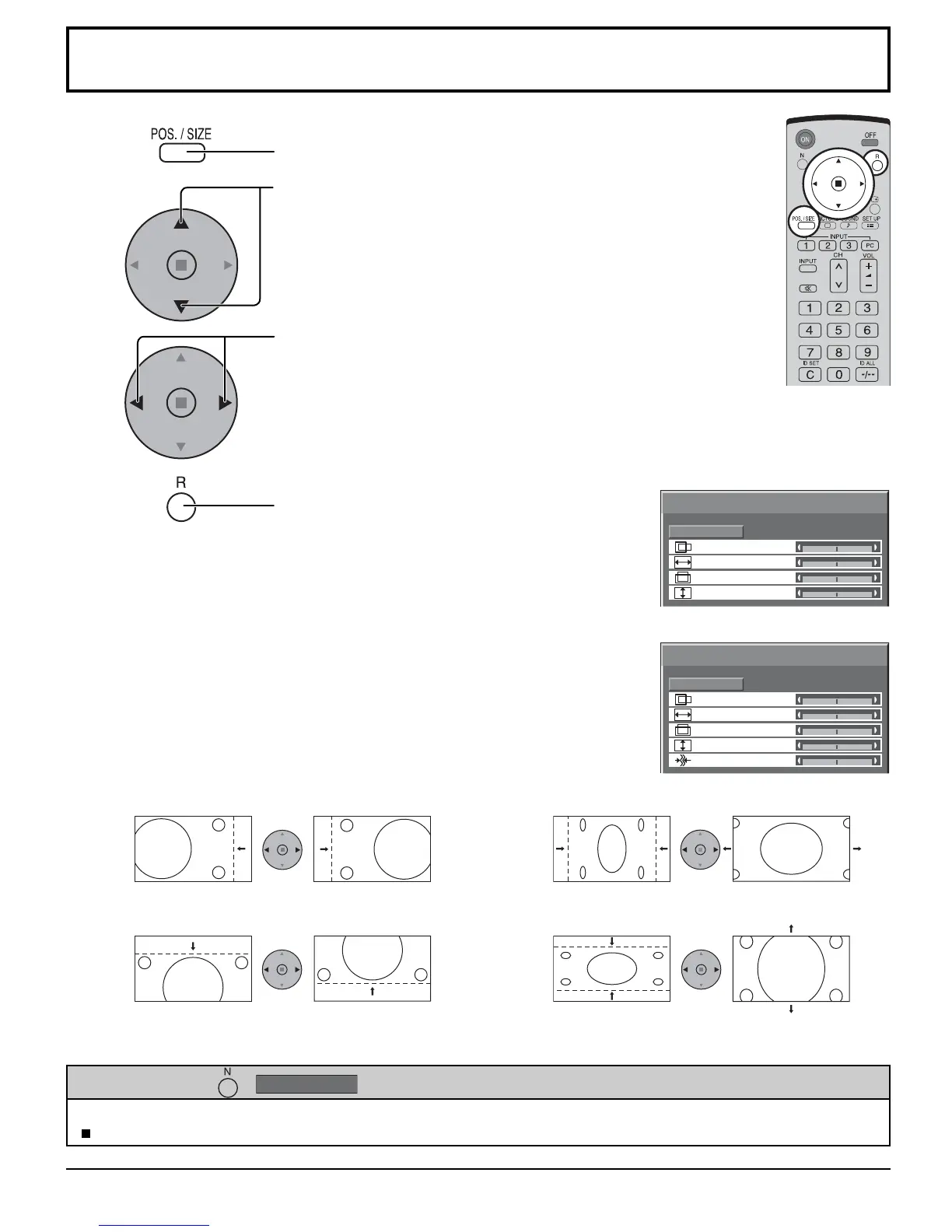
Press to display the POS. /SIZE menu.
Press to select H-POS / H-SIZE / V-POS / V-SIZE /
CLOCK PHASE.
Press to adjust POS. /SIZE.
Press to exit from adjust mode.
During “VIDEO (S VIDEO)”,
“COMPONENT” and “DVI” input signal.
During “RGB / PC” input signal.
3
2
Notes:
• Adjustment details are memorized separately for different input signal formats
(Adjustments for component signals are memorized for 525 (480) / 60i · 60p, 625
(575) / 50i · 50p, 1125 (1080) / 60i · 50i · 24p · 25p · 30p · 24sF, 1250 (1080) / 50i,
750 (720) / 60p · 50p each, and RGB/PC/DVI signals are memorized for each
frequency.)
• If a “Cue” or “Rew” signal from a VCR or DVD player is received, the picture position
will shift up or down. This picture position movement cannot be controlled by the
POS. /SIZE function.
• If adjusting the PICTURE V-POS / V-SIZE in Panasonic AUTO with FULL mode,
the adjustment is not memorized. When exiting the mode, the screen will return
to a former adjustment.
While the POS. /SIZE display is active, if either the N button on the remote control is pressed at any time or the ACTION
( ) button is pressed during “NORMALIZE”, then all adjustment values are returned to the factory settings.
Helpful Hint ( /
NORMALIZE
Normalization)
4
NORMAL
NORMALIZE
POS. /SIZE
V-POS
H-POS
V-SIZE
H-SIZE
H-POS Adjust the horizontal position. H-SIZE Adjust the horizontal size.
V-POS Adjust the vertical position. V-SIZE Adjust the vertical size.
CLOCK PHASE
(RGB/PC in mode)
Eliminate the fl ickering and distortion.








 To Next Page