34
SET UP for MULTI DISPLAY
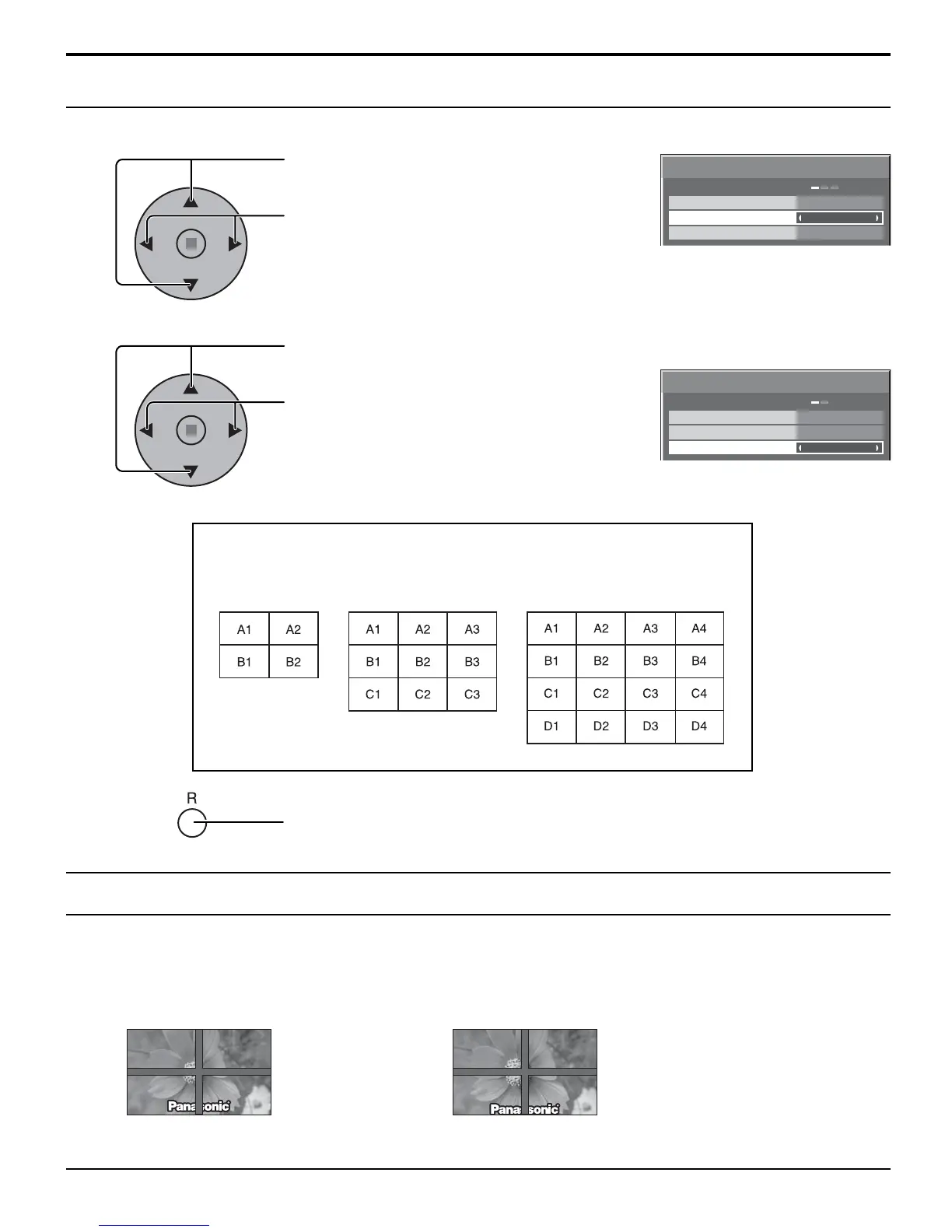
Press to select ARRANGEMENT (2nd step).
Press to select “2 × 2”, “2 × 2F”, “3 × 3”, “3 × 3F”,
“4 × 4”, “4 × 4F”.
Press to select LOCATION.
Press to select the required arrangement number.
(A1-D4 : Refer to the following)
How to set the Display location number for each Plasma Display
Display Number locations for each arrangement.
Press twice to exit from SET UP.
4
5
LOCATION
MULTI DISPLAY SETUP
ARRANGEMENT
OFF
2 × 2
A1
MULTI DISPLAY SETUP
2 × 2
A1
LOCATION
MULTI DISPLAY SETUP
ARRANGEMENT
OFF
MULTI DISPLAY SETUP
( 2 × 2 (F) ) ( 3 × 3 (F) ) ( 4 × 4 (F) )
6
Two options are selectable for MULTI DISPLAY.
• To hide joints between TVs. • To show joints between TVs.
(2 × 2, 3 × 3, 4 × 4) (2 × 2F, 3 × 3F, 4 × 4F)
Suitable for moving image display. Suitable for still image display.
Option F for MULTI DISPLAY









 To Next Page