36
SET UP for Input Signals
3D Y/C FILTER – For NTSC AV images
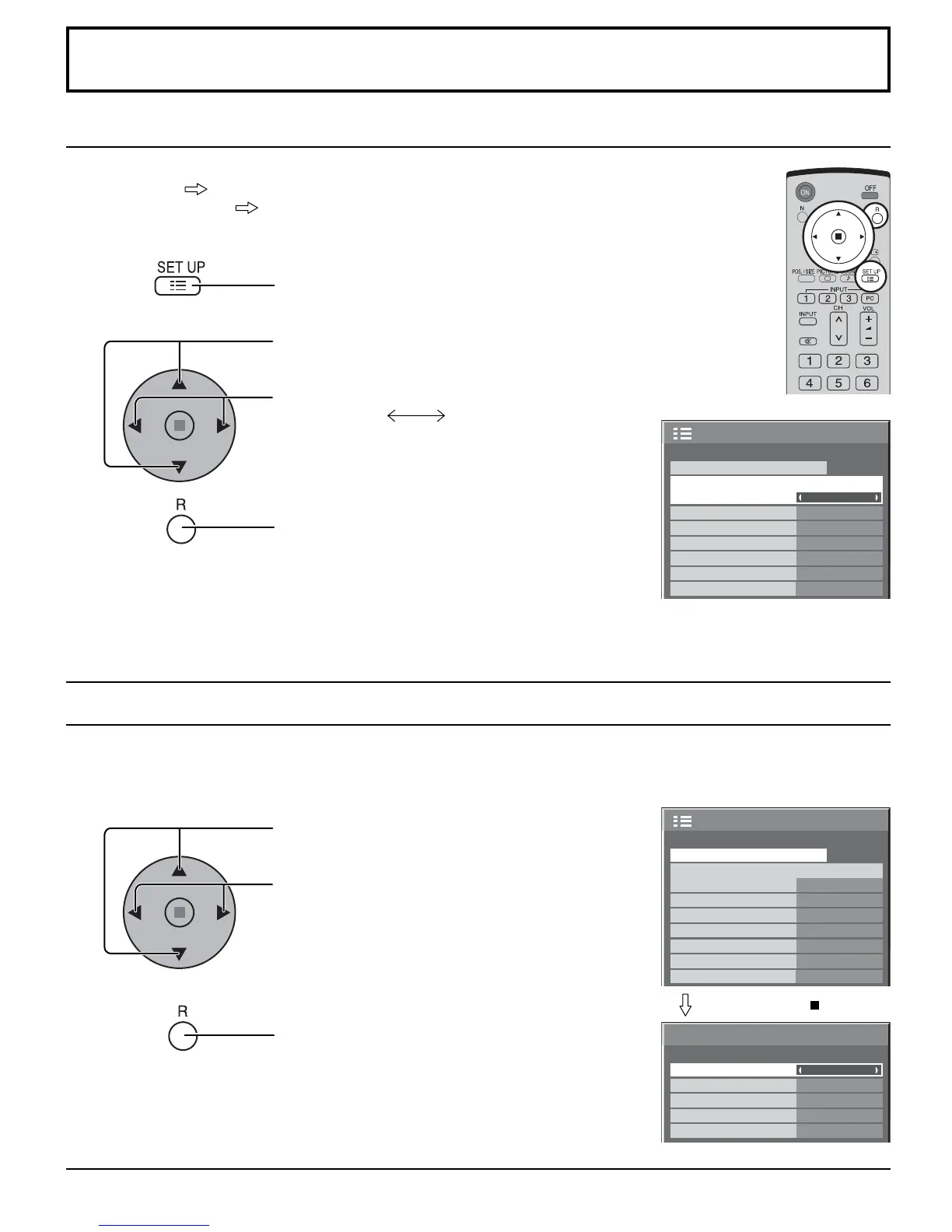
COMPONENT / RGB IN SELECT
Select to match the signals from the source connected to the COMPONENT / RGB input terminals.
Y, P
B
, P
R
signals “COMPONENT”
R, G, B, HD, VD signals “RGB”
Press to display the SET UP menu.
Press to select the “COMPONENT / RGB-IN
SELECT”.
Press to select the desired mode.
COMPONENT RGB
Press to exit from adjust mode.
Select “SIGNAL” from the “SET UP” menu during VIDEO (S VIDEO) input signal mode.
(“SIGNAL [VIDEO]” menu is displayed.)
Note:
When ON, this setting only affects NTSC input signals.
Note:
Selection may not be possible, depending on which optional board is installed.
1
2
1/2
PC
OFF
STANDBY SAVE
OFF
POWER MANAGEMENT
OFF
AUTO POWER OFF
OFF
OSD LANGUAGE ENGLISH
(
US
)
COMPONENT/RGB-IN SELECT
RGB
INPUT LABEL
SIGNAL
POWER SAVE
SET UP
1/2
PC
OFF
STANDBY SAVE
OFF
POWER MANAGEMENT
OFF
AUTO POWER OFF
OFF
OSD LANGUAGE ENGLISH
(
US
)
COMPONENT/RGB-IN SELECT
RGB
INPUT LABEL
SIGNAL
POWER SAVE
SET UP
3D Y/C FILTER (NTSC)
COLOR SYSTEM
SIGNAL
ON
AUTO
3 : 2 PULLDOWN
Panasonic AUTO (4 : 3)
OFF
NORMAL
[
VIDEO
]
VIDEO NR
OFF
3
1
2
Press ACTION ( ) button
Press to select the “3D Y/C FILTER (NTSC)”.
Press to set ON / OFF.
Press to exit from adjust mode.







 To Next Page