12
TH-50FS600D
5.6. Hotel mode
5.6.1. Purpose
Restrict a function for hotels.
5.6.2. Access command to the Hotel
mode setup menu
In order to display the Hotel mode setup menu, please
enter the following command (within 2 seconds). [TV]:
Vol.[Down] + [REMOTE] : AV (3 times)
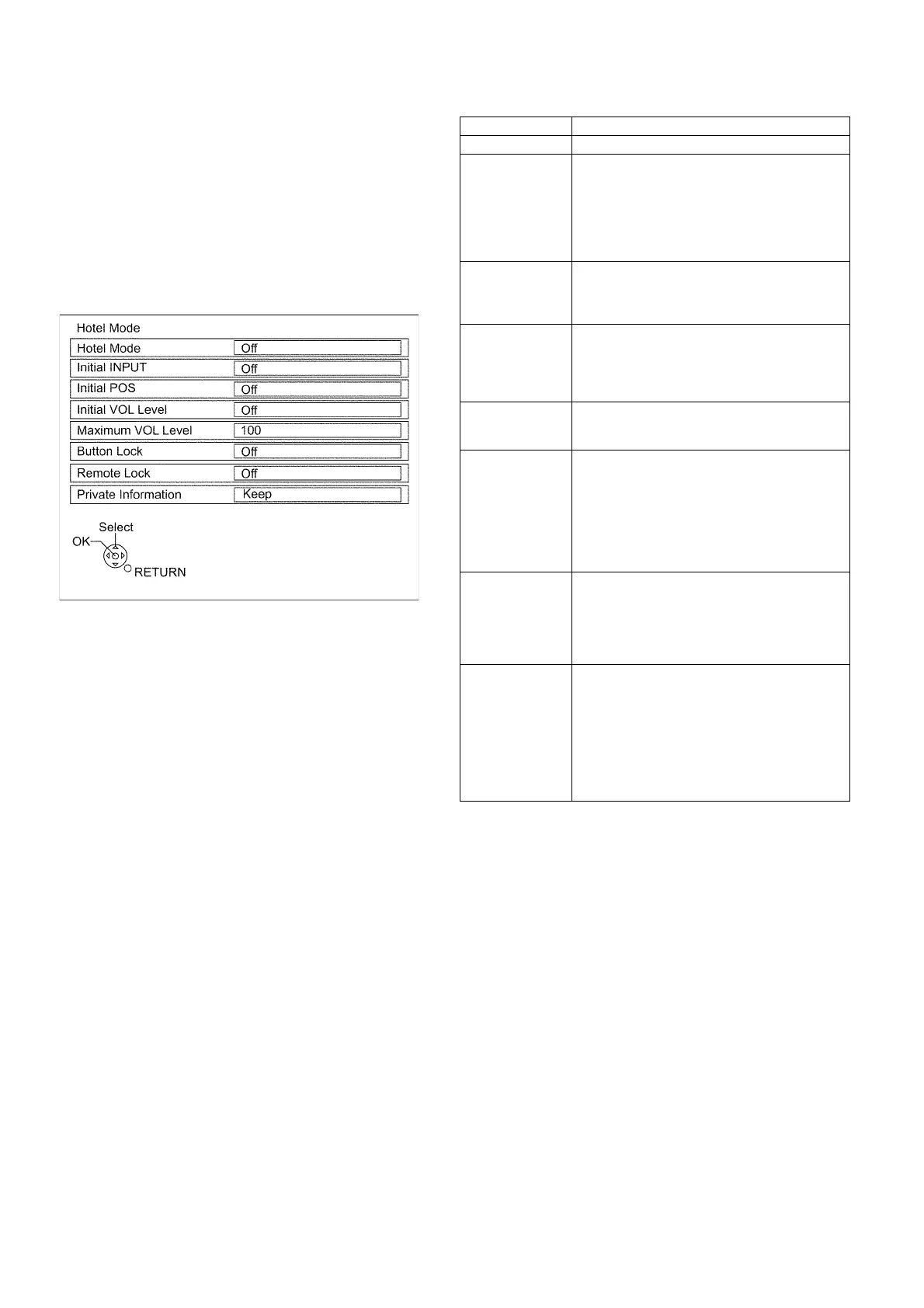
Then, the Hotel mode setup menu is displayed.
5.6.3. To exit the Hotel mode setup menu
Switch off the power with the [POWER] button on the main unit
or the [POWER] button on the remote control.
5.6.4. Explain the Hotel mode setup menu
Item Function
Hotel Mode Select hotel mode On/Off
Initial INPUT Select input signal modes.
Set the input, when each time power is switched
on.
Selection :
• Off, Analogue TV, Digital TV, AV, HDMI1,
HDMI2, HDMI3
• Off: give priority to a last memory.
Initial POS Select programme number.
Selection :
Off/0 to 99
• Off: give priority to a last memory.
Initial VOL Level Adjust the volume when each time power is
switched on.
Selection Range :
Off/0 to 100
• Off: give priority to a last memory.
Maximum VOL
Level
Adjust maximum volume.
Range :
0 to 100
Button Lock Select local key conditions.
Selection :
Off/SETUP/MENU
• OFF: altogether valid
• SETUP: only F-key is invalid
(Tuning guide (menu) can not be selected.)
• MENU: only F-key is invalid
(only Volume/Mute can be selected.)
Remote Lock Select remote control key conditions.
Selection :
Off/SETUP/MENU
• OFF: altogether valid.
• SETUP: only Setup menu is invalid.
• MENU: Picture/Sound/Setup menu are invalid.
Private Information Select private information for VIERA Cast is Keep
or Reset if Hotel mode is set to [On] when TV
power on
Selection :
Keep/Reset
• Keep: private information for VIERA Cast is
keep
• Reset: private information for VIERA Cast is
reset





 To Next Page