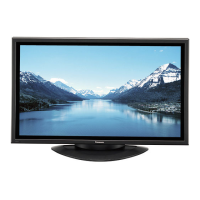

 To Next Page

A
Annette OchoaAug 27, 2025
Why does my Panasonic Plasma TV make whirring sounds?
- TTammy ScottAug 27, 2025
The whirring sound you hear from your Panasonic Plasma TV is caused by the rotation of the fan and is not a malfunction.

Why does my Panasonic Plasma TV make whirring sounds?
The whirring sound you hear from your Panasonic Plasma TV is caused by the rotation of the fan and is not a malfunction.
How to prevent image retention on Panasonic Plasma TV?
To prevent image retention on your Panasonic Plasma TV, avoid displaying a still picture for an extended period.
How to restore color on Panasonic Plasma TV?
If there is no color on your Panasonic Plasma TV, it may be due to the color controls being set at the minimum level. Try adjusting the color controls. Also, check the color system settings.
What to do if Panasonic Plasma TV remote control not working?
If your Panasonic Plasma TV remote control isn't working, several factors could be the cause. First, replace the batteries, as they may have discharged completely. If that doesn't work, check whether the batteries were inserted properly. Also, make sure that the remote control sensor is not exposed to an outdoor light or a strong fluorescent light. Finally, ensure you are using the remote control designed specifically for use with the unit.
 General
| Screen Size | 50 inches |
|---|---|
| Display Type | Plasma |
| Viewing Angle | 160 degrees |
| Aspect Ratio | 16:9 |
| Resolution | 1366 x 768 |
| Input Terminals | DVI-D, VGA, Component, Composite |