EasyManua.ls Logo

Panasonic TH-50PH10UKA - User Manual

Panasonic TH-50PH10UKA
54 pages
Print Icon
To Next Page IconTo Next Page
Loading...
English
TQB2AA0766-1
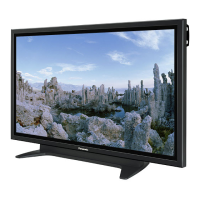
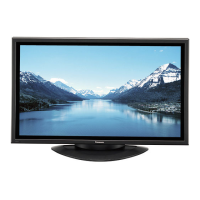
The illustration shown is an image.
Before connecting, operating or adjusting this product, please read these instructions completely.
Please keep this manual for future reference.
La ilustración mostrada es una imagen.
Antes de conectar, utilizar o ajustar este producto, lea completamente este manual de instrucciones;
y guárdelo para consultarlo en el futuro en caso de ser necesario.
Español
Operating Instructions
Manual de instrucciones
High De nition Plasma Display
Alta de nición Pantalla de plasma
TH-42PH10UKA
TH-50PH10UKA
TH-58PH10UKA
Model No.
Número de modelo.

Questions and Answers

  • J
    Jennifer DavidsonAug 19, 2025
    Why is there no picture on my Panasonic TH-50PH10UKA Monitor?
    • V
      Veronica FrankAug 19, 2025
      If your Panasonic Monitor is not displaying a picture, ensure it is plugged into an AC outlet and switched on. Check the PICTURE and BRIGHTNESS/Volume settings by pressing the power switch or stand-by button on the remote control.
  • B
    bakeranthonyAug 21, 2025
    What to do if the Panasonic TH-50PH10UKA remote control is not working?
    • H
      hannahrollinsAug 21, 2025
      If your Panasonic Monitor remote control isn't working, first check if the batteries are completely discharged or inserted incorrectly. Also, make sure the remote control sensor isn't exposed to outdoor light or strong fluorescent light. Lastly, verify you're using the remote control specifically designed for this unit, as it cannot be operated by any other remote control.
  • M
    morrisjodiAug 25, 2025
    How to prevent image retention on Panasonic TH-50PH10UKA?
    • M
      michaelsingletonAug 25, 2025
      To prevent image retention on your Panasonic Plasma Display, avoid displaying a still picture for an extended period, as this can cause a permanent image retention.
  • M
    Maurice LunaAug 26, 2025
    Why does it take so long for the picture to appear on my Panasonic TH-50PH10UKA?
    • L
      Lisa RiveraAug 26, 2025
      Your Panasonic Monitor digitally processes signals to reproduce aesthetically pleasing images. Because of this, it may take a few moments for the picture to appear when the power is turned on, when the input has been switched, or when the images for the main picture and sub picture on the two screens are swapped.
  • G
    griffinchristopherAug 28, 2025
    How to fix Panasonic TH-50PH10UKA with normal picture but no sound?
    • D
      dorisnelsonAug 28, 2025
      Check whether the mute function has been activated on the remote control.
  • T
    Timothy RojasAug 30, 2025
    What to do if Panasonic TH-50PH10UKA displays only input terminal indication?
    • M
      Michael ScottAug 30, 2025
      If your Panasonic Monitor displays only the input terminal indication, it means a signal with a non-applicable color system format or frequency is being input.
  • K
    Kaitlyn AndersonSep 1, 2025
    Why is my Panasonic Monitor making whirring sounds?
    • D
      Dustin LiuSep 1, 2025
      The Panasonic display unit is fitted with a cooling fan to dissipate heat generated during normal use.
  • M
    Mark RangelSep 3, 2025
    Why do the edges of images flicker on my Panasonic TH-50PH10UKA?
    • B
      Benjamin MaldonadoSep 3, 2025
      Due to the characteristics of the system used to drive the panel, the edges may appear to flicker in the fast-moving parts of the images.
  • N
    Noah WilsonSep 5, 2025
    What are the sounds coming from inside my Panasonic Monitor?
    • J
      Jasmine RodgersSep 5, 2025
      When the power is turned on, a sound of the display panel being driven may be heard. This is normal and not indicative of malfunctioning.
  • B
    brent98Sep 7, 2025
    How to fix cut off picture when using zoom function on Panasonic TH-50PH10UKA Monitor?
    • P
      Paul McdowellSep 8, 2025
      Adjust the position of the picture on the screen.

Summary

Important Safety Instructions

General Safety Precautions

Essential safety guidelines for operating the plasma display and preventing hazards.

FCC Statement

Safety Precautions

Accessories

Accessories Supplied

Lists items included with the display unit.

Remote Control Batteries

Instructions for inserting and precautions for using AA batteries.

Connections

PC Input Terminals Connection

Details connecting a computer via the PC input terminal.

SERIAL Terminals Connection

Instructions for computer control via serial communication.

HDMI Connection

Guide for connecting devices using HDMI cables.

COMPONENT; RGB Connection

Steps for connecting analog video sources like component or RGB signals.

Power ON; OFF

Basic Controls

On-Screen Menu Displays

Picture Adjustments Menu

Accessing and modifying picture settings like brightness, color, tint, sharpness.

Sound Adjustments Menu

Modifying audio settings such as bass, treble, and surround sound.

Set Up Menu Navigation

Navigating the main setup menu for various configurations.

Initial Selections

Initial setup steps including input selection and language settings.

Signal Setup Options

Configuring signal-related settings like Screensaver, Multi Display, and timers.

Aspect Controls

Adjusting Position and Size

Multi PIP

Advanced PIP

Picture Adjustments

Advanced Picture Settings

Detailed picture adjustments for professional fine-tuning.

Sound Adjustment

Mute Function

Temporarily silences the audio output.

Digital Zoom

Timer Setup

Set Up Timer

Scheduling power on/off times for automated operation.

Screensaver

Screensaver Time Setup

Configuring start and finish times for the screensaver function.

Image Retention Prevention

Functions like Wobbling and Peak Limit to prevent image burn-in.

Side Bar Adjust

Adjusting side bar brightness to reduce image retention.

Power Consumption Reduction

Customizing Input Labels

Multi Display Setup

Setup Procedure

Configuring multiple displays for an enlarged picture across screens.

Setting Display Location Numbers

Assigning unique numbers to each display in a multi-display setup.

ID Remote Control Function

Seam Hides Video Setting

Adjusting video to hide seams between multiple displays.

Input Signal Setup

Component; RGB Input Selection

Matching input signals to component or RGB terminals.

3 D Y;C Filter

Applying a filter to NTSC AV images for improved quality.

Color System and Auto Settings

Adjusting color systems and automatic picture settings.

Motion and Noise Reduction

Adjusting motion interpretation and reducing video noise.

Sync and Refresh Rate

Settings for signal synchronization and display refresh rate.

Options Adjustments

Weekly Command Timer

Setting up 7-day timer programming for commands and times.

Shipping Condition

Troubleshooting

Input Signal Format Reference

Weekly Command Timer Command List

Specifications

Limited Warranty Statement

Warranty Limits and Exclusions

Details the limitations and exclusions of the product warranty.

Canadian Warranty Statement

Customer Service

Panasonic TH-50PH10UKA Specifications

General IconGeneral
Screen Size50 inches
Display TechnologyPlasma
Native Resolution1366 x 768
Aspect Ratio16:9
Horizontal Viewing Angle160 degrees
Vertical Viewing Angle160 degrees
Input TerminalsHDMI, Component, Composite, S-Video

Related product manuals