EN15EN14
If any items are missing, please contact the dealer from whom you purchased the product.
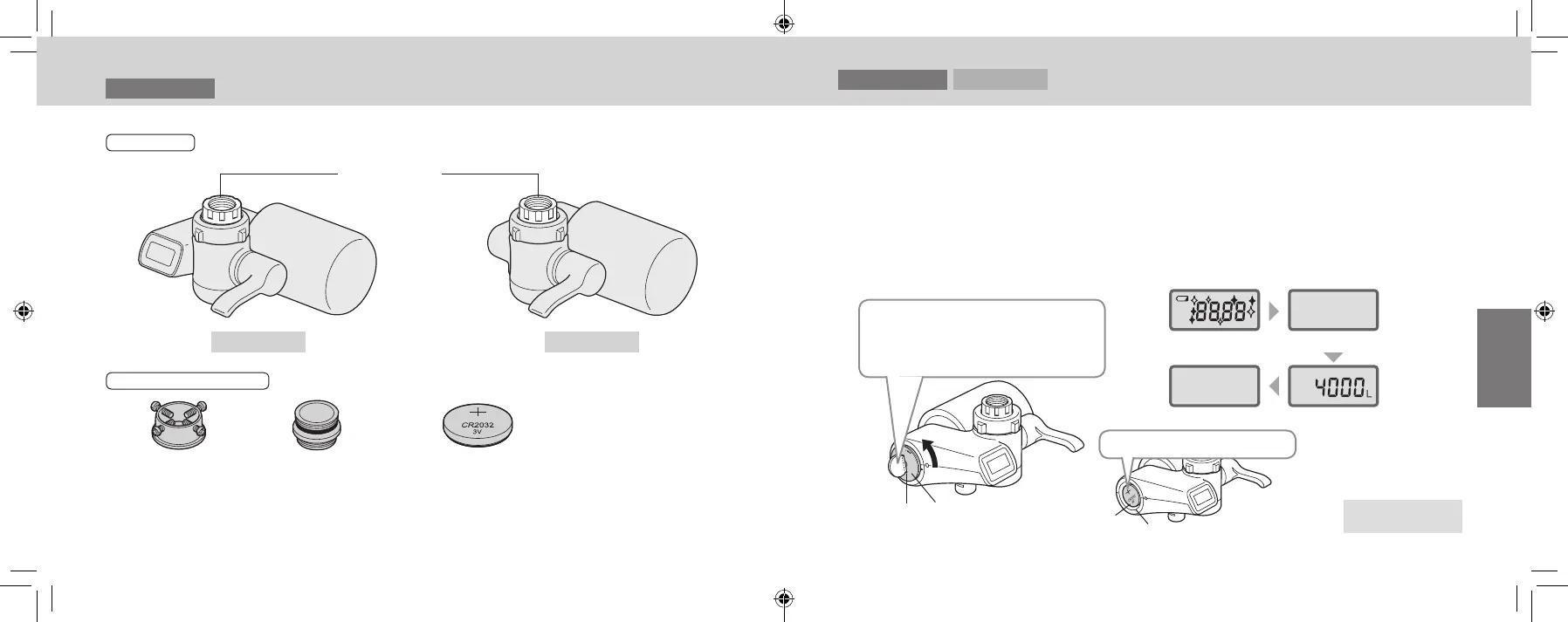
Main unit
TK-CJ600 TK-CJ300
Adaptor
(with gasket)
Supplied accessories
Installation Adaptor
(with 4 screws)
Bushing
(with gasket)
[TK-CJ600 only]
Coin type lithium battery
Model No.: CR2032 (Commercial item)
The battery included in the package is for test
use and may have a short life.
Installation 1
Checking the Main Unit and Supplied Accessories
Installation 2
TK-CJ600
Insert (replace) a Lithium Battery into the
Main Unit
It displays the volume of water (guideline) that the product can process until cartridge replacement
is required.
When replacing the battery, it is recommended to remove the water purier from the faucet.
Do not wet the coin type lithium battery or the battery case compartment interior.
(Failure to do so may cause injury or accidents due to battery heat generation, explosion or uid
leakage.)
1
Open the battery cover.
Before opening the battery cover,
carefully wipe the unit free of all
moisture.
2
Insert battery.
When replacing the battery, remove the old
battery.
Inserting the battery...
Slot Battery cover
Turn the cover counterclockwise
using a medal or a similar object.
(Do not use the battery included in
the package)
Lights up Turns off
Turns off The remaining volume
(guideline) that the
cartridge can process is
displayed (for about
10 seconds)
Proceed to Step 3
on the next page
Battery
Battery case
The “+” mark must be visible
TK-CJ600_CJ300_EXZ.indb 14-15 2022/01/05 15:32:25












 To Next Page