EN41EN40
English
How to replace the cartridge
3
TK-CJ600
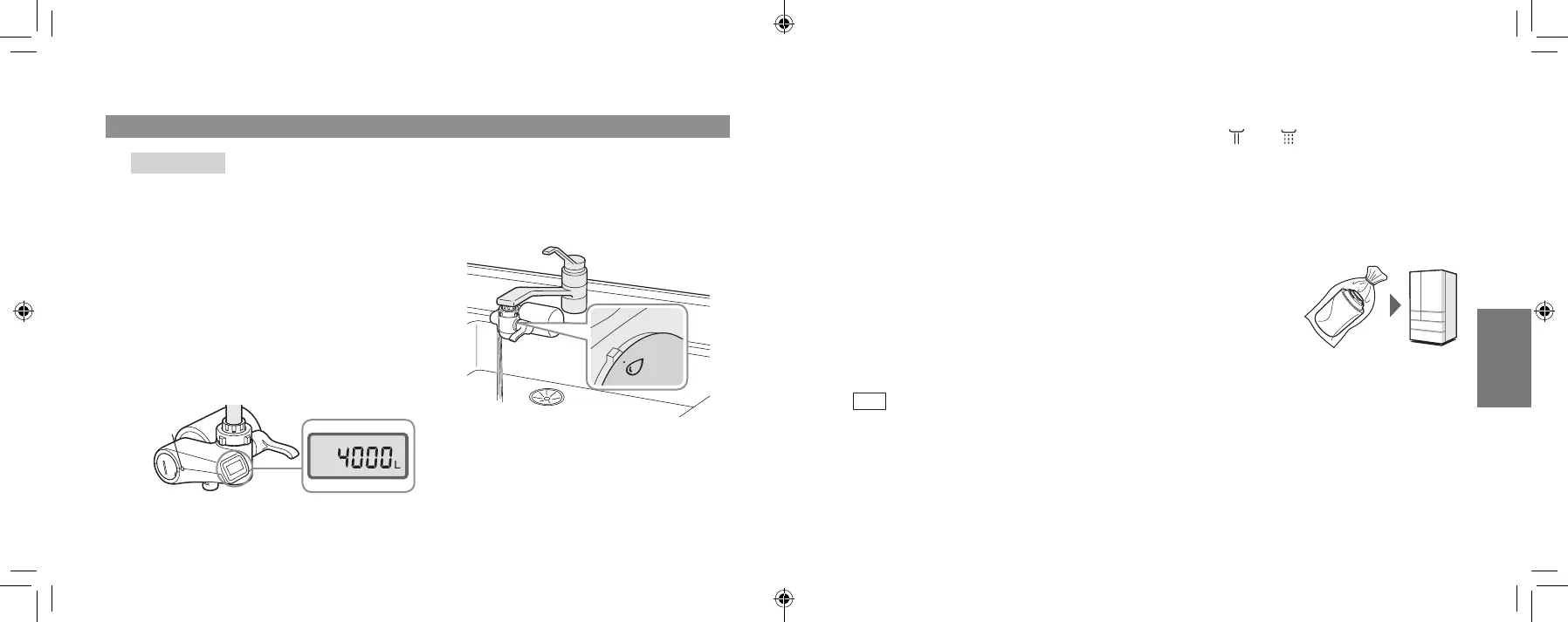
Press the reset button (for about
3 seconds).
(Do not press the button with pointed objects
such as a toothpick. Use an object with a
rounded tip, such as the rounded end of a
toothpick.)
The cartridge volume usage (guide) display
returns to the cumulative volume.
Always press the reset button even if the
cartridge is replaced earlier than the
suggested time.
(This is to ensure that the next replacement
guideline is displayed correctly.)
Reset
button
4
Runpuriedwatertocheck(for
about 3 – 4 minutes).
Check that no water is leaking from the
cartridge mount when the water passes
the product.
Replacing the Cartridge (continued)
It is not available. If the water is cut off during use, turn off the faucet.
When the water supply is restored, set the selector lever to “ ” or “ ”, and rst run unpuri ed
water (tap water) into the sink to run out the air and turbid water inside the pipes.
(This is to prevent the cartridge usage period from becoming considerably shorter.)
When the Water Supply is Cut Off
When not using the product for 1 week or longer
① Remove the cartridge. (P. EN38)
② Place them in a sealed plastic bag and store them in the refrigerator.
When not using the product for 1 month or longer
① Remove the cartridge. (P. EN38)
② Place them in a sealed plastic bag and store them in the refrigerator.
③ Remove the battery. [TK-CJ600 only]
Note
Storing the cartridge for a long period of time may cause the quality of the water inside to
deteriorate, so replacing the cartridges is recommended.
Resume using the product
① Install the cartridge. (P. EN38 – EN40)
② Insert the battery. (when not using for approx. 1 month or longer). (P. EN15 – EN16)
③ Run water for about 3 minutes and check that there are no water leaks and that it is operating
normally with no irregular displays.
When Not Using the Product for a Long Period of Time
TK-CJ600_CJ300_EXZ.indb 40-41 2022/01/05 15:32:30












 To Next Page