EN21EN20
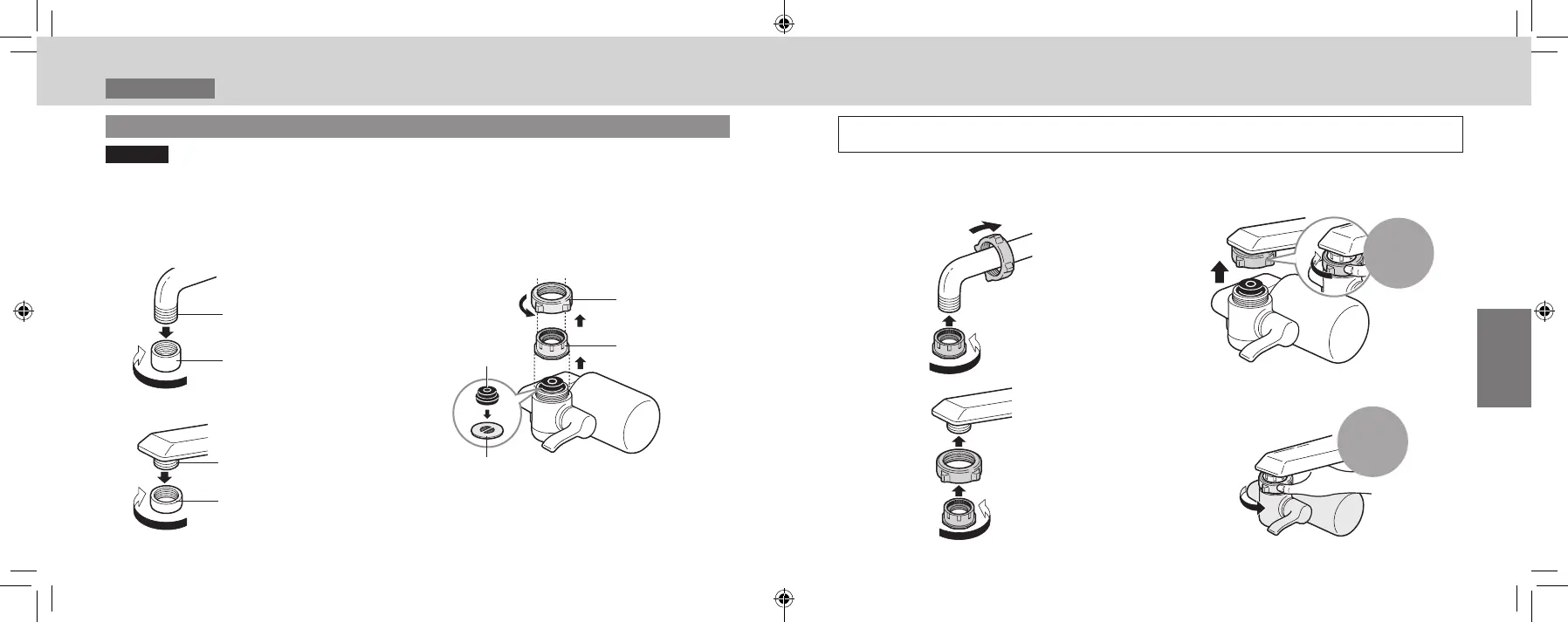
Faucets with an outside thread (thread diameter: 22 mm)
Important Do not use a tool to tighten up the nut.
(Doing so may damage the nut.)
Please store any unused parts instead of disposing of them.
(They may be used when relocating or replacing the faucet.)
1
Remove the aerator.
Outside thread
Aerator
(Do not use.)
Outside thread
Aerator
(Do not use.)
2
Remove the nut and adaptor.
Nut
Adaptor
(with gasket)
Main unit
gasket
Filter
Do not remove
Upon completion of installation, check that the main unit does not easily rotate and that there is no
play.
3
Attach the nut and adaptor.
Fully tighten by hand
4
Turn the nut manually, and
tighten it securely.
Fully
tighten by
hand
■
Ifitisdifculttoturn
Turn the water purier instead.
Hold the
nut
Installation 4
InstallingtheWaterPurier
TK-CJ600_CJ300_EXZ.indb 20-21 2022/01/05 15:32:27












 To Next Page