22
OwnerID
allowsyou toenter asecuritycode (OwnerID) andpersonaldetails intoits memory, sothat inthe unfortunateevent oftheft it
will help the police to trace the owner.
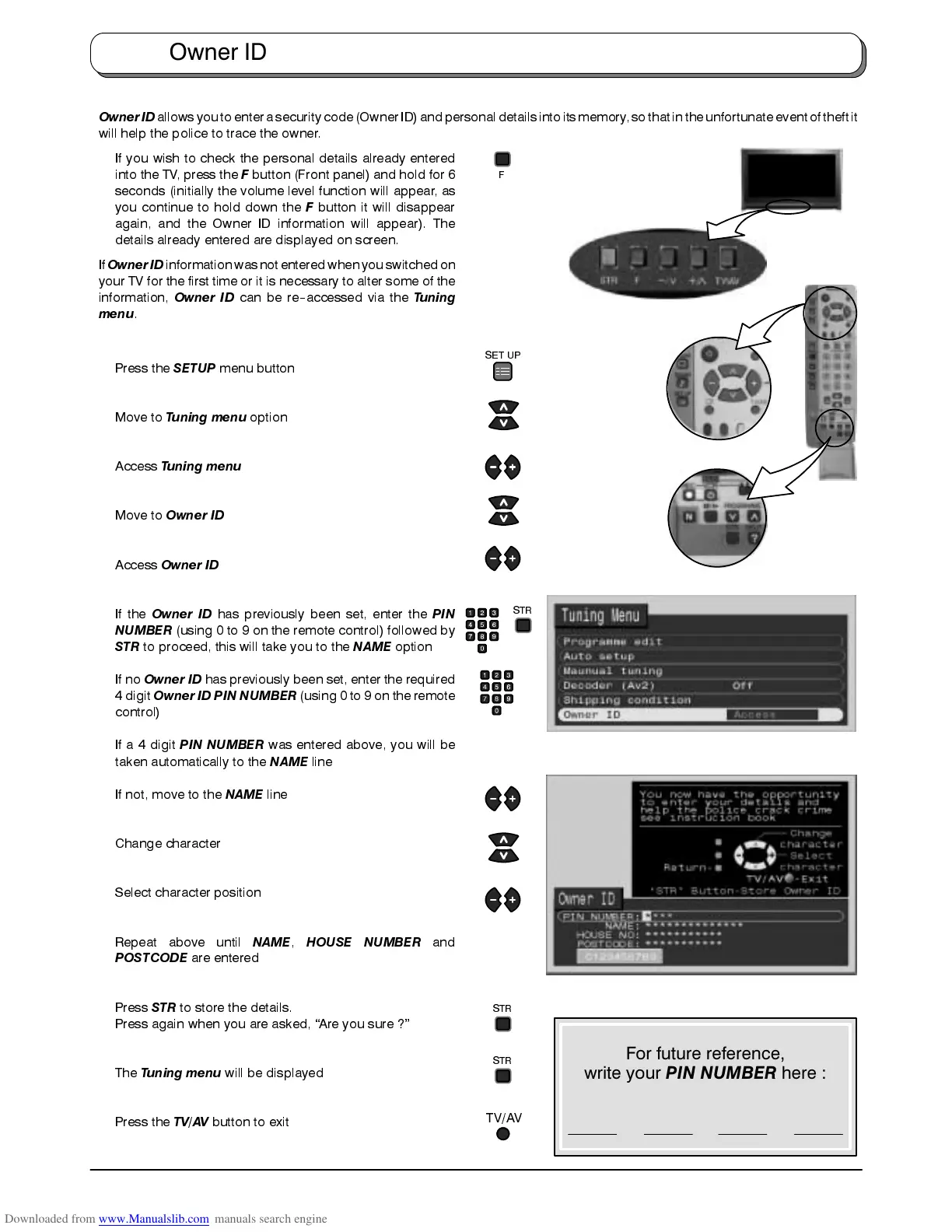
If you wish to check the personal details already entered
into the TV, press the
F
button (Front panel) and hold for 6
seconds (initially the volume level function will appear, as
you continue to hold down the
F
button it will disappear
again, and the Owner ID information will appear). The
details already entered are displayed on screen.
If
OwnerID
informationwasnot enteredwhenyou switchedon
your TV for the first time or it is necessary to alter some of the
information,
Owner ID
can be re
--
accessed via the
Tuning
menu
.
Press the
SETUP
menu button
Move to
Tuning menu
option
Access
Tuning menu
Move to
Owner ID
Access
Owner ID
If the
Owner ID
has previously been set, enter the
PIN
NUMBER
(using 0 to 9 on the remote control) followed by
STR
to proceed, this will take you to the
NAME
option
If no
Owner ID
has previously been set, enter the required
4 digit
Owner ID PIN NUMBER
(using 0 to 9 on the remote
control)
If a 4 digit
PIN NUMBER
was entered above, you will be
taken automatically to the
NAME
line
If not, move to the
NAME
line
Change character
Select character position
Repeat above until
NAME
,
HOUSE NUMBER
and
POSTCODE
are entered
Press
STR
to store the details.
Press again when you are asked, “Are you sure ?”
The
Tuning menu
will be displayed
Press the
TV/AV
button to exit
Owner ID
STR
STR
TV/AV
STR
SET UP
F
For future reference,
write your PIN NUMBER here :









 To Next Page