English
18
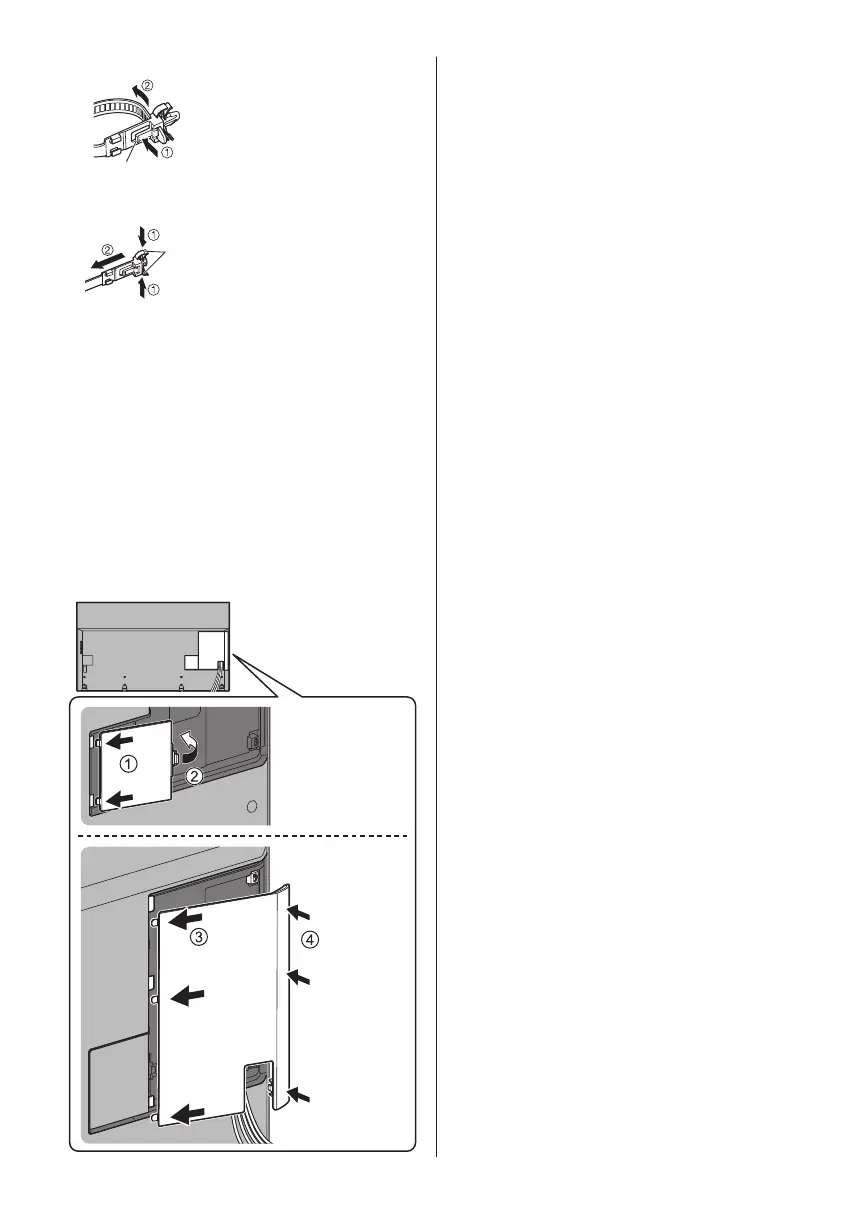
To loosen:
Knob
Keep pushing the knob
To remove from the TV:
Keep pushing both side snaps
Snaps
●
Fix cables as necessary.
●
When using the optional accessory, follow the option’s
assembly manual to fix cables.
■ Attaching the cable cover / terminal cover
●
Do not apply load to the cable cover / terminal cover.
●
Be careful not to nip the cables between the TV and
the cable cover / terminal cover.
●
When using USB 2 port, USB 3 port or HDMI4
terminal, you cannot attach the cable cover. Keep the
removed cable cover for future use.
●
When using AV terminal, ETHERNET terminal or
DIGITAL AUDIO, you cannot attach the terminal
cover. Keep the removed terminal cover for future
use.



 To Next Page