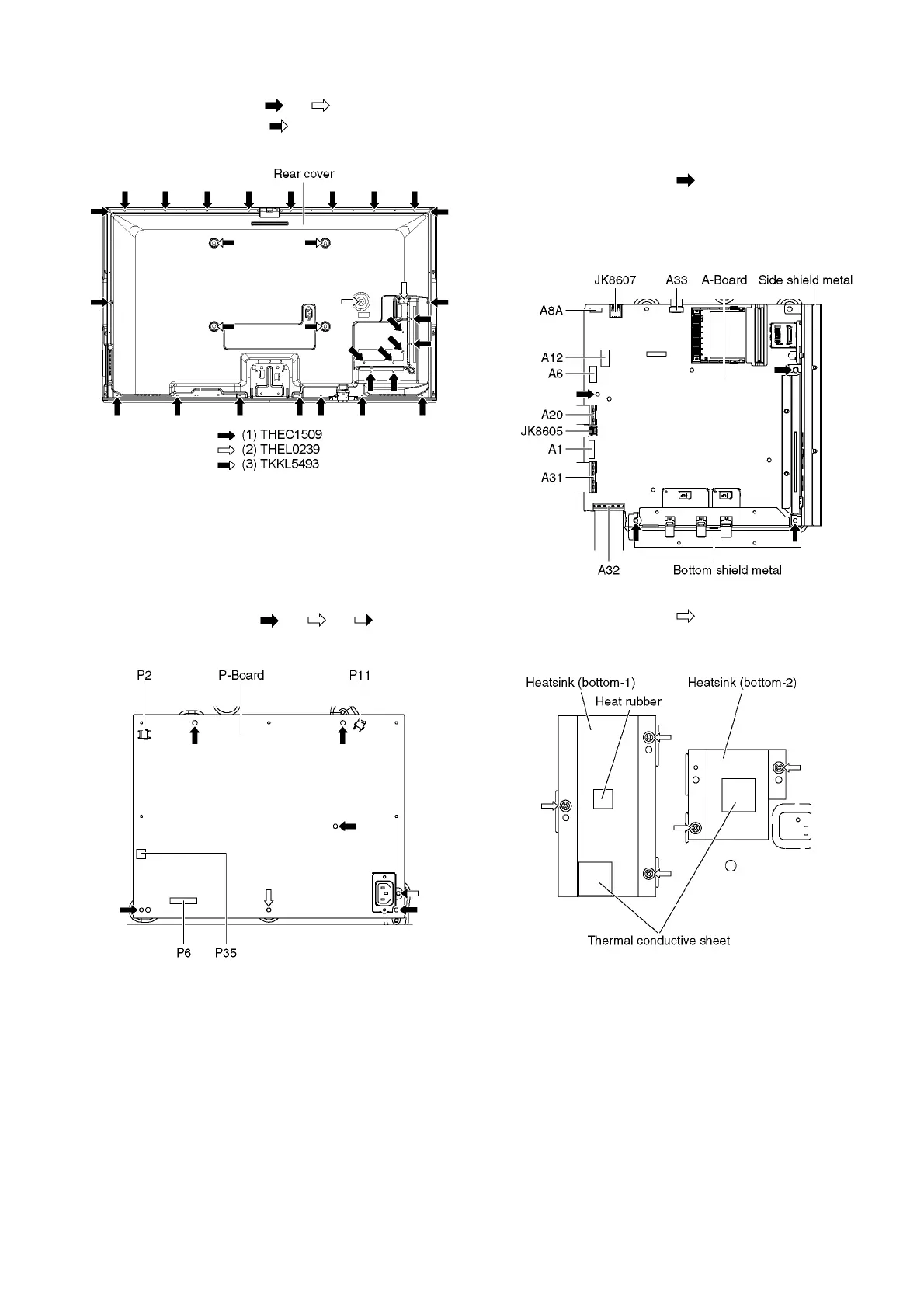
27
9.2.7. Remove the Rear cover
1. Remove the screws (×27 , ×2 ).
2. Remove the M8 caps (×4 ).
3. Remove the Rear cover.
9.2.8. Remove the P-Board
Caution:
To remove P.C.B. wait 1 minute after power was off for
discharge from electrolysis capacitors.
1. Unlock the hooks and the tapes to free the cables
2. Disconnect the connectors (P2, P6, P11 and P35).
3. Remove the screws (×5 , ×1 , ×1 ) and remove
the P-Board.
9.2.9. Remove the A-Board
1. Unlock the hooks and the tapes to free the cables.
2. Disconnect the connectors (A1, A6, A8A and A12).
3. Disconnect the USB cables (JK8605 and JK8607).
4. Disconnect the flexible cables (A20, A31, A32 and A33).
5. Remove the screws (×4 ).
6. Remove the Side shield metal and the Bottom shield
metal.
7. Remove the A-Board.
8. Remove the screws (×5 ).
9. Remove the Heatsinks (bottom-1, -2), the Thermal
conductive sheet and the Heat rubber.











 To Next Page