28
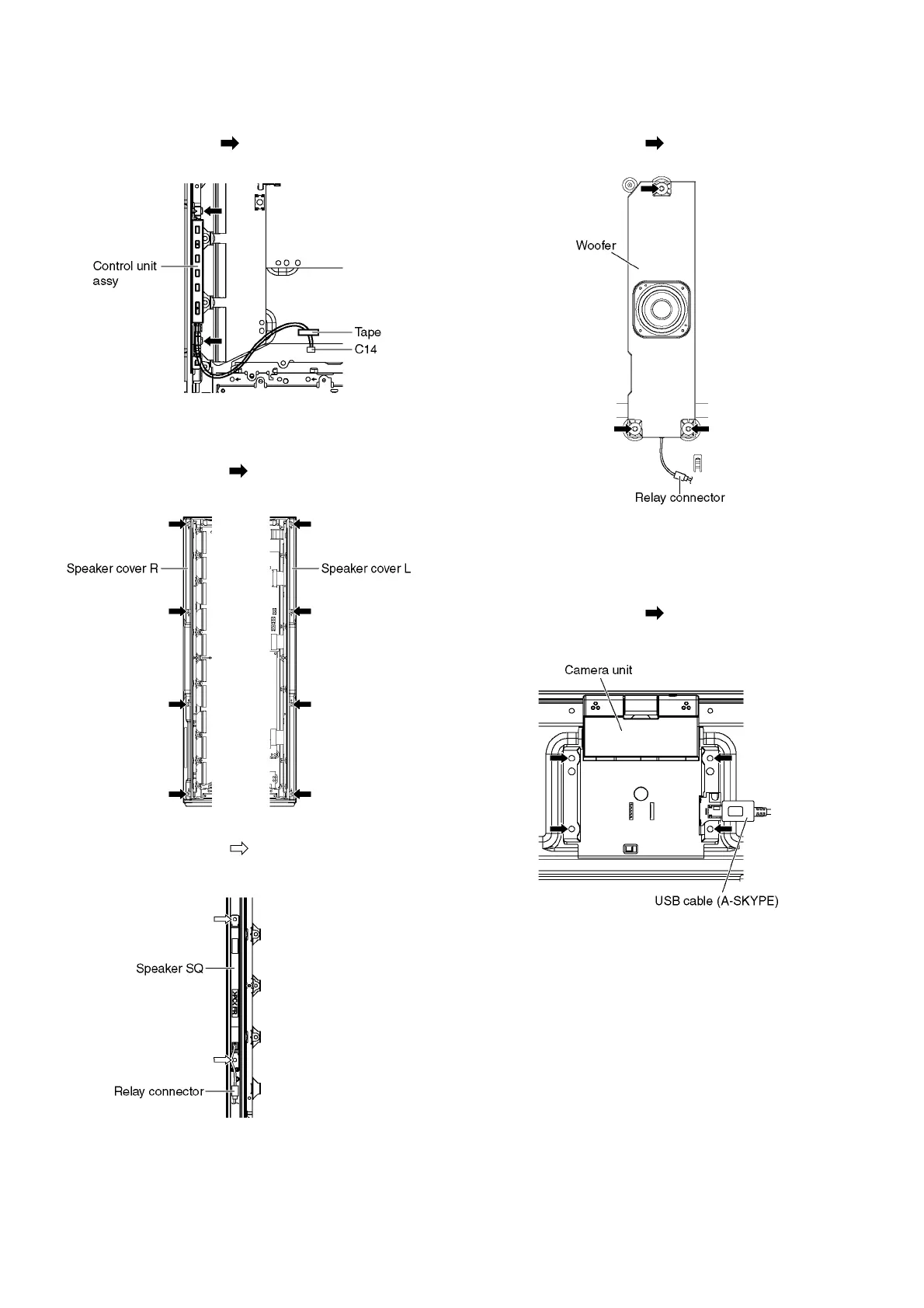
9.2.10. Remove the Control unit assy
1. Unlock the tape to free the cables.
2. Disconnect the connector (C14).
3. Remove the claws (×2 ) and remove the Control unit
assy.
9.2.11. Remove the Speaker SQs
1. Unlock the hooks and the tapes to free the cables.
2. Remove the screws (×4 each) and remove the
Speaker covers (L, R).
3. Disconnect the Relay connector.
4. Remove the screws (×2 each) and remove the
Speaker SQs (L, R).
9.2.12. Remove the Woofer
1. Unlock the hooks and the tapes to free the cables.
2. Disconnect the Relay connector.
3. Remove the screws (×3 ) and remove the Woofer.
9.2.13. Remove the Camera unit
1. Unlock the hooks and the tapes to free the cables.
2. Disconnect the USB cable (A-SKYPE).
3. Remove the screws (×4 ) and remove the Camera
unit.











 To Next Page