How to Use VIERA TOOLS ●
Multi Window ●
Advanced
EXIT
TV
V
I
E
R
A
T
O
O
L
S
49
How to Use VIERA TOOLS
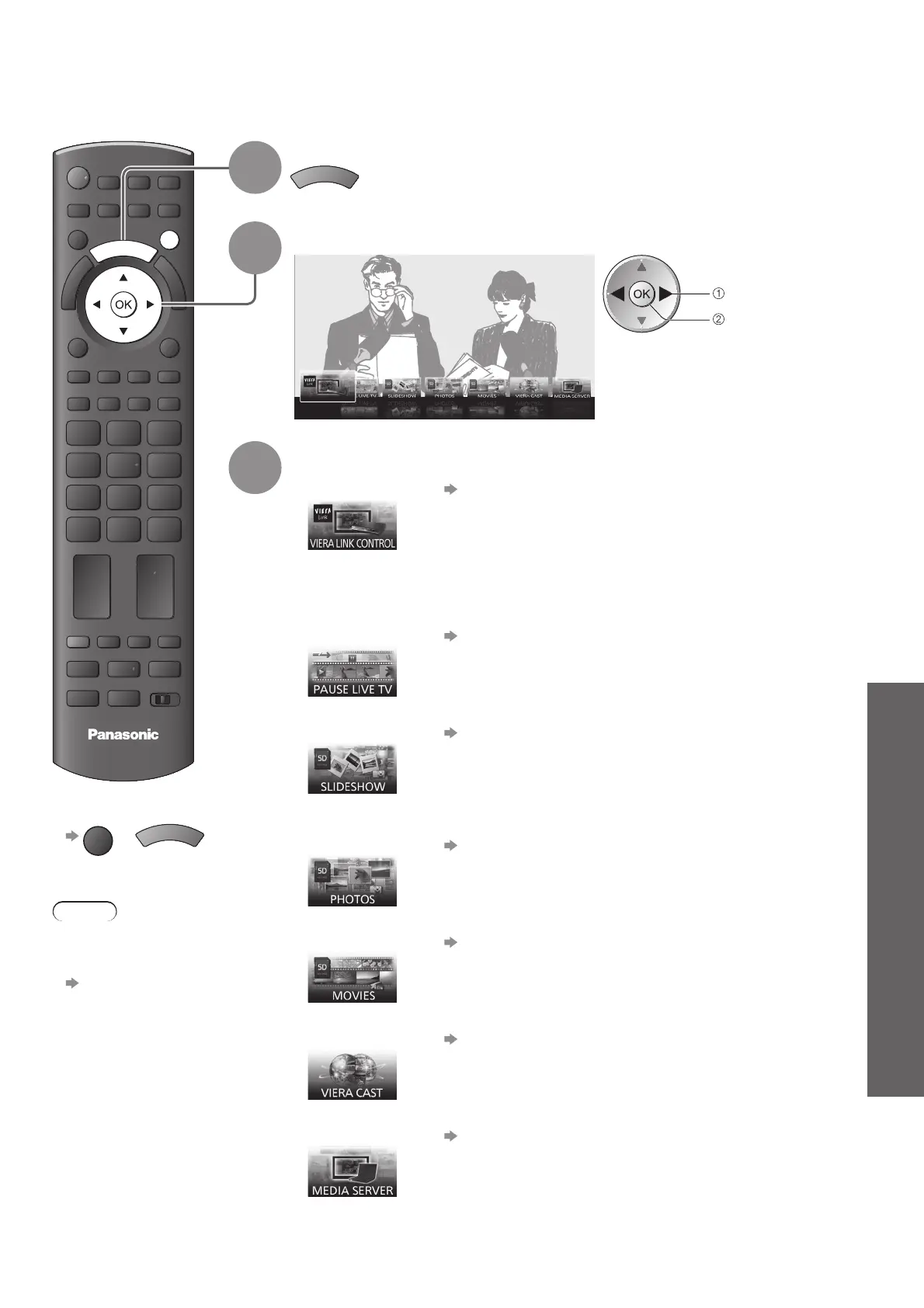
You can access some special features easily by using the VIERA TOOLS function.
To return to TV■
EXIT
or
V
I
E
R
A
T
O
O
L
S
Note
You can change ●
the display type of
feature icons
“VIERA TOOLS”
(p. 30)
1
Display icons of the feature
V
I
E
R
A
T
O
O
L
S
2
Select a feature
VIERA Link Control
access
select
3
Follow the operations of each feature
VIERA Link Control● “VIERA Link Control” (p. 68)
When more than two pieces of compatible equipment are connected a
selection screen will be displayed.
Please select the correct description and access.
Pause Live TV
● “Pause Live TV” (p. 67)
Slideshow● “Slideshow” (p. 59)
Slideshow will use all of the photos on the SD Card.
Photos
● “Photo View” (p. 58)
Movies● “Movie View” (p. 60)
VIERA CAST● “VIERA CAST™” (p. 57)
Media Server● “Using DLNA
®
features” (p. 54)








 To Next Page