AV 1
COMPONENT
AUDIO
IN
AUDIO
OUT
DIGITAL
AUDIO
OUT
HDMI 3 HDMI 2 HDMI 1
AV 2
RGB
VIDEO
S VIDEO
RGB
VIDEO
P
B
Y
P
R
L
R
L
R
70
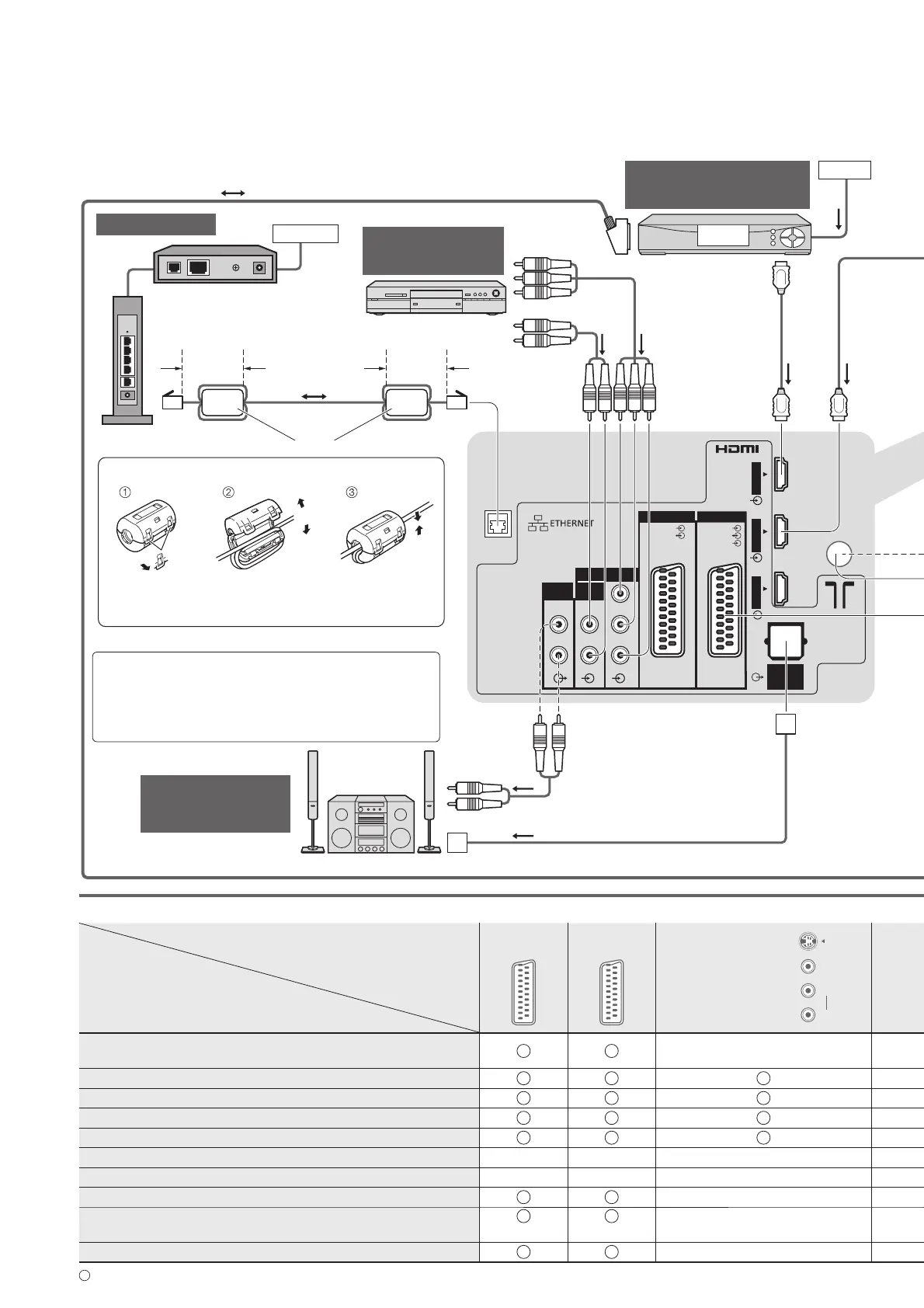
External Equipment
These diagrams show our recommendations for connection of your TV to various pieces of equipment.
For other connections, consult the instructions for each piece of equipment, the table below, and the
specifications (p. 83).
Types of connectable equipment to each terminal■
Terminal
Recording / Playback
(equipment)
AV1 AV2 AV3
(
Side panel
of TV
)
S-
V
L
R
To record / playback videocassettes / DVDs
(VCR / DVD recorder)
To watch DVDs (DVD player)
To watch camcorder images (Video camera)
To watch cable broadcasts (Set top box)
To play games (Game equipment)
To use amplifier with speaker system
To use Network services
Q-Link
VIERA Link
(with HDMI) (with HDMI)
Direct TV Recording
: Recommended Connection
Internet
Network
Hub or Router
Modem
LAN cable
Cable
or
Optical digital audio cable
Fully wired HDMI
compliant cable
To watch
cable broadcasts
To watch
DVDs
RCA cable
(Listening)
(Viewing)
Fully wired SCART cable
DVD player
To listen with
speakers
Amplifier with speaker system
Set top box
To enjoy the sound from the external equipment
in multi-channel sound (e.g. Dolby Digital 5.1ch),
connect the equipment to the amplifier.
For the connections, read the manuals of the
equipment and amplifier.
Installing the Ferrite core
Pull back the tabs
(in two places)
Wind the cable
twice
Open
Press the cable
through and close
Ferrite core (supplied)
Less than
10 cm
Less than
10 cm








 To Next Page