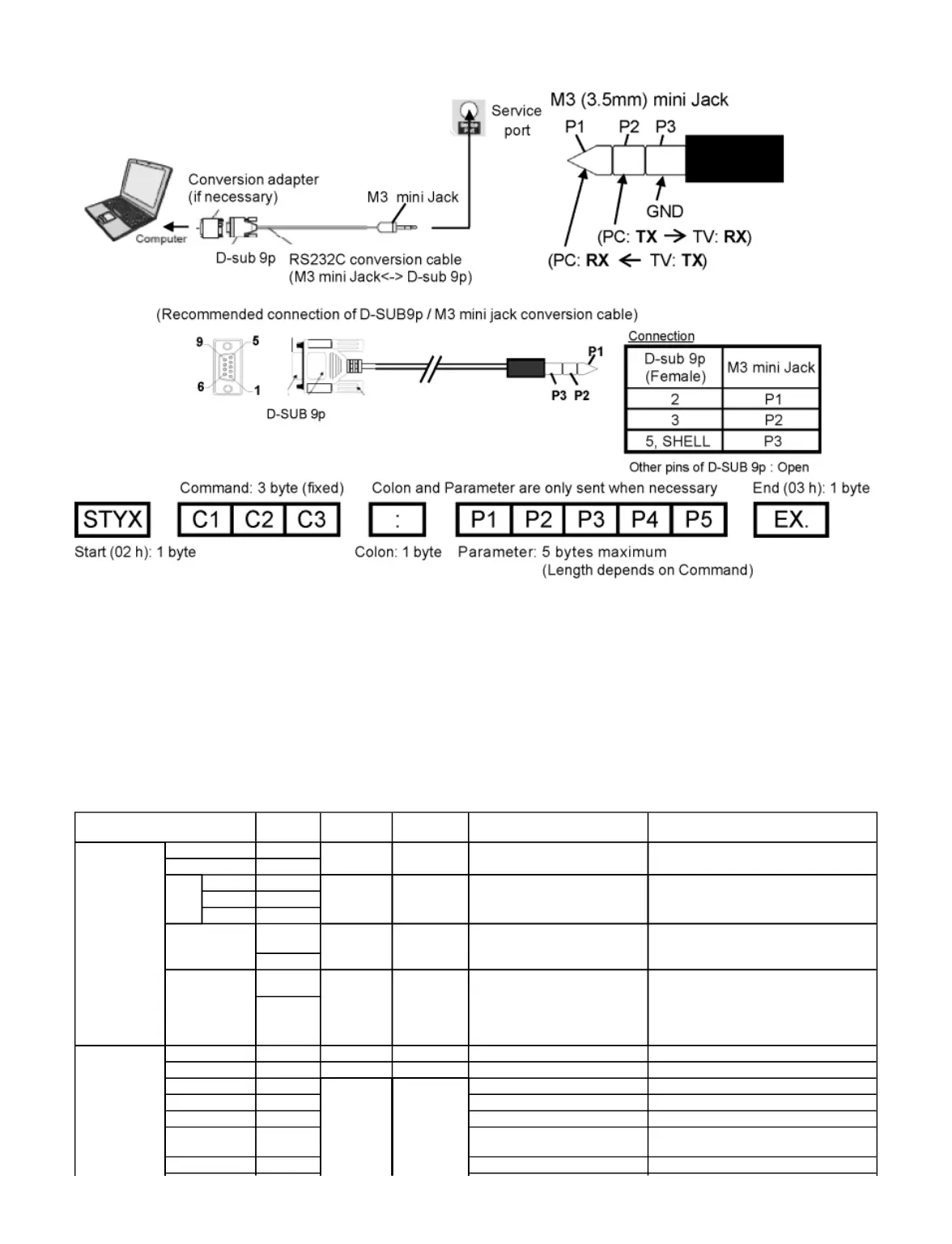
Connection
Notes:
With standby mode, this TV responds to "PON" and "QPW" commands only.
Wait for the response of the first command to come from this unit before sending the next command.
If multiple commands are transmitted, be sure to keep intervals of 250 m sec.
Send the command again when the call back command is unusual.
If an incorrect command is sent by mistake, this TV will send an "ER401" or "ER402" command back to the computer.
This TV does not respond for 15 seconds when "PON" or "POF" commands are transmitted.
Send "EXT" commands before sending "IMS:**" commands.
MUTE commands ("AMT: 0" and "AMT: 1") and "AVL: ***" command are invalid in case of HDMI (CEC) cooperation.
However AMT, AUU, AUD commands is effective. (MUTE rotation (toggle), VOLUME UP and VOLUME DOWN controls are possible.)
Main, Input & Picture Control Command
(480i/480p)
Option : Full → Just → 4:3 → Zoom
(1080i/720p/1080p)
Option : Full → Just → 4:3 → Zoom → H-
Fill → Sidecut Just → Sidecut Zoom









 To Next Page