8 Service Fixture & Tools
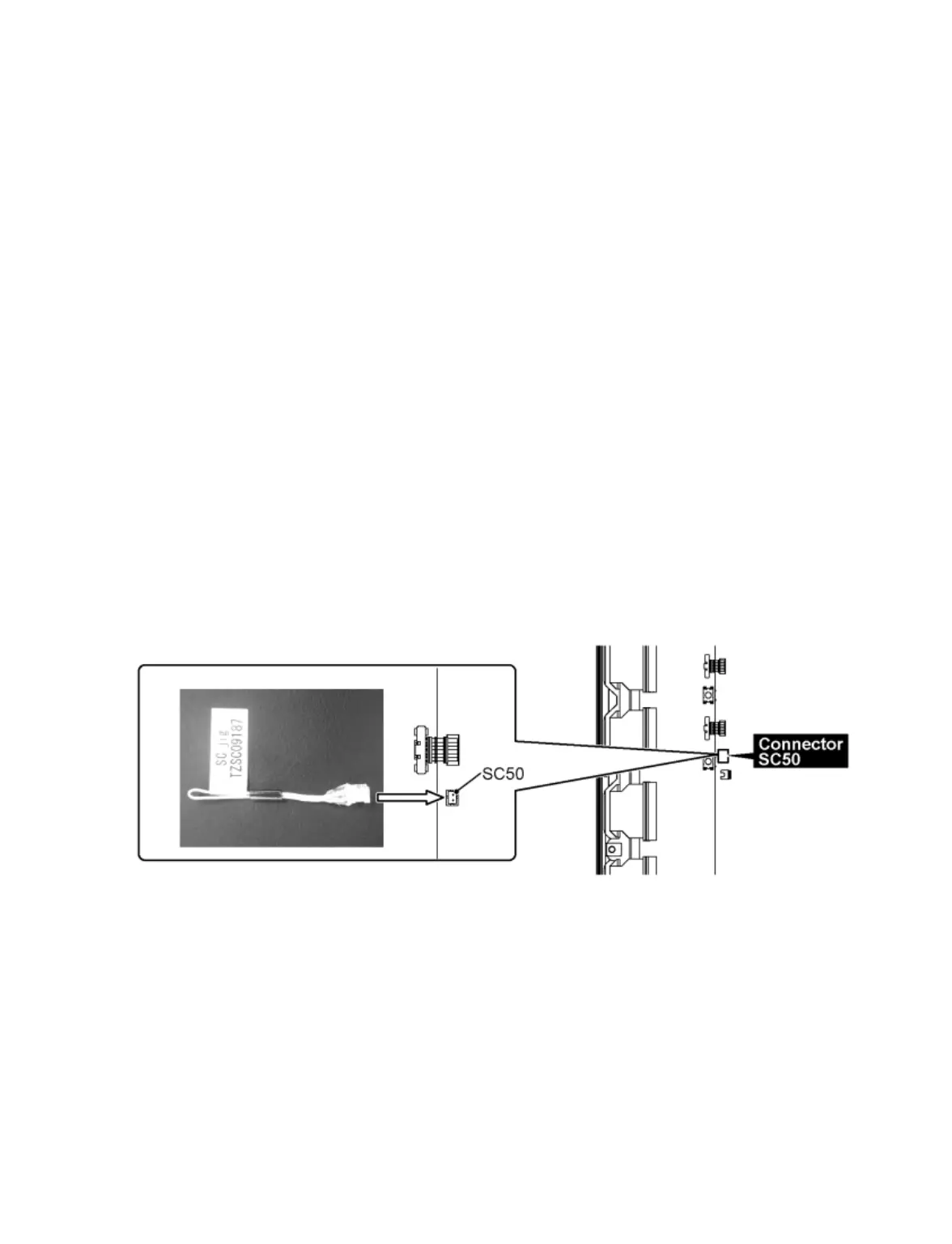
8.1 SC jig
Purpose:
To find the failure board (SC or SU/SD) when the power LED is blinking 7 times.
SC jig:
Jumper connector to connect to SC50 connector on SC board
Part number:
TZSC09187
How to use:
Caution: Remove SC jig from SC board after inspection.
1. Remove the 3 VFG screws from SU and SD board.
2. Remove all connector between SC board and SU/SD board to isolate SC board from both SU and SD board electrically.
Note: The board will be damaged if all connector is not removed (for example; remove connector only for SU board and
stay connecting with SD board. The board will be damaged.)
3. Connect SC jig to connector SC50 at left bottom side of SC board
4. Turn on the TV/Display Unit and confirm the power LED blinking.
LED blinking: Possible cause of failure is in SC board
No LED blinking (Lighting or no lighting): Possible cause of failure is in SU or SD board
5. After inspection, turn off the TV/Display Unit and wait a few minutes to discharge.
6. Remove SC jig from SC board.
Remark: This SC jig can be used for all 2013 Plasma TV and Plasma Display.









 To Next Page