Sub-addressing
136
1. separates the Sub-address from the Telephone number and is indicated by an
"s" in the display.
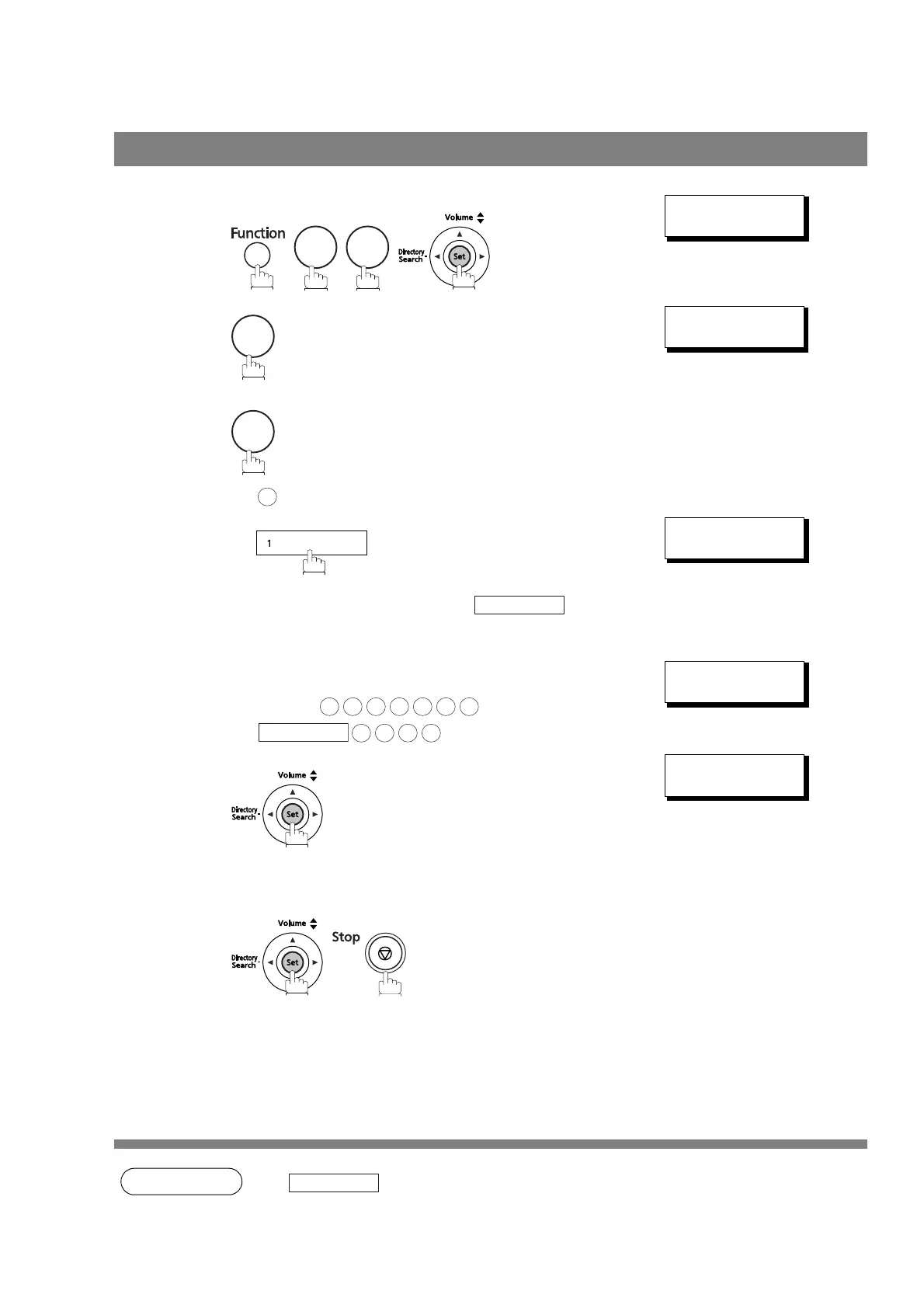
To set the Sub-address into a One-Touch/ABBR. Dialing Numbers
1
1:ONE-TOUCH
2:ABBR NO.
2
to select “One-Touch”.
or
to select “ABBR.NO.”.
Ex:
ONE-TOUCH< >
PRESS ONE-TOUCH
3
Ex:
<01>
ENTER TEL.#
4
Enter the telephone number, press and
then enter the Sub-address. (Up to 20 digits)
(Up to 36 digits including telephone number, pauses,
spaces, FLASH and Sub-address)
Ex: Telephone number = 5551234, Sub-address =2762
Enter as:
<01>
5551234s2762
5
Enter the station name. (See page 32)
Ex: SALES DEPT
<01> SALES DEPT
5551234s2762
6




 To Next Page