166
Problem Solving
Troubleshooting
If You Have Any of These Problems
Troubleshooting
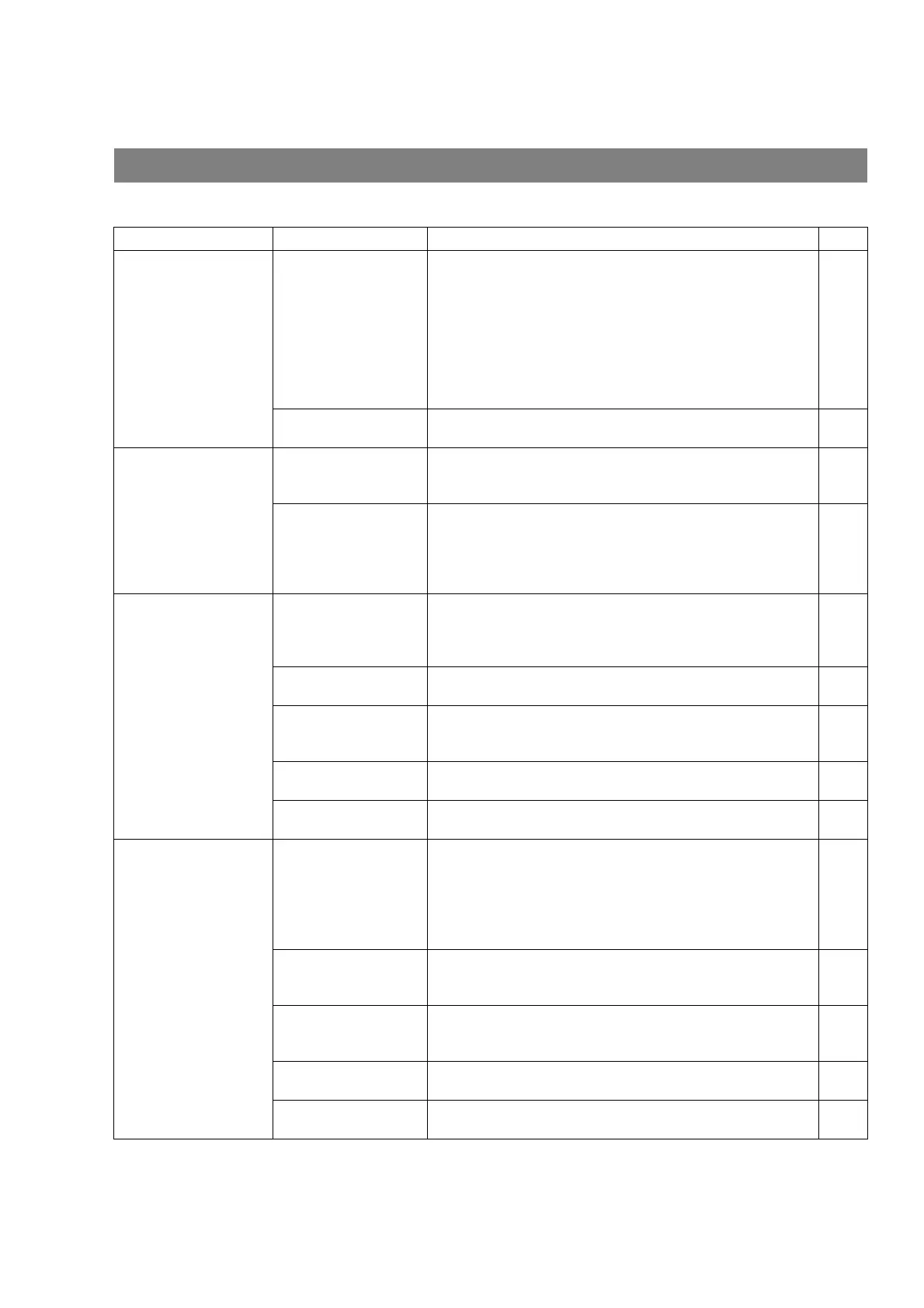
Mode Symptom Cause / Action page
During Transmission Document doesn't
feed/multiple feed
1. Check that your document is free of staples and paper
clips, and that it is not greasy or torn.
2. Check that your document is the right type to send through
a fax machine by consulting the list on "Documents You
Cannot Send". If your document has the characteristics
listed, make a photocopy of your document and send the
copy instead.
3. Check that the document is loaded properly.
4. Adjust the ADF Pressure.
44
45
Document jam The information code 030 or 031 will appear on the display if
the document becomes jammed.
174
Transmission Copy
Quality
Vertical lines on the
transmitted document
Check own copy quality. If copy is OK, your machine has no
problem, so report to the receiving party that they have a
problem. If copy is NG, clean the Document Scanning Area.
176
Transmitted document
is blank
1. Make sure the document is set face up.
2. Check own copy quality. If copy is OK, your machine has
no problem, so report to the receiving party that they have a
problem. If copy is NG, clean the Document Scanning
Area.
176
During Reception No recording paper, or
recording paper
doesn't advance into
the machine.
The information code 001 will appear when there is no
recording paper in cassette, or recording paper feed error
occurs.
23
173
Recording paper jam The information code 001 or 007 will appear on the display if
the paper jams.
173
Recording paper
doesn't eject after
printing
Check to see if the recording paper is jammed inside of the
machine.
173
Document auto
reduction doesn't work
Check Print Reduction settings. 72
Out of toner The information code 041 will appear on the display if the
Toner Cartridge runs out of toner.
20
Print Copy Quality Vertical lines printing
on the received
document
Print out a Journal report (
Ex: FUNCTION, 6, 1 , SET and 1)
and check quality to make sure whether your machine has
trouble.
If Journal report quality is OK, your machine has no problem,
report to the sending party that they have a problem. If copy is
NG, replace the Toner Cartridge.
154
Fuzzy print 1. Make sure you are using the correct paper for the best
possible print quality.
2. Try reversing the recording paper to the other side.
180
Missing dots or lines/
inconsistent darkness
within print
1. Make sure you are using the correct paper for the best
possible print quality.
2. Replace the Toner Cartridge.
20
180
Fading print Your Toner Cartridge may be running out of toner. Replace
the Toner Cartridge.
20
Faint print You may need to choose a different paper type for the best
possible print quality.
180




 To Next Page