CONCEPTSYSTEM EXAMPLESCONNECTIONSPRODUCTSBLOCK DIAGRAMS
69
4
PRODUCTS
WR-210AE
CONCEPT SYSTEM EXAMPLES CONNECTIONS PRODUCTS BLOCK DIAGRAMS
68
4
PRODUCTS
WR-210AE
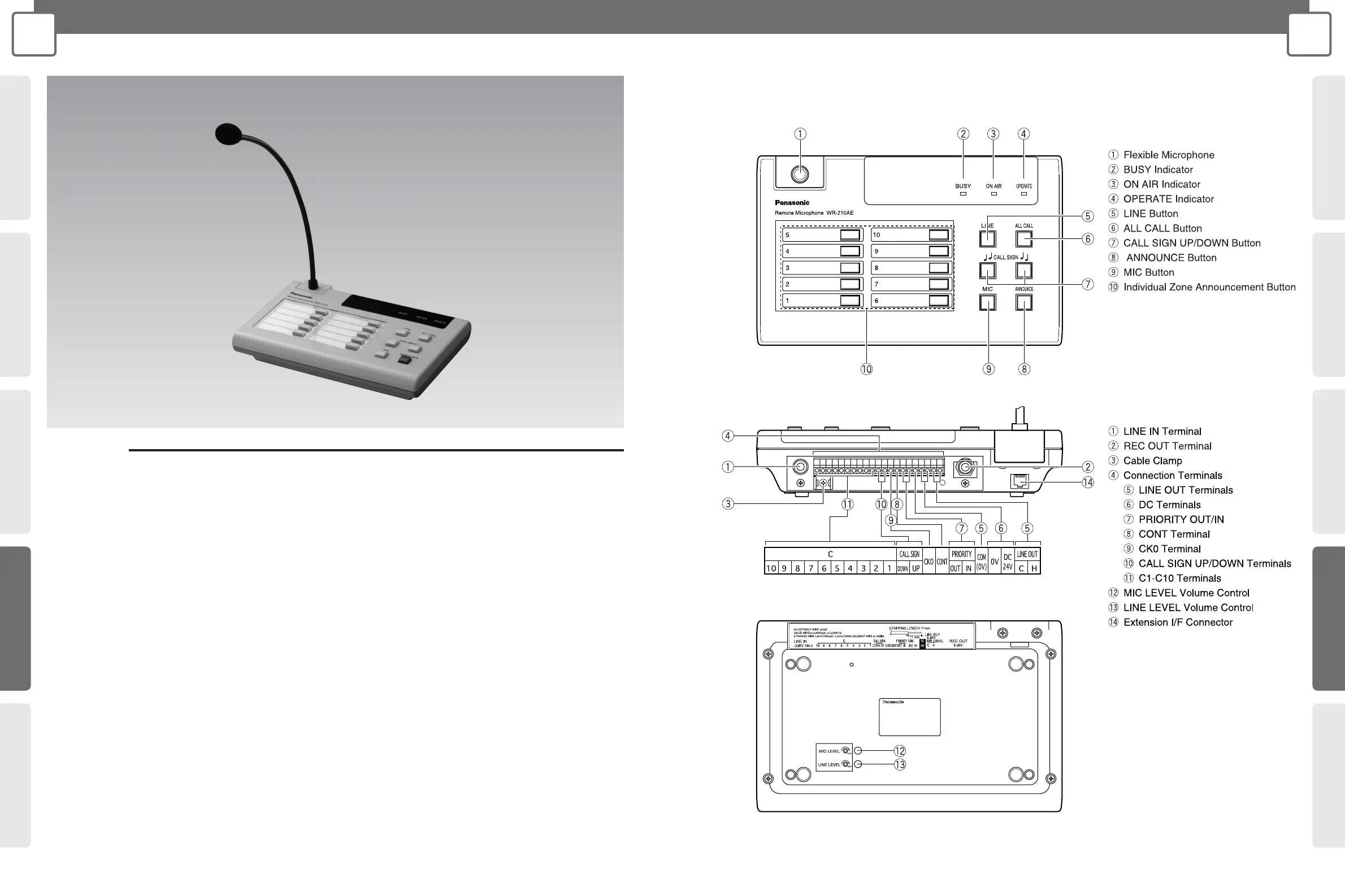
Remote Control Microphone
WR-210AE
MAJOR OPERATING CONTROLS & TERMINALS
Front View
Rear View
Bottom View
PREFACE
This Remote Microphone is designed for use with public
address (PA) systems. It supports both separate zone
announcement and all-zone announcement capabilities.
• Connecting an recording device to the Remote
Microphone's REC OUT terminal makes it possible to
record messages from the microphone.
• The MIC button and LINE button allow you to select MIC
audio or LINE audio for announcements.
• PA system built-in call signs can be sounded using the
Remote Microphone's CALL SIGN button.
• The priority function allows you to set the order of priority
between Remote Microphones if more than one Remote
Microphone is connected.
• The BUSY indicator shows the current busy status of the
Remote Microphone.




 To Next Page