INOXPAN S.L. EN - 12
4.1. OPENING THE DOOR
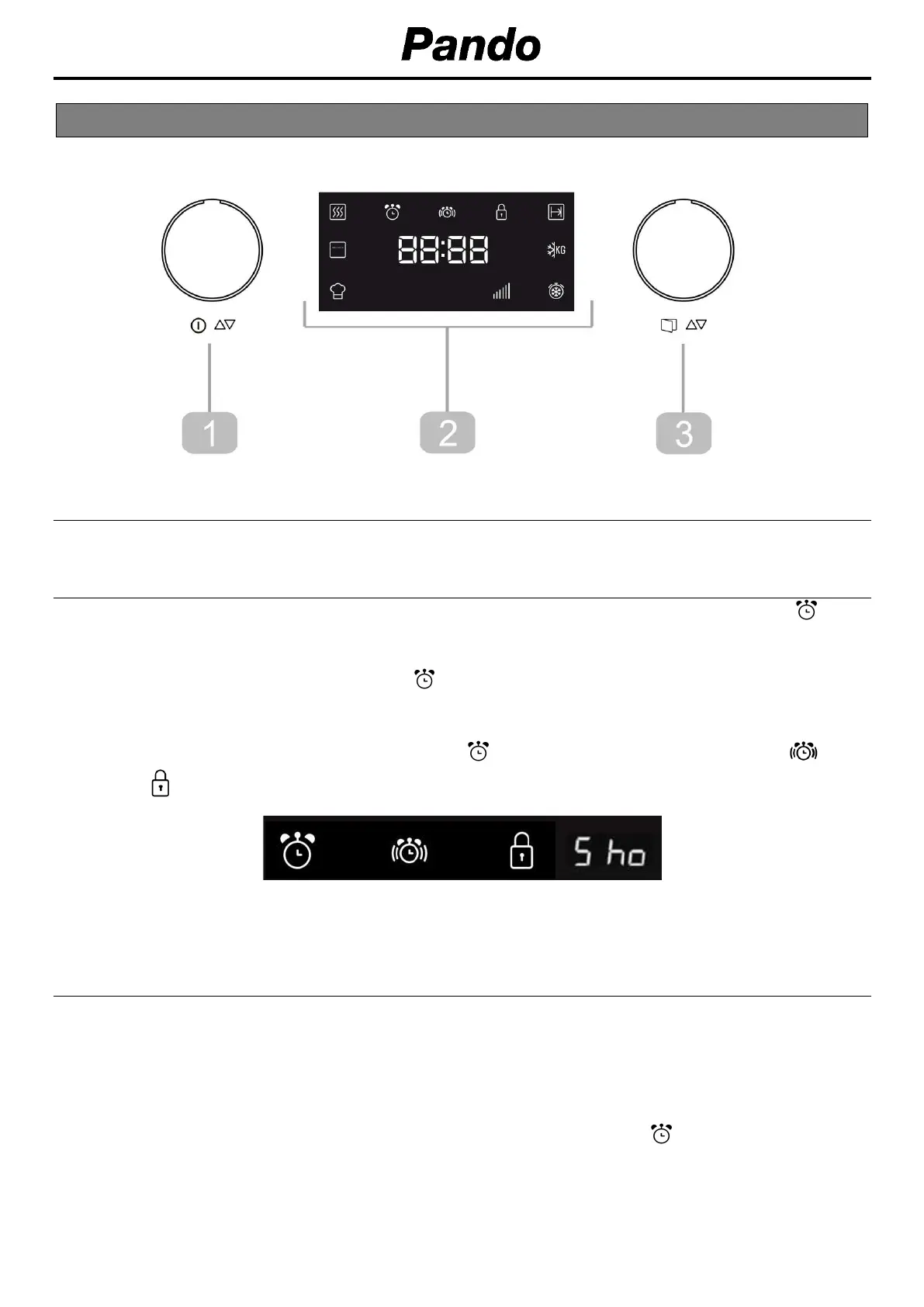
To open the door, press the rotating knob (3) for 2 seconds.
4.2. SECONDARY MENU
It is accessed by pressing the rotary knob (1) for 3 seconds, hearing 3 beep. The symbol
will appear on the screen.
Press again for 3 seconds and the symbol will flash, 1 beep is heard. We will then be inside
the Secondary Menu.
By turning the knob (3), you can access the clock (to adjust or hide / show), the timer , the
securilock and the Sho function (only for show rooms).
ONCE WITHIN THE SECONDARY MENU:
4.3. AJUSTE DEL RELOJ
After your microwave oven is first plugged in or after a power failure, the clock display will flash to
indicate that the time shown is not correct. To set the clock, proceed as follows:
1. Press the function knob (1) for 3 seconds.
2. Turn the rotating knob (3) to navigate through the secondary menu options. The desired
option lights up.
3. Press the rotating knob (3) once, when you see the clock symbol .
4. Turn the function knob (1) to set the correct hour value.
5. Turn the rotating knob (3) to set the correct minute value.
6. To finish, press the rotating knob (3) to confirm.


 To Next Page