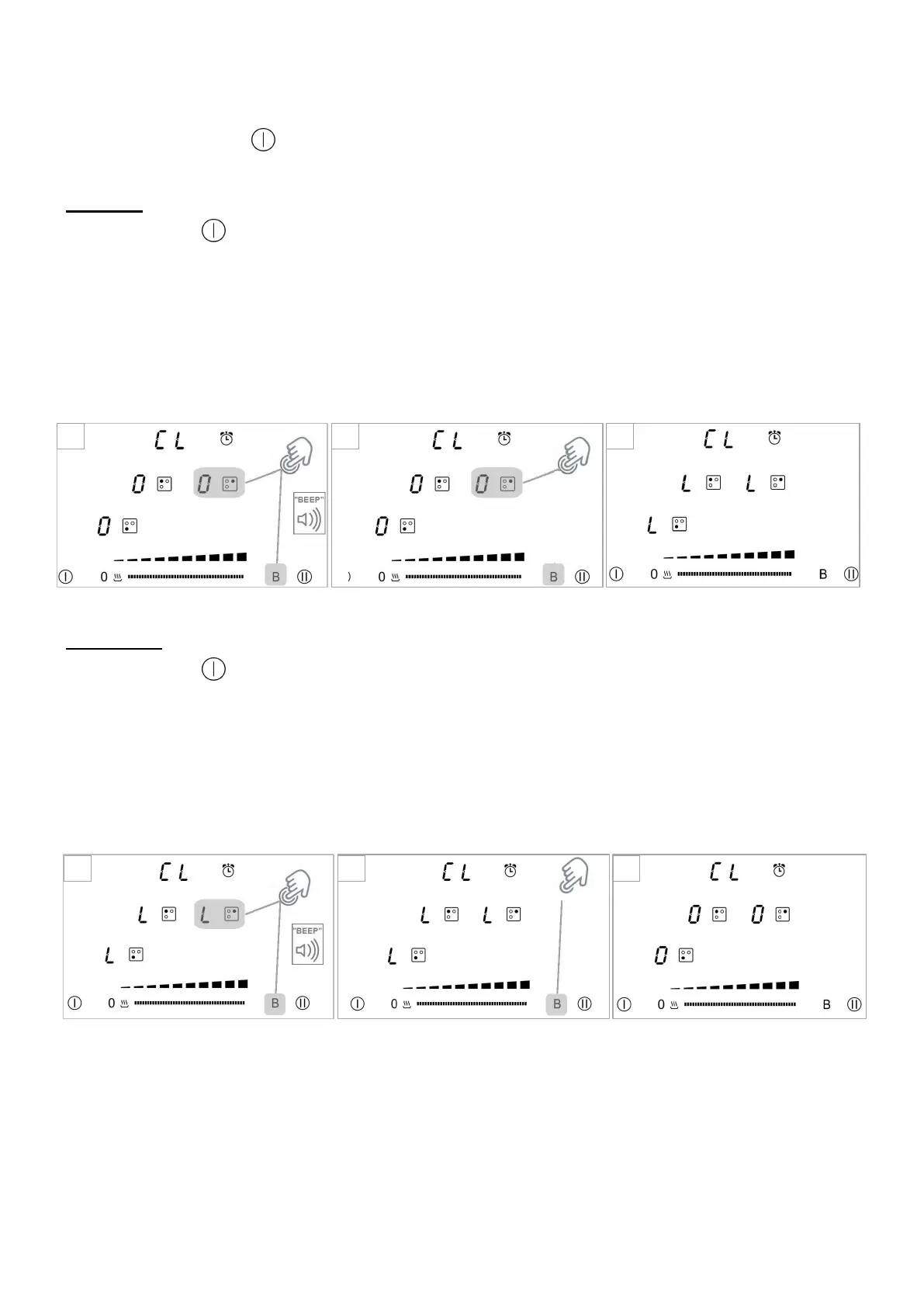
Control panel locking / unloking:
To avoid modifying a setting of cooking zones, in particular during of cleaning the control panel can be locked (with
exception to the On/Off key [ ])
• Locking:
1. Press ON key [ ]
2. Press simultaneously [ B ] and [ 0 ] from the right zone display until you hear "Beep."
(If this Beep is not heard, repeat the steps 1 and 2.)
3. Re-press [ 0 ] from the right zone display].
4. The "L" symbol will appear in the 3 zones, indicating that they are locked.
• Unlocking:
1. Press ON key [ ]
2. Press simultaneously [ B ] and [ L ] from the right zone display until you hear "Beep."
(If this Beep is not heard, repeat the steps 1 and 2.)
5. Re-press [ B ].
3. The "L" symbol will disappear in the 3 zones, indicating that they are unlocked.


 To Next Page