Copyright © ParTech, Inc. 2013. All Rights Reserved.Page 7 6/13/2013
PAR OPOS Drivers
OPOS drivers should already be installed on the terminal when it ships from PAR. Look for
them in the Windows Start Menu under "OPOS Utility". Run the utilities to ensure the OPOS
devices are operating.
If the OPOS Utility drivers are not installed, look for the installation file Setup.exe in the
C:\PAR Drivers\ES500_OPOS_V101\ES500\V1.0.1\ directory. Make sure to run it as
Administrator by right clicking on the file and choosing "Run as Administrator".
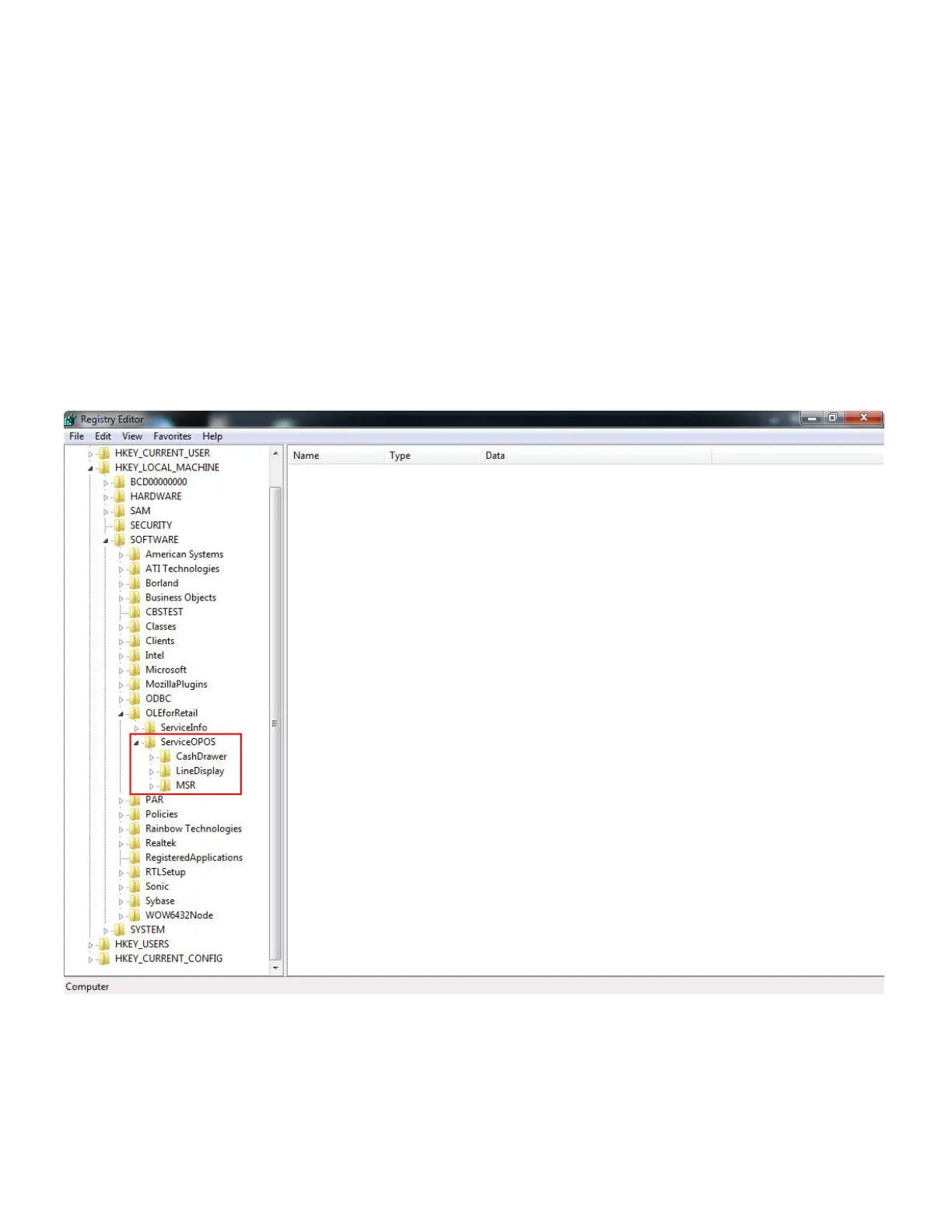
Now open Windows Registry Editor by running "regedit" from the Windows Start Menu.
Navigate to the following key to verify that the device names on the system are the same as in
the image below:
HKEY_LOCAL_MACHINE\SOFTWARE\OLDforRetail\ServicesOPOS
Once the OPOS installation has been verified, continue to the next section in this document.



 To Next Page