EasyManua.ls Logo

Parasound Halo A 21 - User Manual

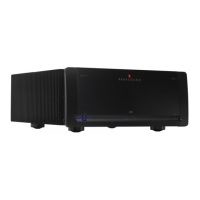
Parasound Halo A 21
23 pages
Print Icon
To Next Page IconTo Next Page
Loading...
A 21 Amplifier
Owner’s Guide

Questions and Answers

  • R
    Robert HarrisAug 13, 2025
    What to do if my Parasound Amplifier power is on, but there is no sound?
    • R
      Rebecca StevensAug 14, 2025
      If your Parasound Amplifier powers on, but no sound is produced and the On-Off button glows red while the channel indicator(s) are off, here are a few things you can check: * Ensure the level controls are adequately turned up by rotating them clockwise. * Verify the connections from the preamplifier or controller are secure, and try different cables. * Check the speaker load impedance and wiring if the over-current protection circuitry may have been activated. * If the A 21 has overheated, allow it to cool down and ensure adequate ventilation, making sure the load impedance of each channel is no less than 4 ohms.
  • R
    ramosdavidAug 17, 2025
    Why is my Parasound Halo A 21 Amplifier producing distorted sound?
    • A
      Alexa StoneAug 17, 2025
      If your Parasound Amplifier is producing distorted sound, here are some potential causes and solutions: * A damaged speaker can cause distortion. Connect each speaker to the opposite channel on the A 21. If the same speaker remains distorted, the speaker or its wire is damaged. If the other speaker distorts, the problem may be with the A 21, the preamp, or a source component. * A problem with the preamplifier or source component. Switch the left and right input cables. If distortion moves to the other channel, the problem is with a component other than the A 21. * Incorrect position of the Balanced-Unbalanced Input switch. Move it to the correct position for the jack in use. * The Mono Bridge switch is in the Mono bridged position. Move the switch to its Stereo position.
  • A
    Amy JohnsonAug 21, 2025
    How to fix hum or buzz through Parasound Halo A 21 speakers?
    • E
      Erin PowellAug 21, 2025
      If you're experiencing hum and/or buzz through your Parasound Amplifier speakers, it could be due to: * A ground loop between the preamplifier and A 21, or at the equipment rack. Try moving the Ground switch to its Lift position. Install nylon shoulder washers on both sides of the panels of all equipment to insulate metal from touching the rack. * A ground loop from cable TV. Move the Ground switch to its Lift position. Install a cable isolation device.
  • V
    vbaldwinAug 25, 2025
    What to do if my Parasound A 21 Amplifier is overheating?
    • M
      Michael BridgesAug 25, 2025
      If your A 21 Amplifier is overheating: * Ensure the load impedance at the speaker terminals is 4 ohms or higher. * Verify that the A 21 has adequate ventilation.
  • J
    Jeffrey ColemanAug 28, 2025
    How to troubleshoot Parasound Amplifier when it has no power?
    • M
      Mary ScottAug 29, 2025
      If your Parasound Amplifier has no power, consider the following: * Ensure the power cord is properly connected. * Verify the correct position of the Auto Turn On switch. * Confirm the AC Voltage selector switch is set correctly for your region. * Check the AC fuse and replace it with one of the same value if it's blown.
  • C
    Christopher KingSep 1, 2025
    What to do if Parasound Amplifier auto turn on doesn’t function with a trigger voltage?
    • T
      Theresa RaymondSep 1, 2025
      If the auto turn on feature of your Parasound Amplifier isn't working with a trigger voltage: * Check the polarity of the DC source with a voltmeter. You might also try connecting a 9V battery to the 12V DC input. * Ensure the Auto Turn On selector switch is in its 12V position.
  • J
    Jasmine JonesSep 5, 2025
    What to do if Parasound Halo A 21 Amplifier auto turn on doesn’t function with an audio input signal?
    • J
      John MendozaSep 5, 2025
      If the auto turn on feature on your Parasound Amplifier does not function with an audio input signal: * Ensure the Auto Turn On selector switch is in its Audio position. * Adjust the sensitivity by turning the Audio trigger Sensitivity knob counterclockwise.
  • D
    david23Sep 9, 2025
    What to do if Parasound A 21 will not turn off when audio signal is removed?
    • M
      Max AndersonSep 9, 2025
      If your Parasound A 21 will not turn off when the audio signal is removed, the sensitivity level might be too high. Try turning the Sensitivity knob clockwise toward 200 mV.

Summary

Placement Guidelines

Rack Mounting

Instructions for installing the A 21 amplifier into a standard 19-inch equipment rack.

Connecting to Balanced Inputs

Connecting to Unbalanced Inputs

Using Loop Out Jacks

Connecting Speakers

Bridged Mono Operation

Turn On-Off Options

Manual On-Off

How to manually power the A 21 amplifier on and off using the front panel button.

Automatic On-Off via Audio Signal

Setting up the A 21 to turn on automatically when an audio signal is detected.

Automatic Turn-On with DC Trigger

Triggering Other Components

Indicators and Controls

AC Present Indicator

Indicates AC power is connected to the A 21, even when it is off.

Status Indicators (On;Off;Fault)

Explains the On-Off button's color changes indicating status or protection activation.

Channel Status Indicators

Round indicators showing the operational status of the left and right audio channels.

High-Temp Indicator

Alerts when the amplifier's internal temperature exceeds safe limits.

Gain Control Knobs

Adjusts the input gain level for each channel of the A 21 amplifier.

Ground Switch

Helps reduce system hum by isolating the A 21's signal ground.

Connecting the AC Power Cord

Maintenance and Fuse

Exterior Cleaning

Guidance on safely cleaning the amplifier's exterior surfaces.

Main Power Fuse

What to do if the main power fuse blows.

Troubleshooting Guide

Servicing and Returns

Contacting Parasound Support

How to contact Parasound for help with diagnostic tests and servicing.

Returning Unit for Service

Steps and requirements for returning the A 21 for repair or inspection.

Shipping Recommendations

Advice on proper packing and shipping procedures to prevent damage.

Technically Speaking

Audio Trigger Sensitivity Adjustment

Details on adjusting the sensitivity for automatic audio turn-on.

Balanced vs. Unbalanced Lines

Comparison of balanced and unbalanced audio signal transmission.

Bare Speaker Wire Termination

Instructions for preparing bare speaker wire for connection.

Bridged Mono Operation Explained

Technical explanation of how bridged mono mode works and its benefits.

Ground Loops - Eliminating Hum and Buzz

Methods for identifying and eliminating audio hum and buzz caused by ground loops.

Loop Out Jacks Explained

Detailed use cases and functionality of the A 21's loop out jacks.

Gain Controls Explained

Guidance on adjusting gain settings for optimal system performance.

Parasound A 21 Design Overview

Circuit Design by John Curl

Information about the renowned designer and his contribution to the A 21.

Parts Selection

Details on the high-quality components chosen for the A 21's construction.

The Power Supply

Description of the toroidal transformer and capacitor system used in the power supply.

Relay-Bypassed Soft Start Circuit

Explanation of the soft start circuit that manages in-rush current.

Audio Circuit Path Topology

Overview of the hybrid transistor topology used in the audio circuits.

Complementary Configuration

Explanation of the complementary amplification stages for linearity.

The Input Stage

Details on the JFET input stage designed for superior noise reduction.

The Driver Stage

Description of the MOSFET driver stage and its sonic benefits.

The Output Stage

Information on the bipolar transistor output stage for reliability and power.

Class A-A;B Operation

Explanation of the amplifier's Class A-A/B operating mode and its advantages.

Total Protection - DC Servos

How the DC servo circuits prevent speaker damage from DC offset.

Total Protection - Relays

Details on the protection relays that safeguard the amplifier and speakers.

Total Protection - Current Overload

Explanation of the current overload protection mechanism.

Total Protection - Fuses

Information on the internal fuses providing backup protection.

Parasound A 21 Specifications

Parasound Halo A 21 Specifications

General IconGeneral
TypeStereo Power Amplifier
Frequency Response5 Hz - 100 kHz, +0/-3 dB
Gain29 dB
Continuous Power Output - 8 Ohms250W
Continuous Power Output - 4 Ohms400W
Continuous Power Output - 8 Ohms Bridged800 Watts
S/N Ratio>110 dB
Signal-to-Noise Ratio>110 dB

Related product manuals