EasyManua.ls Logo

Parkside PNTS 1300 B2 - User Manual

Parkside PNTS 1300 B2
52 pages
Print Icon
To Next Page IconTo Next Page
Loading...
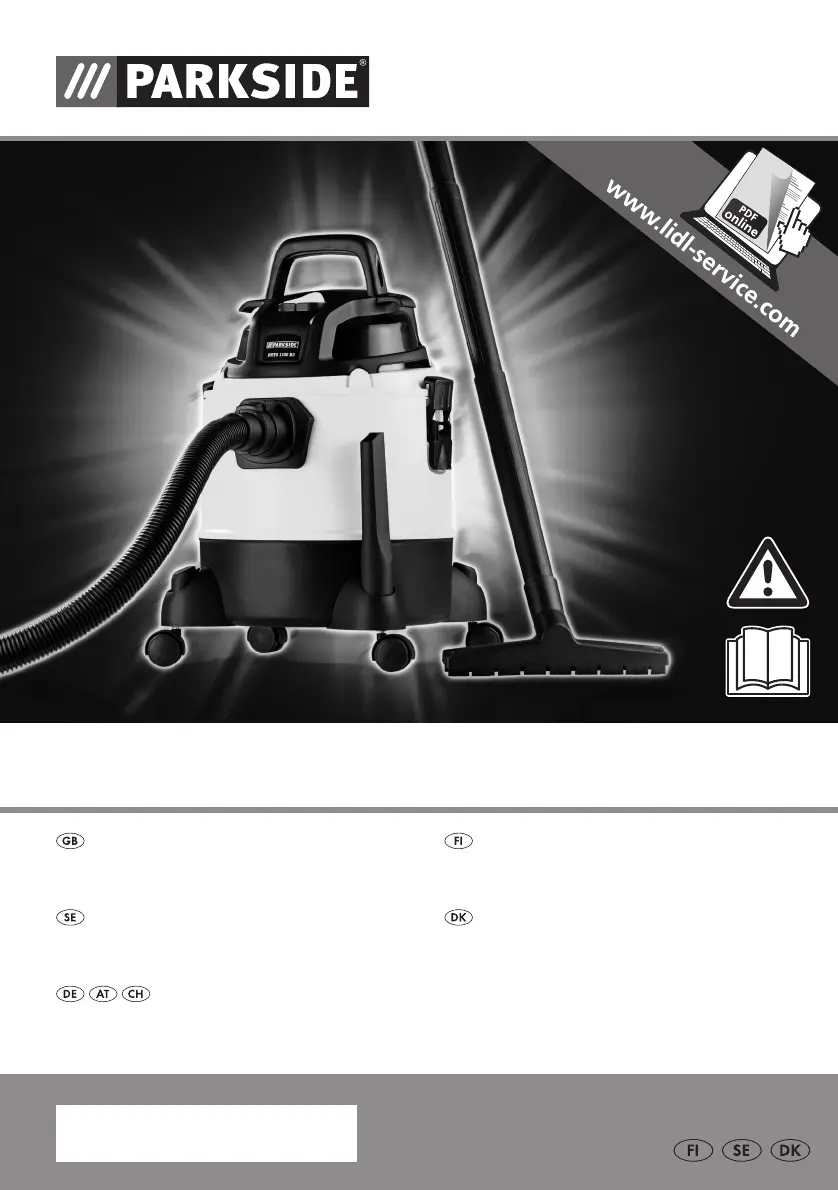
WET & DRY VACUUM CLEANER PNTS 1300 B2
NASS-/TROCKENSAUGER
Originalbetriebsanleitung
WET & DRY VACUUM CLEANER
Translation of original operation manual
TØR-/VÅDSUGER
Oversættelse af den originale driftsvejledning
VÅ T-/TORRSUG
Översättning av bruksanvisning i original
KUIV A-/MÄRKÄIMURI
Alkuperäisen käyttöohjeen käännös
IAN 78834

Table of Contents

Other manuals for Parkside PNTS 1300 B2

Questions and Answers

  • J
    Jennifer GlassAug 14, 2025
    What to do if my Parkside Vacuum Cleaner has no suction?
    • M
      Mr. Austin BennettAug 15, 2025
      If your Parkside Vacuum Cleaner isn't picking anything up, several factors could be at play. Start by checking for blockages in the hose system or jets and remove them. Make sure the suction pipe is properly assembled. Verify that the container is closed and not full; empty it if necessary. Also, inspect the filter to see if it's full or clogged; if so, empty, clean, or replace it. Finally, ensure the ball on the filter basket is correctly positioned by switching the equipment off then on again.
  • B
    bdavidsonAug 18, 2025
    Why is my Parkside PNTS 1300 B2 losing suction?
    • T
      Tyrone WalkerAug 18, 2025
      A loss of suction in your Parkside Vacuum Cleaner can stem from a few issues. Check the hose system or jets for any blockages and remove them. Ensure the suction pipe is correctly assembled. Confirm that the container is properly closed and empty if it's full. Also, inspect the filter to see if it’s full or clogged; empty, clean, or replace it. In addition, the ball on the filter basket may be incorrectly positioned; switch off the equipment so the ball drops then switch on again.
  • K
    Krista KingAug 21, 2025
    Why is my Parkside PNTS 1300 B2 not sucking?
    • K
      Katherine RileyAug 21, 2025
      There are several reasons why your Parkside Vacuum Cleaner might have low or no suction: * The hose system or jets could be blocked. Clear any obstructions. * The suction pipe might be incorrectly assembled. Ensure it is correctly assembled. * The container might be open or full. Close or empty the container. * The filter might be full or clogged. Empty, clean, or replace the filter. * The ball on the filter basket might be incorrectly positioned. Turn the equipment off and on again.
  • X
    xburkeAug 25, 2025
    What to do if my Parkside PNTS 1300 B2 won't start?
    • C
      Courtney MannAug 26, 2025
      If your Parkside Vacuum Cleaner isn't starting, here are a few things to check: * Ensure the mains voltage is present by checking the plug socket, cable, line, plug, and fuse. If necessary, have an electrical specialist make repairs. * The on/off switch may be defective. Contact customer service for repair.
  • S
    Stacey ReyesAug 27, 2025
    What to do if my Parkside PNTS 1300 B2 won't turn on?
    • A
      Alexis PhillipsAug 28, 2025
      If your Parkside Vacuum Cleaner doesn't start, begin by checking the plug socket, cable, line, plug, and fuse to ensure mains voltage is present. If there are any issues, have them repaired by a qualified electrical specialist. If the voltage is OK, the on/off switch may be defective and require repair through customer service. The carbon brushes or the motor could also be defective, but no solution is provided for these causes.
  • N
    Nicole BarnettAug 31, 2025
    Why does my Parkside PNTS 1300 B2 Vacuum Cleaner have low suction?
    • M
      Michele StewartAug 31, 2025
      Low suction in your Parkside Vacuum Cleaner can occur due to several reasons. The hose system or jets might be blocked; clear any obstructions. Ensure the suction pipe is correctly assembled. Check if the container is open and close it, or if it's full, empty it. The filter might also be full or clogged, so empty, clean, or replace it. Lastly, the ball on the filter basket may be incorrectly positioned; switch the equipment off and on again.
  • S
    scarpenterSep 3, 2025
    How to fix a Parkside Vacuum Cleaner that won't start?
    • E
      Elizabeth BenderSep 4, 2025
      If your Parkside Vacuum Cleaner isn't starting, there could be a few reasons. First, check the plug socket, cable, line, plug and fuse to ensure mains voltage is present; if needed, have an electrical specialist make repairs. A defective on/off switch could also be the problem; this requires repair by customer service. Other potential causes are worn carbon brushes or a defective motor.
  • S
    Scott MaloneSep 6, 2025
    Why won't my Parkside PNTS 1300 B2 turn on?
    • L
      Logan CochranSep 7, 2025
      If your Parkside Vacuum Cleaner won't turn on, it might be due to a few reasons. Begin by checking the plug socket, cable, line, plug and fuse to ensure they are working properly; if necessary, have an electrical specialist make repairs. Another possibility is a defective on/off switch, which requires repair by customer service. Other potential causes are worn carbon brushes or a defective motor.
  • H
    Holly RubioSep 10, 2025
    What causes a Parkside Vacuum Cleaner not to start?
    • R
      Roberto TaylorSep 10, 2025
      There are several reasons why your Parkside Vacuum Cleaner might not be starting. It could be due to the absence of mains voltage; check the plug socket, cable, line, plug and fuse, and if needed, have an electrical specialist perform repairs. A defective on/off switch could also be the cause, requiring repair through customer service. Other potential causes are worn carbon brushes or a defective motor.

Summary

Introduction

Application

The appliance is intended for domestic wet and dry vacuuming in the house, work room, car or garage.

General Description

Overview

Illustration of the principal functioning parts found on the front and back foldout pages.

Contents

Unpack the appliance and check that it is complete. Lists main components and accessories.

Description of Operation

Explains the robust plastic container, castors for maneuverability, and blower function.

Technical Data

Safety Information

Symbols Used in Instructions

Explanation of hazard, precaution, and notice symbols for safe operation and handling.

General Safety Notes

Essential safety guidelines to prevent fire, electric shock, personal injury, and damage to objects.

Electric Shock Prevention

Ensures the mains cable is not damaged by sharp edges, jamming, or pulling on the cable.

Assembly

Operation

Switching On and Off

Connect the mains plug and use the on/off switch (position 'I' for on, 'O' for off).

Nozzle Usage

Guidance on using floor nozzles and crevice nozzles for various cleaning tasks and surfaces.

Wet Vacuuming

Instructions for wet vacuuming, including attaching the foam filter (15) onto the filter tray.

Dry Vacuuming

Instructions for dry vacuuming, including using the material filter (16) over the filter basket.

Fine Dust Vacuuming

Recommendations for vacuuming very fine dust, suggesting additional use of the paper filter bag.

Insert Fabric Filter

Step-by-step guide to inserting the material filter (16) over the filter basket for dry vacuuming.

Insert Paper Filter Bag

Instructions for folding and fitting the paper filter bag (17) over the internal suction pipe.

Blowing Function

How to use the blowing function by plugging the suction hose (13) onto the connection (10) on the motor head.

Cleaning and Maintenance

Cleaning the Appliance

Never hose down the appliance. Use a damp cloth and mild soap; do not use aggressive cleaning agents or solvents.

Storage

Store the appliance in a dry place, wind the cable, and insert vacuum tubes into the accessory holder.

Disposal and Environmental Protection

Be environmentally friendly. Return tool, accessories, and packaging to a recycling centre.

Troubleshooting

Replacement Parts

Guarantee

Terms of Guarantee

The guarantee begins on the date of purchase. Retain the original receipt as proof of purchase.

Guarantee Period and Statutory Claims

Guarantee period is not extended by service. Statutory claims are not restricted by this guarantee.

Guarantee Cover

Applies to material and manufacturing defects; excludes wearing parts or damage from misuse.

Processing Guarantee Claims

To ensure efficient handling, have receipt and item number ready for all guarantee queries.

Service-Center

Service Branch

Repair Service

EC Declaration of Conformity Translation

Exploded Drawing

Parkside PNTS 1300 B2 Specifications

General IconGeneral
BrandParkside
ModelPNTS 1300 B2
CategoryVacuum Cleaner
LanguageEnglish

Related product manuals