18 GB
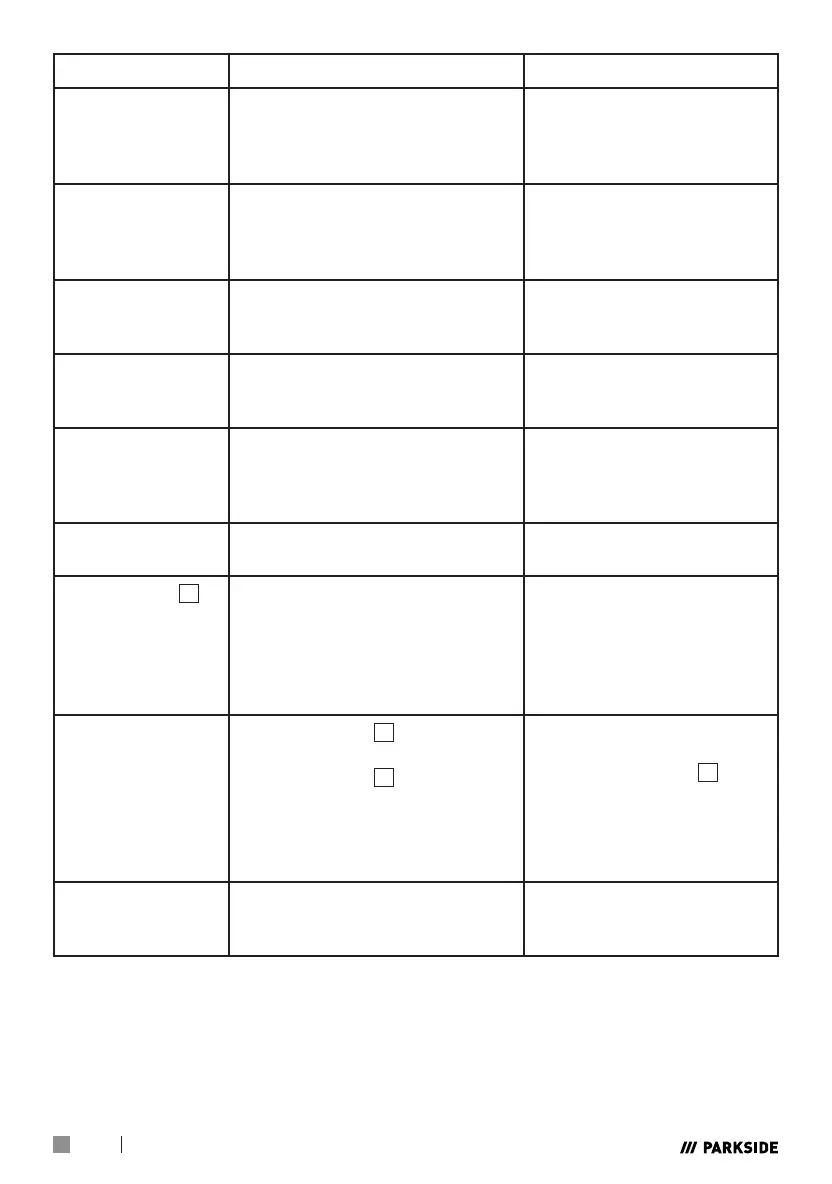
Faults Cause of fault Troubleshooting
Warning lamp
switches on?
Overheating protection
switched on.
Input voltage too high.
Allow device to cool
down.
Input voltage according to
type plate.
No output current?
Machine faulty.
Overvoltage protection
activated.
Machine must be
repaired.
Allow device to cool
down.
Output current does
not decrease?
Input voltage too low.
Connection cable cross-section
too small.
Observe input voltage
according to type plate.
Air flow cannot be
regulated?
Compressed air hose damaged
or faulty.
Valve/manometer fails.
New connection of the
line.
HF-arc is not
created?
The burner switch is faulty.
Soldering point on the burner
switch or plug loosened.
Valve/manometer fails.
Replace electrode.
Bad ignition?
Burner wear parts damaged or
worn.
Change wear parts.
Plasma burner
8
is
not ready for
operation?
Current switch is switched off.
Air transmission is restricted.
Workpiece is not connected to
the earthing terminal.
Switch the current switch
to “on”.
Another indication of this
is a green flame. Check
the air supply.
Check the connections.
Sparks fly upwards,
instead of down
through the
material?
Burner sleeve
8c
does not
penetrate the material.
Burner sleeve
8c
is too far
away from the material.
Material was probably not
earthed properly.
Lifting speed is too quick.
Increase the current.
Reduce the gap between
the burner sleeve
8c
and
material.
Check the connection for
correct earthing.
Reduce the speed.
Initial cut but not
completely drilled
through?
Potential connection problem. Check all connections.





 To Next Page