35
SMART Self Test
This item is used to enable monitoring of hard disks that support the S.M.A.R.T. (Self-Monitoring
And Reporting Technology) feature, which can allow the hard disk to report, under some
circumstances, impending failures of the hard disk.
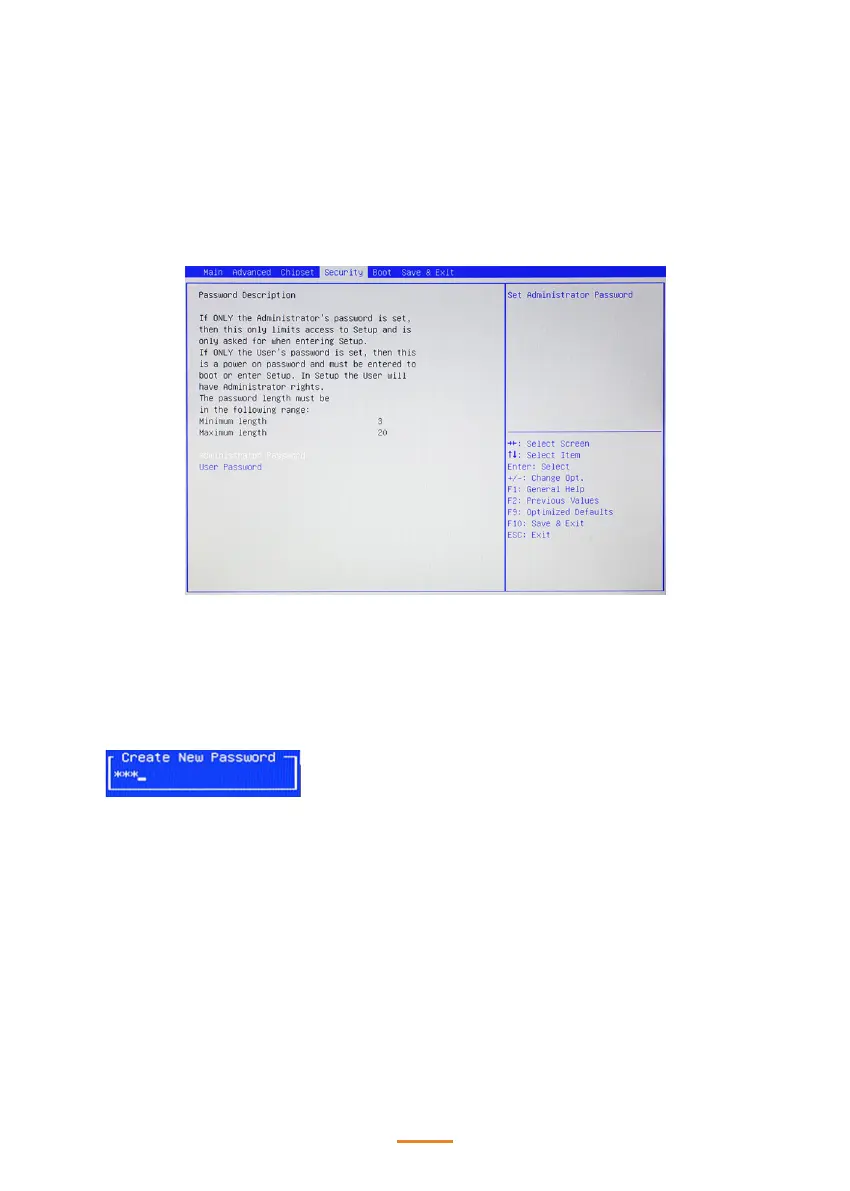
Security Settings
This screen allows you to congure the system security settings.
Create or Change Adminitrator/ User Password
An administrator password takes precedence over a user password, and the administrator can limit
the activities of a user. To create or change a password, follow these steps:
1. Highlight the item Administrator/ User Password on the Security menu and press <Enter>.
2. The password dialog box appears.
3. If you are creating a new password, type in the password. You can type alphanumeric
characters. Symbols are ignored. The Administrator/ User Password item dierentiates between
upper and lower case characters. Press <Enter> after you have typed in the password. To
conrm the password, type the password again and press <Enter>.
4. Write the passwords down and keep them in a safe place.
Clear Adminitrator/ User Password
To clear the password, leave the dialog box blank, press <Enter>, when the conrm box appears,
press <Enter> again.
Case Open Warning
This item allows you to enable or disable the case open detecting function.



 To Next Page