Wireless Smart Gate Assign SmartGate- Smart Gate Only
10
013-16123A
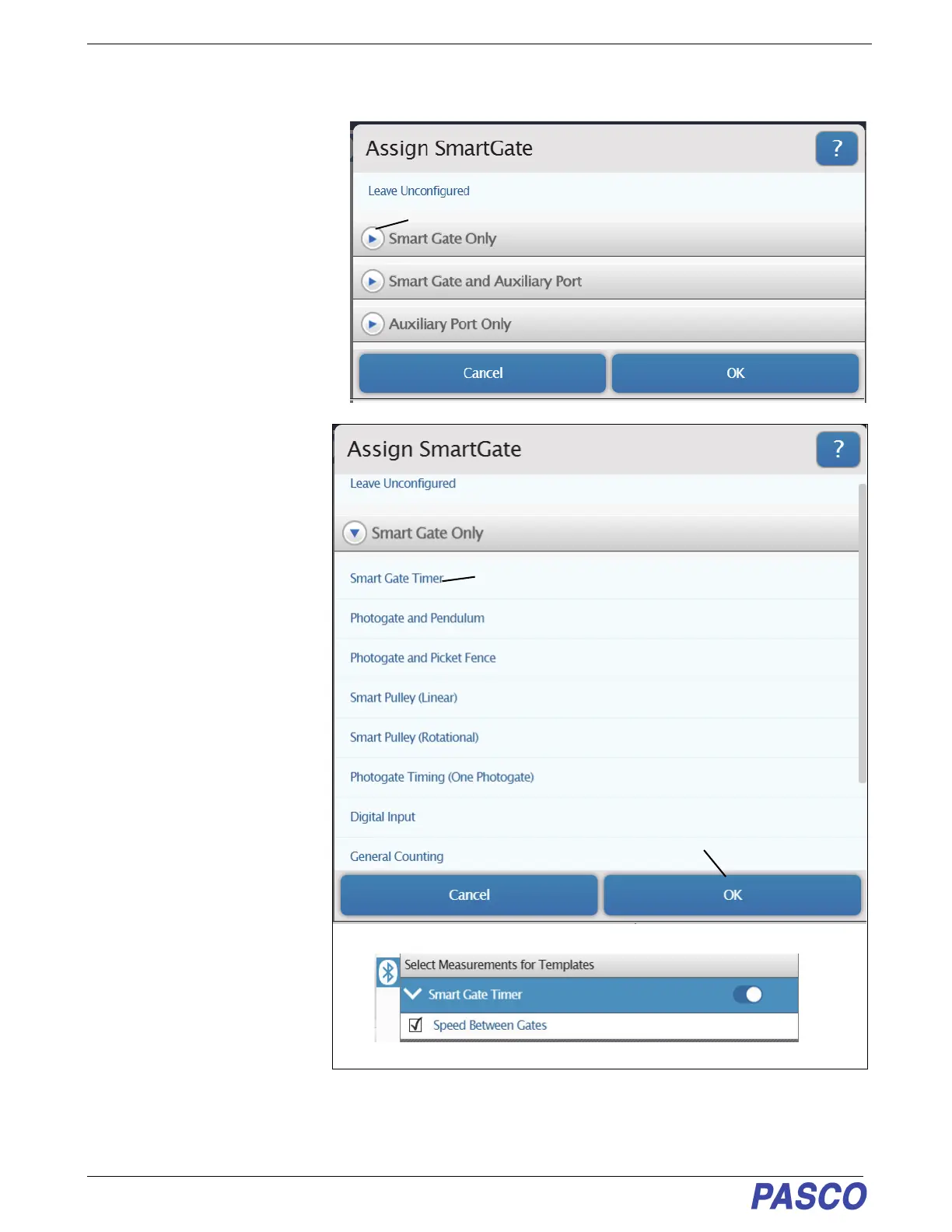
Assign SmartGate- Smart Gate Only
The three choices are:.
• “Smart Gate Only”
• “Smart Gate and Auxiliary Port”
• ”Auxiliary Port Only”
Smart Gate Only
Click or touch the menu arrow for
“Smart Gate Only” to show the
various timer choices.
See the descriptions that follow.
1. Smart Gate Only - Smart
Gate Timer
• Click or touch “Smart Gate
Timer” and then click or touch
“OK” to accept the choice and
close the dialog.
• The “Select Measurements for
Templates” panel is revealed.
• The panel shows “Speed
Between Gates” as the default
choice.
• This measurement is based
on the time from when the first
Detector Port beam is blocked
until the second Detector Port
beam is blocked.
Click or Touch the Menu arrow
Assign SmartGate Choices
Smart Gate Only- Timer Choices
Click or Touch to select
Smart Gate Timer Measurements
Click or Touch “OK” to accept the choice


 To Next Page