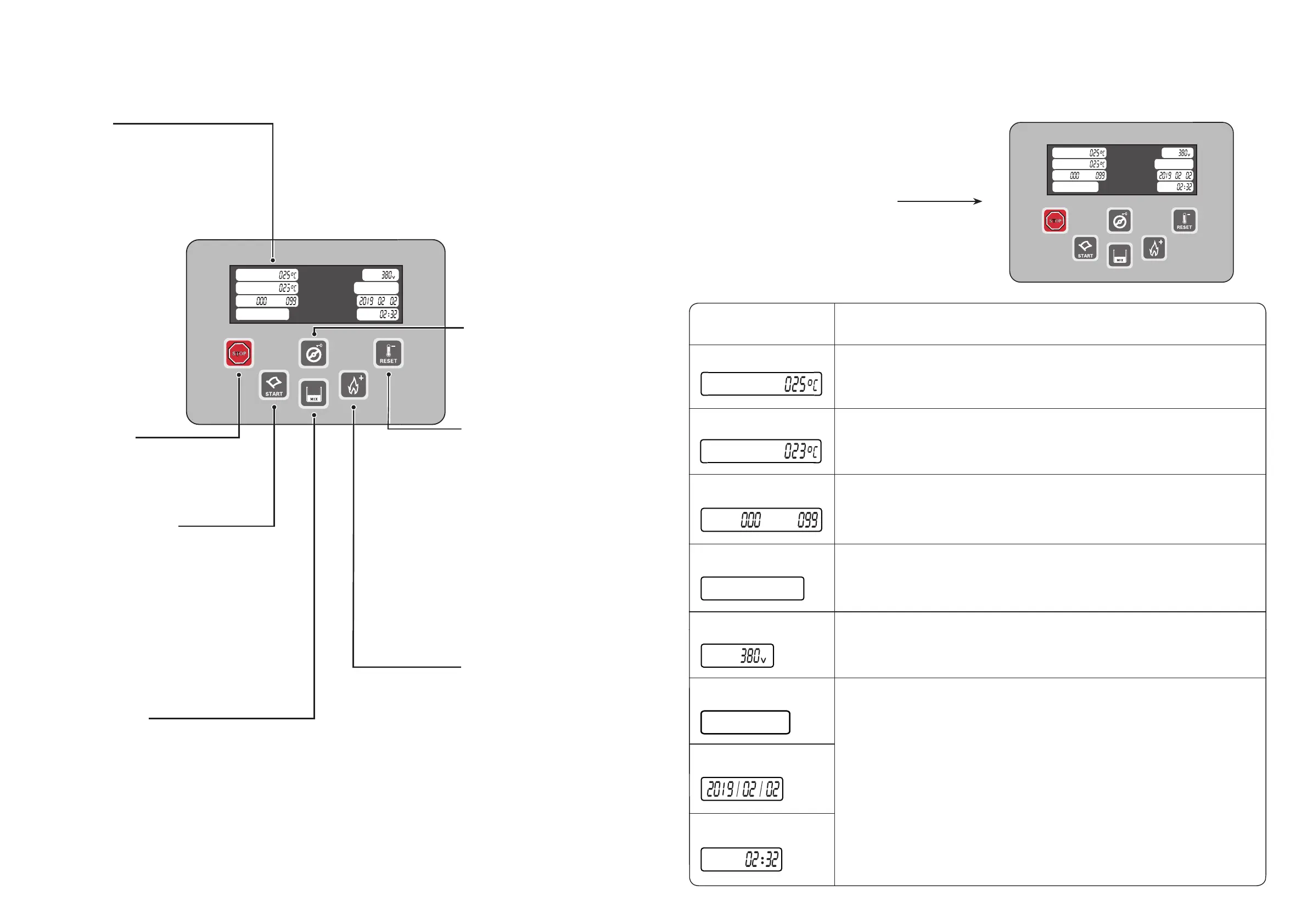
Short press this button, the
main motor works only, which
is only for cleaning. When the
machine is under [Cleaning]
mode,the air pump stops
working when first short press
this button. The main motor
stops working when short
press this button for the
second time.
Press this button long to
activate the function of [Screen
Lock]; press this button long
again to unlock.
Press this button to enter into the
refrigeration mode. The screen displays
[Do not serve!];when the screen displays
[Product is ready!], you can make ice cream.
When making the first batch of ice cream,
do not touch the photoelectric sensor switch,
otherwise the refrigeration will stop and the
operation will be resumed automatically after
your hand moves out from the sensor switch.
If the signal light is on, mixture level the hopper
is too low , and the temperature will be kept
between 1~5 °C. The actual preservation period
will depend on the real material property used.
Press this button, the machine
enters into pre-cooling mode,
and the temperature of the
unused raw materials left
inside the hopper will be kept
between 1-5 °C . The
preservation period will be
different for the different
mixture,it depends on the
actual situation.Under
refrigeration mode, short
press this button to decrease
the hardness.
【RESET Pre-cooling】
Press this button for 5 seconds to
stop the current working mode and
enter into standby state.
【Wash button】
【
Stop button】
Display screen
【Refrigeration button】
【
Mix low alarm】
For detailed digital explanation,
please refer to page 6
Introduction for the control panel
5
【Heating button】
Short press this button to
start Heat mode, the machine
will stop automatically after
the cylinder temperature
reach 10 °C. Press this button
long to start [Pasteurization].
Under normal circumstances,
the duration of no-wash can
be extended. Under
refrigeration mode, short press
this button to increase the
hardness.
AC
Wednesday
Hopper
Cylinder
SET
=
Time
+
+
HOT
=
It indicates the current temperature of hopper.
It indicates the current voltage. If the voltage is too low or too high, the
machine protection program will be triggered and the machine will be stopped
automatically.
It indicates the current temperature of the cylinder.
It indicates that the machine is in refrigeration mode.
HOT indicates the current hardness value , and SET indicates the setting
hardness value .
Digital displays (status display)
「Temperature」
「Temperature」
「Hardness 」
「Voltage」
「 Date」
Display screen content explanation
6
AC
Wednesday
Hopper
Don’t serve
时钟
+
+
Cylinder
「Working mode」
「Calender」
「Time」
SET
=
HOT
=
It indicates that the current hardness value has not reached the setting
hardness value.
When the HOT value rises to the setting hardness value, the screen will display
“Product ready” and the ice cream can be made.
It indicates the current time.
Don not serve
AC
Wednesday
Hopper
Cylinder
SET
=
Time
+
+
HOT
=
Don not serve
Display
Contents


 To Next Page