35 | P a g e
Testing the barcode reader function:
In order to test the barcode reader function, follow the procedure below.
1. Find out what COM port number the barcode reader is on following the procedure above.
2. Run the Honeywell "EZConfig-Scanning" software. There should be a shortcut on the desktop that looks
like this:
3. On the bottom left of the "EZConfig-Scanning" software, you should see a picture of the scanner as well as
text in the Serial, Model, and Firmware Number fields.
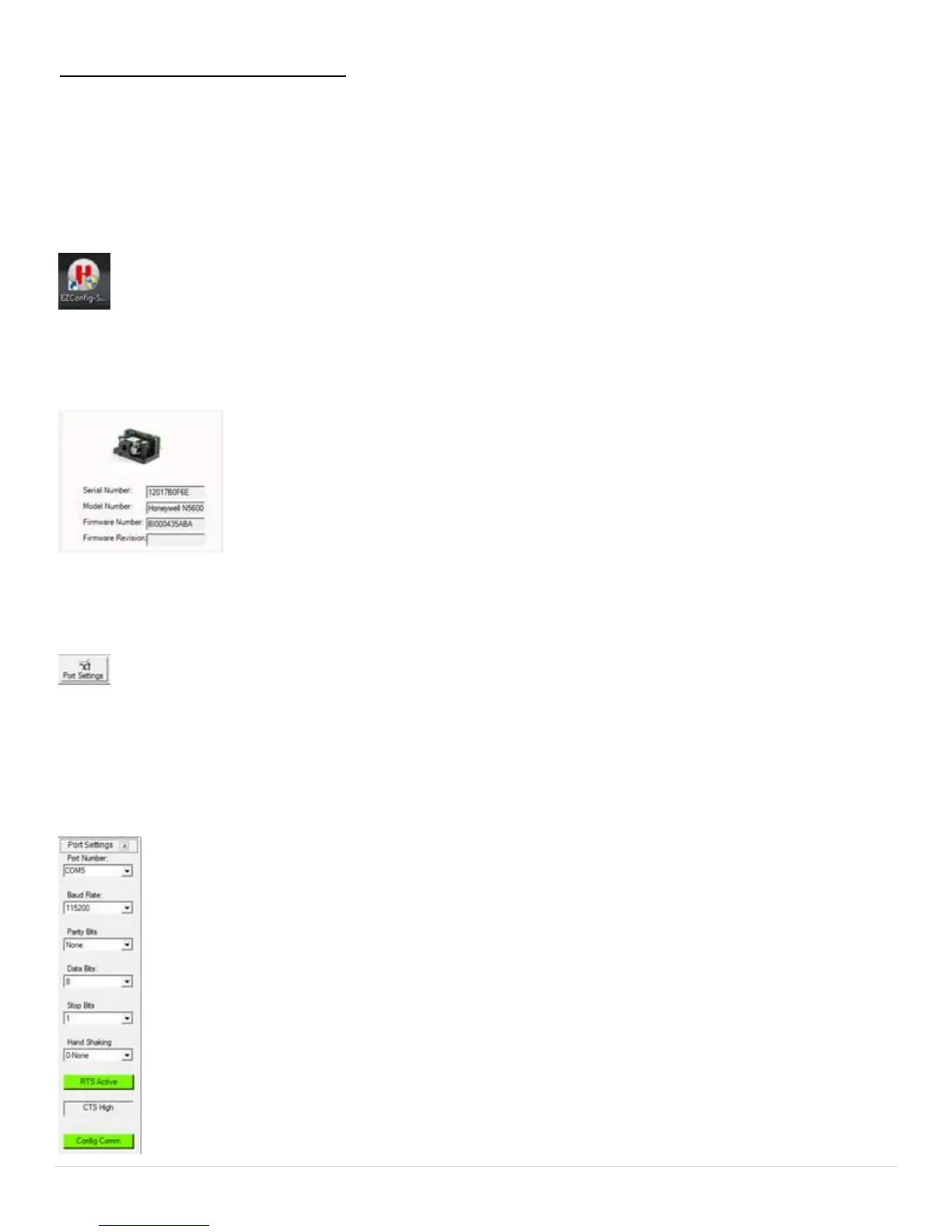
4. If you don't see any information written in the Serial, Model, and/or Firmware number fields, click the "Port
Settings" icon near the top of the window.
A window will appear as shown below. Verify that the COM port number matches what you noted in step 1. If
it does not, set the "Port Number" to the correct COM number and then click "Config Comm". After it is
complete, close the "EZConfig-Scanning" software and then restart it. Your scanner should now be
communicating with the software.


 To Next Page