5 | P a g e
Using The Patrol PC Ticket System
If a problem occurs with your RT-12i tablet, creating a support ticket is the quickest and most efficient way to
get the problem resolved quickly. You can create a support ticket on our website at
http://www.patrolpc.com/support/login. After creating the ticket, our support staff will call you or email you
back swiftly to get the problem resolved. During our office hours (Monday to Friday, 9AM-5PM ET), we will
get back to you on the same day.
To Create a Support Account:
1. Go to http://www.patrolpc.com/support/login.
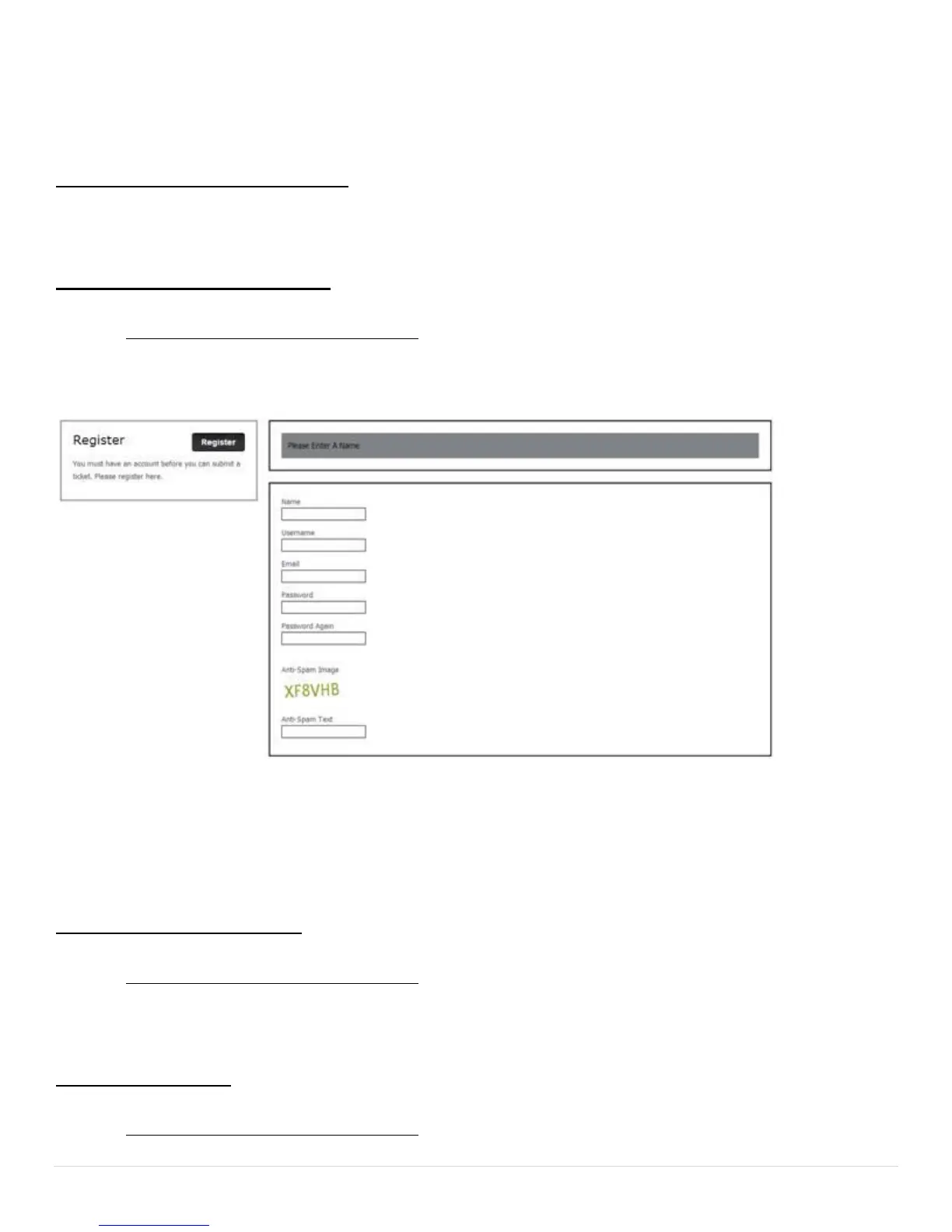
2. Click "Create Account". You should now be at a screen similar to the one below.
3. Fill in all fields. Pick a username and password and store the information is a safe place for future reference.
Please ensure that your email address is correct so that we can notify you of any issues via email.
4. When all fields have been completed, click "Register".
To Login to Your Account:
1. Go to http://www.patrolpc.com/support/login.
2. Type in your username and password, then click "Login".
To Create a Ticket:
1. Go to http://www.patrolpc.com/support/login.


 To Next Page