Page 25
To access the setup menu, press the PRG key and then the SET key and hold them down simultaneously
for 3 seconds or press and hold the PRG key for at least 6 seconds .
Access by confirming your choice with the PRG key.
MESSAGE NAME DESCRIPTION
1nFo
Information
Parameter menu can be viewed for identification of the instrument
and its configuration.
tEst
Test
Menu of test procedures for operation of the instrument hardware.
SEtuP
Setup
Menu of programmable parameters which determine the operation
of the instrument
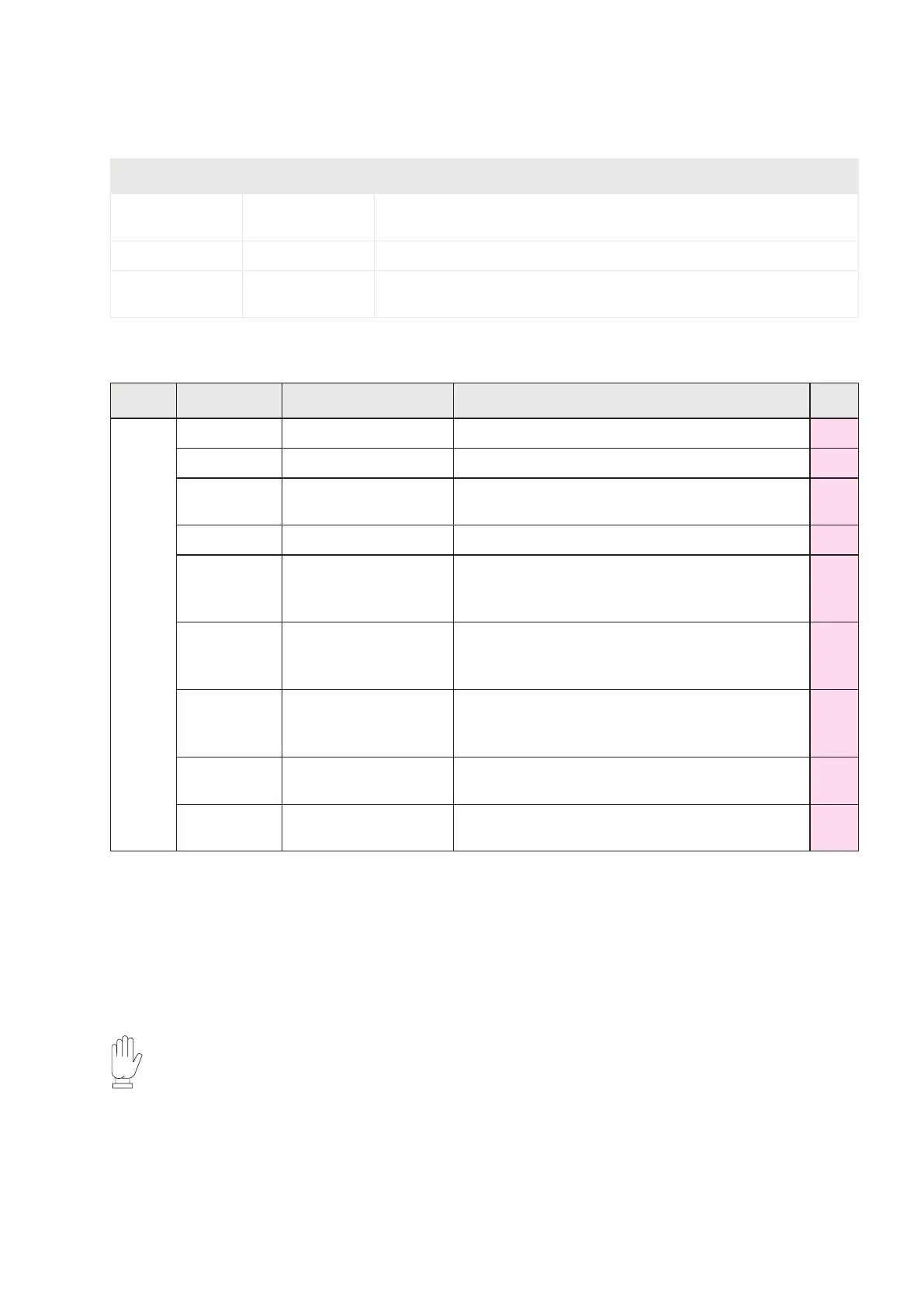
INFO MENU
MENU MESSAGE NAME DESCRIPTION TYPE
1nFo
Cod. FN
Firmware code Indication of installed Firmware code Vis.
rEL. FN
Firmware revision Indication of revision of the Firmware installed Vis.
F.SCALE
Full scale of the
instrument
Indicates the full scale set Vis.
F. bUS
Fieldbus present Indicates the type of Fieldbus configured Vis.
Addr.
Fieldbus address
Indicates the Fieldbus address set. This
menu item is displayed only in the RS485
configurations.
Vis.
1P
Fieldbus IP address
Indicates the IP Fieldbus address set. This
menu item is displayed only in the ETHERNET,
PROFINET and ETHERNET/IP configurations.
Vis.
SubnEt.
Subnet Mask
Fieldbus
Indication of the subnet mask Fieldbus set. This
menu item is displayed only in the ETHERNET,
PROFINET and ETHERNET/IP configurations.
Vis.
oUt.. An
Analog Output
Configuration
Indicates the presence and type of analogue
output (Not present - Unipolar - Bipolar)
Vis.
NENory
Optional Memory
Configuration
Indicates the presence and type of memory
(None - Alibi memory - μSD card)
Vis.
In the case of PROFINET field bus: the parameters IP address and Subnet Mask are program-
mable by PLC and are updated in this menu only when the instrument is switched on. Following
a change in these parameters from the PLC, the instrument must be switched off and on again
to display the correct value.
It is important to remember that even if you set the parameters IP address and subnet mask
in Temporary mode, these parameters are not automatically updated in the instrument. Mo-
reover, when the instrument is switched off and then on again, these parameters will all be
set to 0.0.0.0.


 To Next Page