Page 15
USING THE KEYPAD
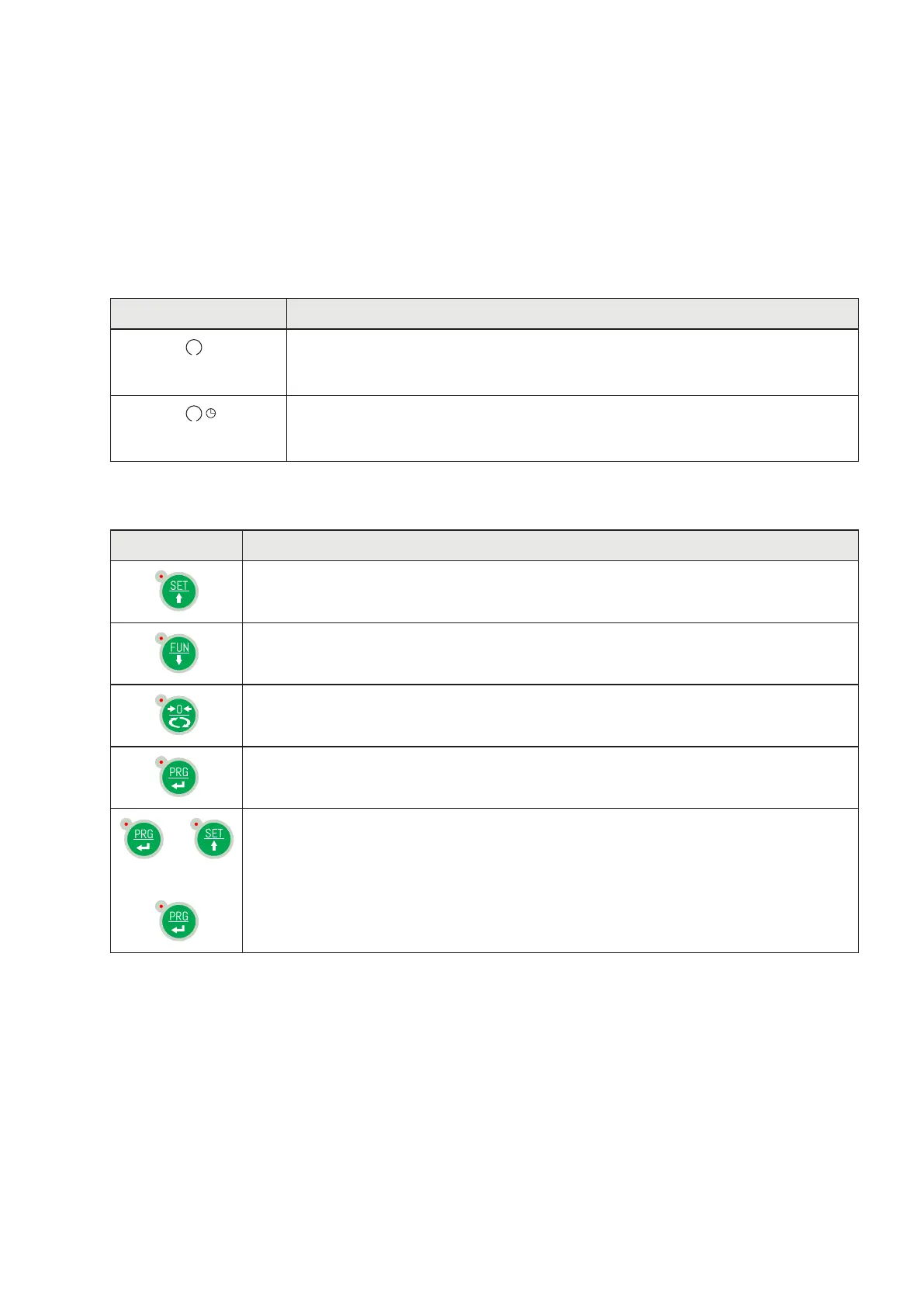
The instrument is programmed and controlled via the keypad consisting of 4 keys, all with dual function.
The selection of one of the two key functions is automatically established by the instrument based on
operation in progress. In general, the programming menus are managed using keys and keys to
scroll through the items; the to access the relevant submenu or programmable setting, whereas key
is used to exit the menu or go back to the higher level.
You can also use the keyboard by sliding your finger from left to right and back again as with a regular
smartphone.
SYMBOL DESCRIPTION
Short press on the single key. The corresponding LED will flash briefly
Long press on a single key. The corresponding LED will flash briefly and then
lights up until released.
The red LED at each key signals its activation.
KEY FUNCTIONS DURING WEIGHT DISPLAY
Access to the set points value programming menu
Display selection (gross weight, net weight).
(Press and hold) Weight / peak display selection
Resetting the displayed value (gross weight, net weight or peak).
Sending the weight string via the serial line.
(Press and hold) Access to quick set-up menu.
+
or
(Press for 3 sec) Access to set-up menu.
(Press for 6 sec) Access to set-up menu.


 To Next Page