EasyManua.ls Logo

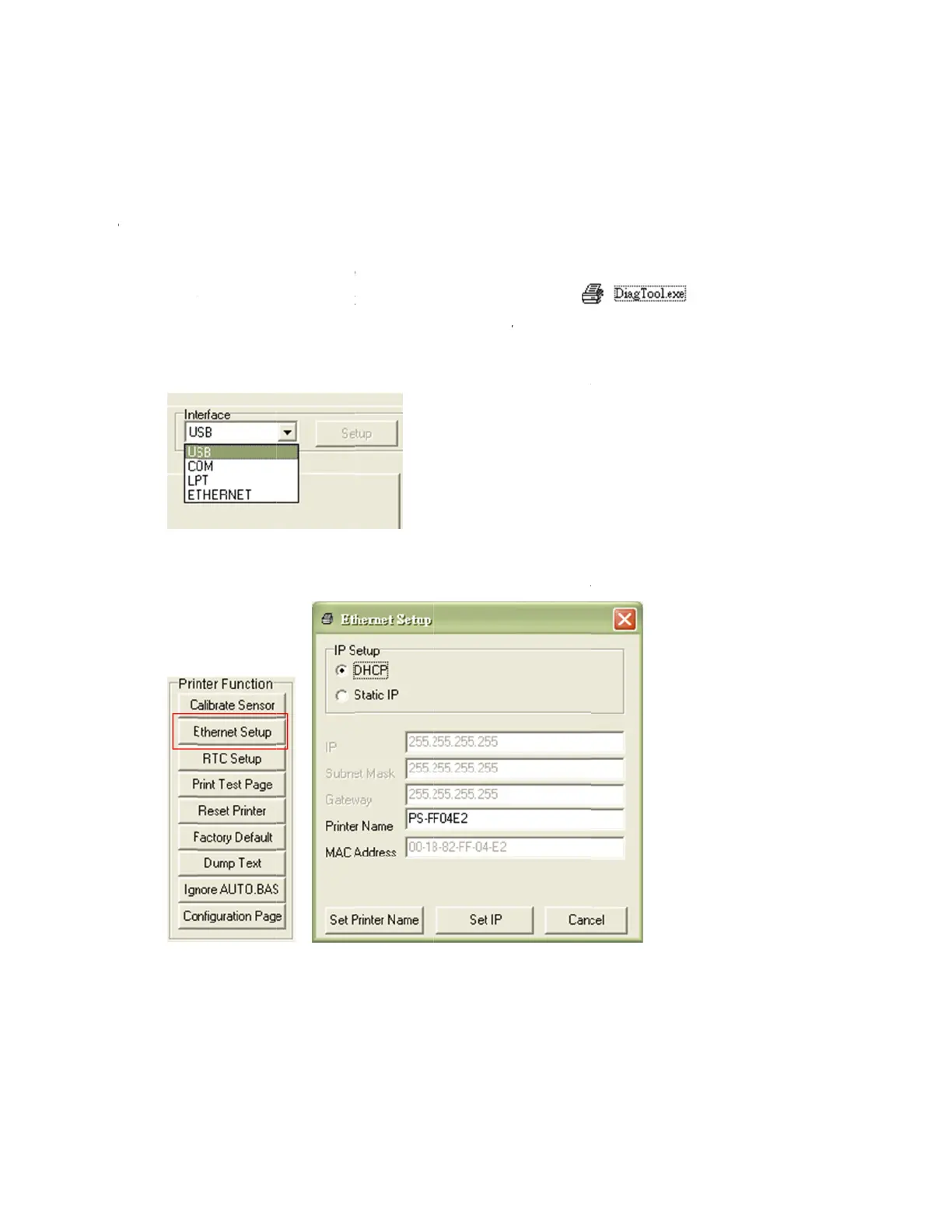
PDC CERTIS B2 - Setting Ethernet by Diagnostic Utility

PDC CERTIS B2
30 pages
Print Icon
To Next Page IconTo Next Page
To Previous Page IconTo Previous Page
Loading...
3
T
to
h
3.
.
4 Setti
n
h
e Diagno
s
setup the
o
w to confi
4
.1
Using
1.
Con
2.
Tur
n
3.
Sta
r
Not
e
4.
The
con
n
5.
Clic
k
tab
t
n
g Eth
e
s
tic Utility
i
Ethernet
b
gure the
E
USB inte
r
n
nect the
U
n
on the pr
rt
the Diag
n
e
: This ut
i
Diagnosti
c
n
ected wit
h
k
on the “
E
t
o setup t
h
e
rnet b
y
i
s enclose
d
b
y USB an
E
thernet b
y
r
face to s
e
U
SB cable
inter pow
e
n
ostic Utili
t
i
lity work
s
c
Utility de
h
printer,
n
E
thernet S
e
h
e IP addr
e
y
Diagn
o
d
in USB
S
d Etherne
t
y
these int
e
e
tup Ethe
between t
h
e
r.
t
y by doubl
s
with pri
n
fault interf
a
n
o other s
e
e
tup” butt
o
e
ss, subn
e
12
o
stic U
t
S
tick \Utiliti
t
interface
s
e
rfaces.
rnet inter
f
h
e comput
e clicking
o
n
ter firm
w
a
ce settin
g
e
ttings nee
o
n from “P
r
e
t mask an
d
t
ility
es directo
r
s
. The foll
o
f
ace
er and the
o
n the
w
are V6.00
g
is USB i
n
d to be ch
a
r
inter Fun
c
d
gatewa
y
r
y. Users
c
o
wing cont
printer.
and later
n
terface. If
a
nged in t
h
c
tion” grou
p
y
for the on
c
an use Di
a
ents will i
n
icon.
versions.
USB inter
f
h
e interfa
c
p
in Printe
r
board Eth
a
gnostic T
n
struct use
f
ace is
c
e field.
r
Configur
a
ernet.
ool
rs
a
tion